
Introduction
This manual provides comprehensive instructions for the setup, operation, and maintenance of your Seiko Musical Motifs Melodies In Motion Wall Clock, Model QXM366SRH. This unique timepiece features a captivating hourly performance where the dial opens to reveal a turning decorative musical wheel, accompanied by one of eighteen Hi-Fi melodies. It is designed to enhance your living space with both its timekeeping function and its intricate musical display.
Key features include:
- Rotating center dial that opens and closes during melody playback.
- Ornaments adorned with Swarovski Crystals.
- Plays one of 18 Hi-Fi melodies on the hour, including an opening and ending melody.
- Light sensor to automatically disengage melodies and motion in low light conditions.
- Adjustable volume control.
- Demonstration button for manual melody playback.
- One-way rotating pendulum.

Figure 1: Front view of the Seiko Musical Motifs Melodies In Motion Wall Clock with the dial closed.
Setup
1. Unpacking and Inspection
Carefully remove the clock from its packaging. Inspect the clock for any signs of damage. Retain all packaging materials for future transport or service needs.
2. Battery Installation
The clock requires four (4) C batteries (included). Locate the battery compartment on the back of the clock.
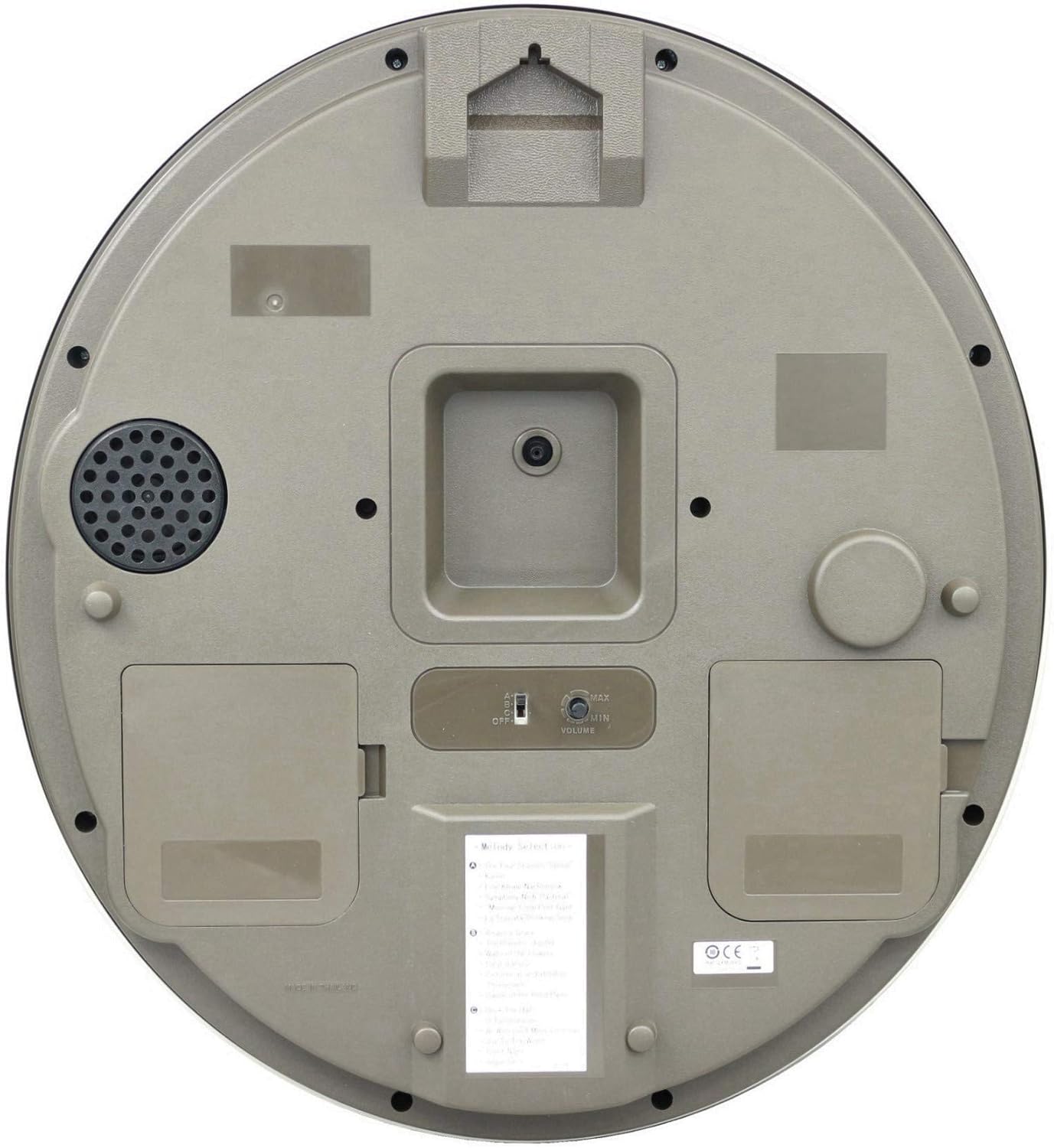
Figure 2: Rear view of the clock, highlighting the battery compartments and control panel.
- Open the battery compartment covers.
- Insert four C batteries, ensuring correct polarity (+/-) as indicated inside the compartment.
- Close the battery compartment covers securely.
3. Setting the Time
After installing the batteries, the clock hands will begin to move. To set the correct time:
- Locate the time setting knob on the back of the clock (often a small wheel or knob).
- Rotate the knob to move the minute and hour hands clockwise until the correct time is displayed.
- Ensure the clock is set to the correct AM/PM if it affects the light sensor or melody playback schedule.
4. Mounting the Clock
The clock is designed for wall mounting. Choose a suitable location on a sturdy wall, away from direct sunlight or heat sources that could affect its operation.
- Use a screw or hook appropriate for the clock's weight (approximately 5.7 pounds) and wall material.
- Hang the clock securely using the mounting slot on the back.

Figure 3: Example of the clock mounted on a wall.
Operating Instructions
1. Hourly Melody and Motion
On the hour, the clock will play one of its pre-programmed melodies, and the dial will open to reveal the decorative musical wheel and other moving elements. The pendulum will also rotate.

Figure 4: The clock's dial opens to reveal the musical mechanism during hourly melodies.
Video 1: Official product video demonstrating the hourly melody and motion of the Seiko Musical Motifs Melodies In Motion clock.
2. Melody Selection
The clock offers three sets of melodies. You can select your preferred set using the control panel on the back of the clock.
- Classic Selection: The Four Seasons "Spring", Kanon, Eine Kleine Nachtmusik, Symphony No. 6 "Pastoral", Morning from Peer Gynt, La Traviata "Drinking Song", Amazing Grace, The Planets "Jupiter", Waltz of the Flowers, Salut d'Amour, Pictures At An Exhibition "Promenade", Dance Of The Reed Pipes.
- Christmas Selection: Deck The Halls, O Tannenbaum, We Wish You A Merry Christmas, Joy To The World, Silent Night, Jingle Bells.
- Note: A third set may be available depending on the specific model variant. Refer to the label on the back of your clock for details.
3. Volume Control
Adjust the melody volume using the volume control knob located on the back of the clock (refer to Figure 2). Turn the knob to increase or decrease the sound level.
4. Light Sensor
The built-in light sensor automatically disengages all melodies and motion when the room becomes dark. This feature conserves battery life and prevents melodies from playing during nighttime hours. The melodies and motion will resume automatically when sufficient light is detected.
5. Demonstration Button
Press the demonstration button (located on the back, refer to Figure 2) to play a melody and activate the motion sequence at any time, regardless of the hour.
Maintenance
1. Battery Replacement
When the melodies become faint, the motion slows, or the clock stops keeping accurate time, it is an indication that the batteries need to be replaced. Replace all four C batteries simultaneously with new, high-quality alkaline batteries. Do not mix old and new batteries or different types of batteries.
2. Cleaning
To clean the clock, gently wipe the surface with a soft, dry cloth. Do not use abrasive cleaners, solvents, or chemical sprays, as these can damage the finish and internal components. For the glass, a mild glass cleaner applied to a cloth (not directly to the clock) can be used sparingly.
Troubleshooting
| Problem | Possible Cause | Solution |
|---|---|---|
| Clock does not play melodies or move. |
|
|
| Clock hands stop moving or keep incorrect time. |
|
|
| Melodies sound distorted or "out of tune". |
|
|
Specifications
- Model Number: QXM366SRH
- Brand: SEIKO
- Color: Gray
- Display Type: Analog
- Style: Classic
- Special Features: Adjustable Volume, Light Sensor, Musical Melodies, Motion
- Product Dimensions: 16"W x 17.5"H
- Item Weight: 5.7 Pounds
- Power Source: Battery Powered (4 C batteries, included)
- Room Type: Living Room (suitable for various indoor spaces)
- Shape: Oval
- Indoor/Outdoor Usage: Indoor only
- Mounting Type: Wall Mount
- Watch Movement: Quartz
- Material Type: Plastic
- Frame Material: Plastic
- GTIN (UPC): 029665185662
Warranty
SEIKO guarantees this product's workmanship and material quality for one year from the date of purchase, assuming normal use. Please retain your proof of purchase for warranty claims.
Support
For further assistance, technical support, or warranty inquiries, please refer to the official SEIKO website or contact their customer service department. Contact information can typically be found on the manufacturer's packaging or official website.
You may also visit the official SEIKO store on Amazon for additional product information and support: SEIKO Store
