
1. Product Overview
The LUX Pro P711V-010 is a versatile thermostat designed for controlling heating and cooling systems. It offers both programmable (7-day, 5/2-day) and non-programmable settings, an easy-view backlight, and a keypad lock feature. This manual provides detailed instructions for installation, operation, and programming to ensure optimal performance and energy efficiency.

Image 1.1: Front view of the LUX Pro P711V-010 Thermostat, showing the digital display and control buttons.

Image 1.2: Key features of the P711V-010, highlighting vertical installation compatibility, dual power options (battery or 24VAC), and keyboard lockout functionality.
2. Features
- Programmable Settings: Offers 7-day, 5/2-day, or non-programmable options for flexible temperature control.
- Easy-View Backlight: Provides a clear display for easy reading in various lighting conditions.
- User-Selectable Periods: Customize your heating and cooling schedule with 2 or 4 periods per day.
- Keypad Lock: Prevents unauthorized adjustments to settings.
- Dual Power Options: Can be powered by 2 AA batteries (included) or a 24-volt system.
- Temperature Display: Switch between Fahrenheit (F) and Celsius (C) display.
- Adjustable Temperature Differential: Allows customization of the temperature swing before the system activates.
- User Temperature Calibration: Fine-tune temperature readings for accuracy.
- Adjustable Heat/Cool Set Temperature Limit Stops: Set minimum and maximum temperature limits.
- 5/2-Minute Time Delay: Protects HVAC equipment by preventing short cycling.
3. Package Contents
Upon opening the package, verify that all the following items are included:
- LUX Pro P711V-010 Thermostat Unit
- 2 AA LR6 Batteries
- 2 ST Screws
- 2 Wall Anchors
- Wire Labels
- Instruction Manual (this document)

Image 3.1: Illustration of the contents included in the thermostat package.
4. Specifications
| Specification | Detail |
|---|---|
| Model Name | P711V-010 |
| Dimensions | 1.25 x 3.38 x 5.38 inches |
| Item Weight | 0.01 ounces |
| Power Source | Battery Powered (2 AA included) or 24 Volts (system) |
| Display Type | LCD with Backlight |
| Control Type | Push Button |
| Mounting Type | Vertical Mount |
| Voltage | 24 Volts |
| Color | White |
| Certification | UL Listed |
5. System Compatibility
The P711V-010 thermostat is compatible with a variety of HVAC systems. Please review the compatibility information below to ensure it is suitable for your system.
Compatible Systems (24V)
- ✔ Gas/Oil/Electric Furnace (Heating only)
- ✔ Gas/Oil/Electric Furnace (Single Stage)
- ✔ Heat Pump without Auxiliary Heat
- ✔ 2-wire Hydronic (Hot Water)
- ✔ 750 Millivolt Systems
- ✔ Gas Fireplaces (24V)
- ✔ Cooling only systems
- ✔ Single stage cooling systems
Not Compatible With:
- ✘ Heat Pump Multistage
- ✘ Radiant Ceiling Heat
- ✘ Electric Baseboards
- ✘ Heat Pump with Auxiliary Heat
- ✘ Portable Space Heaters
- ✘ 3-wire Hydronic (Hot Water)
- ✘ Gas/Oil/Electric Furnace - Multistage
- ✘ Cool Multistage
- ✘ Plug-in Air Conditioners

Image 5.1: Visual chart detailing compatible and incompatible HVAC system types.
6. Installation
Important: Before beginning installation, turn off power to your heating and cooling system at the main circuit breaker or fuse box. Improper wiring can damage the thermostat and/or your HVAC system.
6.1 Wiring Diagrams
Refer to the following diagrams to correctly wire your thermostat based on your existing system configuration. Use the provided wire labels to mark your existing wires before disconnecting your old thermostat.
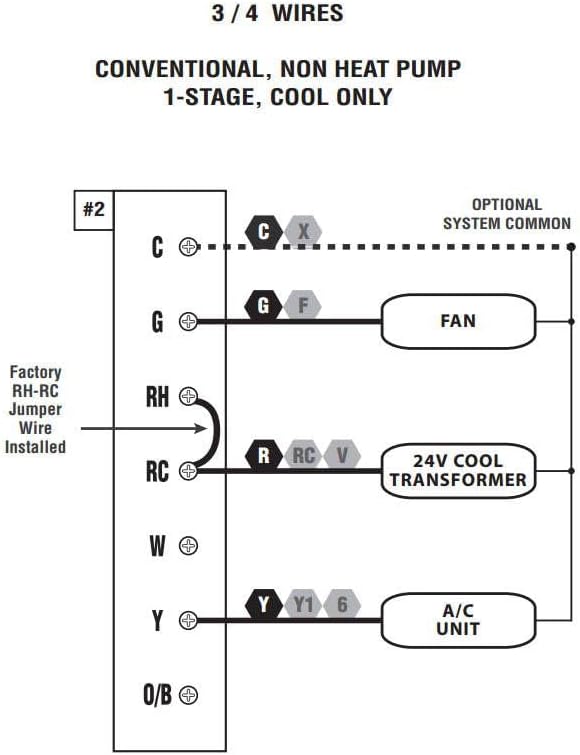
Image 6.1: Wiring diagram for 3 or 4 wire conventional systems with 1-stage cooling only.

Image 6.2: Wiring diagram for 4 or 5 wire conventional systems with 1-stage heating and 1-stage cooling.

Image 6.3: Wiring diagram for 5 or 6 wire conventional systems with 1-heat and 1-cool, utilizing two transformers. Note: Remove the factory RH-RC jumper wire for this configuration.
7. Operation
This section details the basic controls and functions of your P711V-010 thermostat.

Image 7.1: Labeled diagram of the P711V-010 control panel, indicating the LCD display, programming buttons (Set, Next, Hold), temperature adjustment buttons (Up, Down), Fan Mode switch, and System Mode switch.
7.1 Basic Controls
- Fan Switch (Auto/On):
- Auto: Fan runs only when the heating or cooling system is active.
- On: Fan runs continuously.
- Mode Switch (Heat/Off/Cool):
- Heat: Thermostat controls the heating system.
- Off: Both heating and cooling systems are off.
- Cool: Thermostat controls the cooling system.
- UP (▲) / DOWN (▼) Buttons: Adjust the set temperature or navigate programming menus.
- SET Button: Used to enter and confirm programming settings.
- NEXT Button: Advances through programming steps.
- HOLD Button: Maintains the current temperature indefinitely, overriding any programmed schedule. Press again to cancel HOLD and resume program.
7.2 Programming
The P711V-010 offers 7-day, 5/2-day, or non-programmable modes. Refer to the full instruction manual for detailed programming steps for each mode. Generally, programming involves setting the time, day, and desired temperatures for specific periods (e.g., Wake, Leave, Return, Sleep).
7.3 Keypad Lock
To prevent unauthorized changes, the thermostat features a keypad lock. Consult the detailed manual for instructions on how to activate and deactivate this feature.
8. Troubleshooting
If you encounter issues with your thermostat, consider the following common troubleshooting steps:
- No Display/Blank Screen: Check batteries and replace if necessary. Ensure power to the HVAC system is on.
- System Not Responding: Verify the thermostat is set to the correct mode (Heat/Cool). Check wiring connections. Ensure the system's circuit breaker is not tripped.
- Incorrect Temperature Reading: The thermostat may require calibration. Refer to the full manual for calibration instructions.
- Program Not Running: Ensure the thermostat is not in 'HOLD' mode. Verify programming settings are correctly entered.
- Short Cycling: The 5/2-minute time delay is designed to prevent this. If short cycling persists, consult an HVAC professional.
For more detailed troubleshooting, refer to the comprehensive instruction manual included with your product or visit the LUX support website.
9. Warranty and Support
The LUX Pro P711V-010 Thermostat comes with a 5-year limited warranty. This warranty covers defects in materials and workmanship under normal use. Please retain your proof of purchase for warranty claims.
For technical support, warranty service, or additional information, please refer to the contact details provided in the full product manual or visit the official LUX website.


