
1. Introduction
This manual provides detailed instructions for the safe installation, operation, and maintenance of your Progress Lighting Lucky Collection 4-Light Vanity, model P2182-15DI. Please read all instructions carefully before beginning installation and retain this manual for future reference.

Figure 1: Front view of the Progress Lighting Lucky Collection 4-Light Vanity (Model P2182-15DI).
2. Important Safety Information
WARNING: Risk of electric shock. Disconnect power at the fuse box or circuit breaker before installation or servicing. Consult a qualified electrician if you are unsure about the installation process.
- Read all instructions carefully before installation.
- All wiring must be in accordance with national and local electrical codes.
- Ensure the mounting surface can support the weight of the fixture.
- Do not connect this fixture to an ungrounded electrical system.
- Use only the specified bulb type and wattage.
- Do not attempt to alter the fixture in any way.
- Keep flammable materials away from the light fixture when in operation.
3. Package Contents
Carefully unpack the fixture and check that all parts are present. If any parts are missing or damaged, do not attempt to assemble or install the fixture. Contact customer service for assistance.
- Vanity Light Fixture (1)
- Glass Shades (4)
- Mounting Hardware Kit (includes mounting strap, outlet box screws, wire nuts)
- Installation Instructions (this manual)
Note: Bulbs are not included and must be purchased separately.
4. Setup and Installation
4.1 Tools Required (Not Included)
- Phillips Head Screwdriver
- Flathead Screwdriver
- Wire Strippers
- Electrical Tape
- Safety Glasses
- Ladder
4.2 Pre-Installation
- Turn off power: Locate the circuit breaker or fuse box and turn off the power to the electrical outlet box where the fixture will be installed.
- Prepare mounting surface: Ensure the electrical outlet box is securely mounted and capable of supporting the fixture's weight.
- Unpack: Carefully remove all contents from the carton.
4.3 Mounting the Fixture
- Attach the mounting strap to the outlet box using the provided outlet box screws. Ensure the strap is oriented correctly for the fixture.
- Pull the electrical wires from the outlet box through the center hole of the mounting strap.

Figure 2: Example of the vanity light fixture installed above a mirror.
4.4 Wiring Connections
Follow these steps to make the electrical connections. If you are unfamiliar with electrical wiring, consult a qualified electrician.
- Connect the green or bare copper ground wire from the fixture to the green or bare copper ground wire from the outlet box using a wire nut. If the outlet box does not have a ground wire, attach the fixture's ground wire to the green grounding screw on the mounting strap.
- Connect the white wire from the fixture to the white (neutral) wire from the outlet box using a wire nut.
- Connect the black wire from the fixture to the black (hot) wire from the outlet box using a wire nut.
- Carefully tuck all wires into the outlet box.
4.5 Securing the Fixture and Installing Shades/Bulbs
- Align the fixture's backplate with the mounting strap and secure it with the provided screws.
- Carefully place each glass shade over the socket and secure it with the retaining ring (if applicable).
- Screw the recommended bulbs (E26 base, max 100W incandescent or equivalent LED) into the sockets. Do not overtighten.
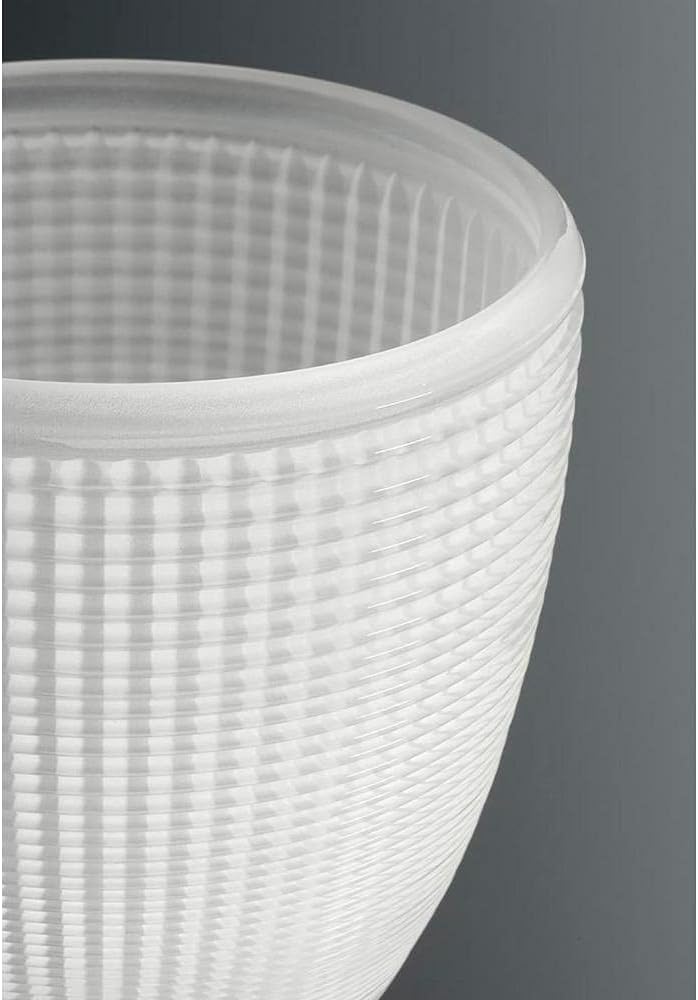
Figure 3: Detail of the textured glass shade.
- Restore power at the circuit breaker or fuse box.
- Test the fixture to ensure proper operation.
5. Operating Instructions
The Progress Lighting Lucky Collection 4-Light Vanity is operated by a standard wall switch connected to the electrical circuit. Ensure the wall switch is in the "ON" position for the fixture to receive power.
- Turning On/Off: Use the wall switch to turn the light fixture on or off.
- Bulb Type: This fixture is designed for E26 base bulbs, with a maximum wattage of 100 watts per socket for incandescent bulbs. For energy efficiency, consider using equivalent LED bulbs.
- Control Method: The product specifications mention "Remote" as a control method. If your installation includes a compatible remote control system (purchased separately), refer to its specific instructions for operation. Otherwise, control is via a standard wall switch.
6. Maintenance
6.1 Cleaning
- WARNING: Always disconnect power before cleaning.
- To clean the fixture, wipe it with a soft, damp cloth.
- Do not use abrasive cleaners, solvents, or polishes as they may damage the finish.
- For glass shades, remove them carefully and wash with mild soap and water, then rinse and dry thoroughly before reattaching.
6.2 Bulb Replacement
- WARNING: Allow bulbs to cool completely before replacing.
- Turn off power to the fixture at the circuit breaker.
- Carefully unscrew the old bulb from the socket.
- Screw in a new E26 base bulb, ensuring it does not exceed 100 watts for incandescent bulbs.
- Restore power and test the fixture.
7. Troubleshooting
| Problem | Possible Cause | Solution |
|---|---|---|
| Fixture does not light |
|
|
| Flickering light |
|
|
| Fixture hums |
|
|
8. Specifications
| Feature | Detail |
|---|---|
| Model Number | P2182-15DI |
| Brand | Progress Lighting |
| Fixture Type | Vanity Light |
| Material | Glass, Metal (Polished Finish) |
| Color | Silver (Fixture), Clear (Shades) |
| Number of Lights | 4 |
| Bulb Base | E26 (Medium) |
| Max Wattage per Bulb | 100 Watts (Incandescent) |
| Voltage | 120 Volts |
| Indoor/Outdoor Usage | Indoor |
| Room Type | Bathroom |
| Control Method | Remote (if compatible system installed), Wall Switch |
| Required Assembly | Minor assembly required (shades, bulbs, mounting) |
9. Warranty and Support
Progress Lighting products are manufactured to high standards and are backed by a limited warranty. For specific warranty details, please refer to the warranty card included with your purchase or visit the official Progress Lighting website. For technical support or replacement parts, please contact Progress Lighting customer service.
Contact Information: Please refer to the packaging or the official Progress Lighting website for the most current customer service contact details.


