
1. Introduction
The ION Audio Party Rocker Max is a powerful 100-watt portable wireless Bluetooth speaker and karaoke center designed to enhance any gathering with dynamic sound and vibrant light displays. Featuring an 8-inch woofer and 3-inch tweeter, it delivers rich audio. Its rechargeable battery provides extended playtime, and the integrated light dome and lighted grille offer six dazzling colors that pulsate with the music. Dual microphone inputs with an Echo Effect are perfect for karaoke, and its built-in handle and wheels ensure easy portability.

Figure 1: Front view of the ION Audio Party Rocker Max speaker showcasing its colorful light display.
2. What's in the Box
Ensure all items listed below are present in your package:
- Party Rocker Max Speaker
- Microphone with Cable
- 1/8th inch (3.5mm) Audio Cable
- Power Cable
- Quickstart Guide
- Safety & Warranty Manual
3. Setup
3.1 Initial Charging
Before first use, fully charge the Party Rocker Max. Connect the included Power Cable to the speaker's AC input and then to a power outlet. The battery indicator will show charging status. A full charge takes approximately 10 hours.
3.2 Powering On/Off
Locate the Power/Charge button on the control panel. Press and hold to power the unit on or off.

Figure 2: Detailed view of the top control panel, showing power button, input jacks, and various controls.
4. Operating Instructions
4.1 Bluetooth Connectivity
The Party Rocker Max features wireless Bluetooth connectivity (A2DP, AVRCP profile) with a range of up to 100 feet (30.5 meters).
- Ensure the speaker is powered on.
- Activate Bluetooth on your smartphone or tablet.
- Select "Party Rocker Max" from the list of available devices.
- Once paired, you can stream audio wirelessly.
4.2 Auxiliary Input
For non-Bluetooth devices, use the included 1/8th inch (3.5mm) audio cable to connect to the AUX input on the control panel.
4.3 Microphone Usage & Karaoke
The speaker includes a high-quality microphone and features dual microphone inputs for karaoke. Adjust microphone volume and apply the unique Echo Effect using the dedicated knobs on the control panel.
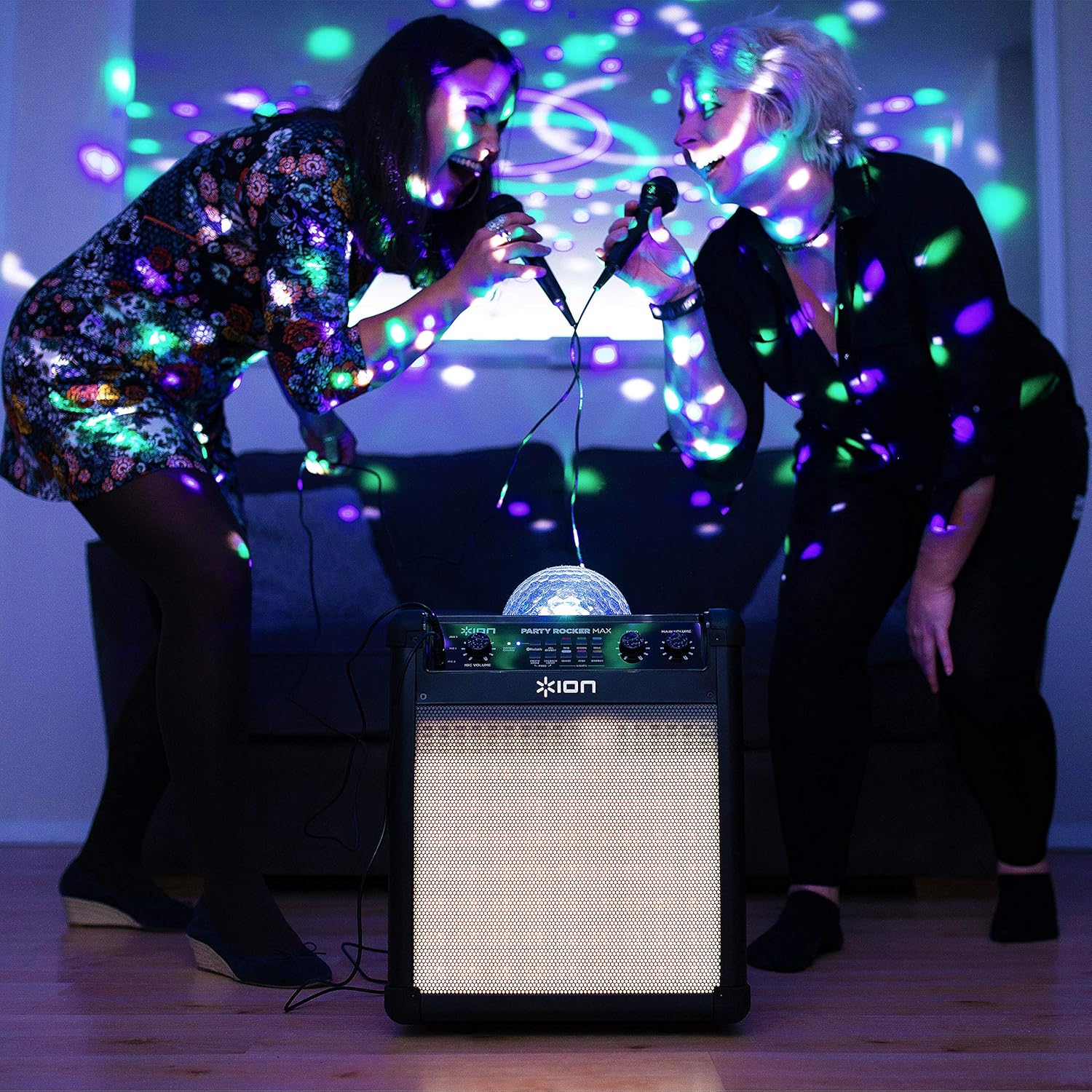
Figure 3: Two individuals enjoying karaoke with the Party Rocker Max.

Figure 4: Close-up of the Echo and Main Volume controls for fine-tuning audio output.
4.4 Party Light Display
The light dome and lighted grille electrify your space with six dazzling colors: Red, Green, Blue, Magenta, Orange, and White. The lights change pattern and pulsate in time to the music. Controls for the lights are located on the control panel.

Figure 5: The Party Rocker Max illuminating a room with its dynamic light display.
4.5 Portability
The Party Rocker Max is designed for easy transport with its built-in handle and wheels. Simply extend the handle and tilt the unit to roll it to your desired location.

Figure 6: Demonstrating the speaker's portability with its retractable handle and wheels.
4.6 Official Product Video
Watch this official product video from inMusic Brands Inc. to see the ION Audio Party Rocker Max in action, highlighting its features and light effects.
Video 1: Official product overview of the ION Audio Party Rocker Max by inMusic Brands Inc.
5. Maintenance
5.1 Battery Care
The Party Rocker Max uses a 12V, 9.0 Ah SLA battery. To maximize battery life, avoid completely draining the battery and recharge it regularly. If the unit is stored for extended periods, ensure it is fully charged every 3 months.
5.2 Cleaning
Wipe the exterior of the speaker with a soft, dry cloth. Do not use harsh chemicals or abrasive cleaners. Keep the unit dry and away from excessive moisture.
6. Troubleshooting
- No Power: Ensure the power cable is securely connected and the unit is charged. Check the power outlet.
- No Sound: Verify Bluetooth connection or AUX cable connection. Adjust the main volume and individual input volumes.
- Microphone Not Working: Ensure the microphone is plugged into the correct input and its volume is adjusted. Check the microphone cable for damage.
- Battery Not Charging: If the battery has been left uncharged for over 6 months, it may not charge. Contact customer service for assistance.
- Bluetooth Pairing Issues: Ensure the speaker is in Bluetooth mode and no other device is currently paired. Try forgetting the device on your source device and re-pairing.
7. Specifications
| Output Power | 100 W (peak) |
| Drivers | 8” / 203 mm woofer, 3” / 76 mm tweeter |
| Bluetooth Profile | A2DP, AVRCP |
| Bluetooth Range | Up to 100 feet / 30.5 meters |
| Frequency Response | 65 Hz – 20 kHz (+ 3 dB) |
| Battery Type | 12 V, 9.0 Ah SLA |
| Battery Life (Music Only) | Up to 75 hours (when fully charged) |
| Battery Life (Lights & Music) | Up to 6 hours |
| Recharge Time | 10 hours |
| Power Input Voltage | 100–240 VAC, 50/60 Hz, 120 W |
| Dimensions (W x D x H) | 11.0" x 15.0" x 17.25" (279 x 381 x 438 mm) |
| Weight | 24.6 lbs. (11.16 kg) |
8. Warranty and Support
The ION Audio Party Rocker Max is covered by a standard manufacturer's warranty. For detailed warranty information, please refer to the included Safety & Warranty Manual. For technical support or service inquiries, please visit the official ION Audio website or contact their customer service department.


