
ION Audio Block Rocker Sport
ION Audio Block Rocker Sport User Manual
Portable Waterproof and Dustproof Bluetooth Speaker System
Introduction
Thank you for purchasing the ION Audio Block Rocker Sport. This powerful, portable, and rugged speaker system is designed to deliver high-quality audio in any environment, whether indoors or outdoors. With its waterproof and dustproof design, long-lasting rechargeable battery, Bluetooth connectivity, AM/FM radio, and microphone input, the Block Rocker Sport is your ultimate companion for parties, tailgates, and any event requiring robust sound.
Safety Information
Please read these safety instructions carefully before using the Block Rocker Sport. Keep this manual for future reference.
- Water Resistance: The Block Rocker Sport is IPX4 water-resistant, meaning it is protected against splashing water from any direction. Do not submerge the unit in water or expose it to heavy rain for extended periods. Ensure all port covers are securely closed before exposure to water.
- Power Source: Use only the specified power adapter for charging. Disconnect the power adapter during lightning storms or when unused for long periods.
- Battery Care: The unit contains a sealed lead-acid battery. For optimal battery life, fully charge the unit before first use and after each use. Store the unit with a full charge.
- Ventilation: Do not block any ventilation openings. Install in accordance with the manufacturer's instructions.
- Cleaning: Clean only with a dry cloth. Avoid using harsh chemicals or abrasive cleaners.
- Servicing: Do not attempt to repair the unit yourself. Refer all servicing to qualified service personnel.
Package Contents
- Block Rocker Sport Speaker
- Microphone with Cable
- 1/8" (3.5 mm) Stereo Auxiliary Cable
- Power Cable
- Quickstart Guide
- Safety & Warranty Manual
Product Overview
Familiarize yourself with the various components of your Block Rocker Sport.
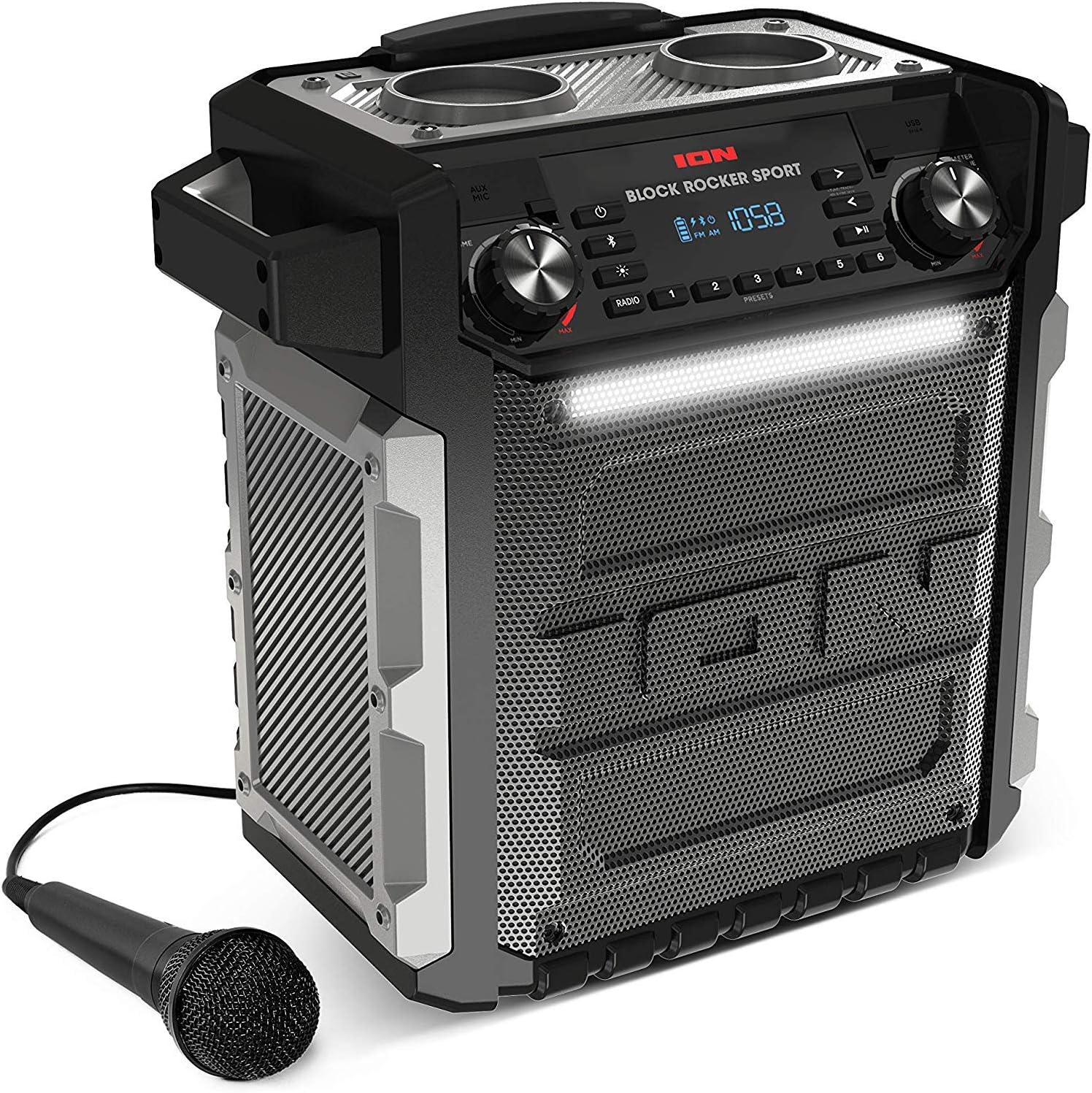
Front view of the ION Audio Block Rocker Sport speaker, showing the main grille, control panel, and included microphone.

A detailed view of the control panel, highlighting the power button, Bluetooth button, light mode button, radio presets, and the digital display showing FM frequency and battery level.
Key Features:
- Control Panel: Located on the top, it includes power, volume, Bluetooth pairing, radio controls, and light mode buttons.
- Display: Digital display showing radio frequency, battery status, and other indicators.
- Speakers: Features an 8-inch woofer and a 3-inch wide-dispersion tweeter for powerful sound.
- Light Bar: Integrated LED light bar that illuminates in various colors.
- Telescopic Handle & Wheels: For easy transport.
- Side Handles: Additional handles for lifting and carrying.
- USB Charging Port: For charging external devices.
- Auxiliary Input: 3.5mm input for connecting non-Bluetooth devices.
- Microphone Input: 1/4-inch input for the included microphone.

The ION Audio Block Rocker Sport with its telescopic handle fully extended, demonstrating its portability.
Setup
Charging the Battery:
- Before first use, ensure the Block Rocker Sport is fully charged.
- Connect the power cable to the unit's power input and then to a power outlet.
- The battery indicator on the display will show charging status. A full charge is indicated when all segments are lit and stable.
- Charging typically takes several hours. The unit can be used while charging.
Powering On/Off:
- Press and hold the Power button to turn the unit on or off.
Operating Instructions
Bluetooth Connection:
- Ensure your Block Rocker Sport is powered on.
- Press the Bluetooth button. The Bluetooth icon on the display will flash, indicating it's in pairing mode.
- On your Bluetooth device (e.g., smartphone, tablet), navigate to the Bluetooth settings and select "Block Rocker Sport" from the list of available devices.
- Once connected, the Bluetooth icon will stop flashing and remain solid. You can now play audio from your device through the speaker.
- To disconnect, press the Bluetooth button again or disable Bluetooth on your device.
AM/FM Radio:
- Press the Radio button to switch to AM or FM mode.
- Use the Tune/Track buttons (< and >) to manually tune to a station.
- To auto-seek for the next available station, press and hold the Tune/Track buttons.
- Saving Presets: To save a station as a preset, tune to the desired station, then press and hold one of the Preset buttons (1-6) until the display confirms it's saved.
- Recalling Presets: Briefly press a Preset button (1-6) to recall a saved station.

The control panel of the Block Rocker Sport with water droplets, demonstrating its IPX4 water resistance. The buttons for power, Bluetooth, light mode, radio, and presets are visible.
Microphone Usage:
- Connect the included microphone cable to the Microphone Input on the control panel.
- Adjust the microphone volume using the Mic Volume knob.
- Ensure the microphone's ON/OFF switch is in the ON position.

A close-up view of the microphone connected to the AUX/MIC input on the ION Audio Block Rocker Sport's control panel.
USB Charging:
- The USB port on the control panel can be used to charge your smartphone or other USB-powered devices.
- Connect your device's USB charging cable to the Block Rocker Sport's USB port.
- Charging will begin automatically.
Light Bar Operation:
- Press the Light Mode button (sun icon) to cycle through different light effects or turn the light bar off.
- The light bar can respond to music or display a static color.
ION Sound XP App (Optional):
Enhance your experience by controlling audio and lighting levels directly from your iOS or Android device using the ION Sound XP App. This app provides additional control and customization options for your Block Rocker Sport.

Screenshot of the ION Sound XP App interface, showing controls for audio and lighting settings.
- Download the "ION Sound XP" app from the Apple App Store or Google Play Store.
- Ensure your Block Rocker Sport is connected via Bluetooth to your device.
- Open the app and follow the on-screen instructions to connect to your speaker and access its features.
Maintenance
Cleaning:
- Always disconnect the power cable before cleaning.
- Use a soft, dry cloth to clean the exterior surfaces of the speaker.
- For stubborn dirt, a slightly damp cloth can be used, followed by a dry cloth.
- Do not use abrasive cleaners, solvents, or harsh chemicals, as they may damage the finish.
Battery Care and Storage:
- For optimal battery life, fully charge the battery before storing the unit.
- Recharge the battery every 3 months if not in regular use to maintain battery health.
- Store the unit in a cool, dry place, away from extreme temperatures.
- Do not store the unit with a depleted battery for extended periods, as this can lead to permanent damage.
Troubleshooting
| Problem | Solution |
|---|---|
| No sound from speaker. |
|
| Bluetooth device will not connect. |
|
| Poor radio reception. |
|
| Microphone not working. |
|
| Unit not charging. |
|
Specifications
| Feature | Detail |
|---|---|
| Output Power | 100 Watts (Dynamic) |
| Speaker Type | Portable |
| Woofer | 8 inches |
| Tweeter | 3 inches |
| Connectivity | Bluetooth, AUX (3.5mm), Microphone (1/4") |
| Radio | AM/FM |
| Water Resistance | IPX4 (Splash-proof) |
| Power Source | Rechargeable 12V Battery, AC Power |
| USB Charging Output | Yes (for external devices) |
| Dimensions (L x W x H) | 27.94 x 45.72 x 46.99 cm (11 x 18 x 18.5 inches) |
| Weight | 14.02 kg (30.9 lbs) |
| Model Number | Block Rocker Sport |
| UPC | 812715018368, 812715010027, 812715010270 |
Warranty and Support
For the most up-to-date warranty information and customer support, please visit the official ION Audio website or contact their support team directly.
- Online Support: Visit www.ionaudio.com/support for FAQs, troubleshooting guides, and product registration.
- Contact Information: Refer to the contact section on the ION Audio website for phone numbers and email support.
- Warranty Registration: Register your product online to receive updates and validate your warranty.
Related documentsBlock Rocker Sport


Ask a question about this manual
Ask about setup, troubleshooting, compatibility, parts, safety, or missing instructions. Manuals+ will review the question and use this page’s manual context to help answer it.