
Introduction
The ION Audio Ford Mustang LP is a versatile 4-in-1 music center designed to bring your favorite audio to life with classic automotive styling. This unit features a 3-speed belt-drive turntable, an FM radio tuner, a USB input for recording and playback, and an auxiliary input for connecting external devices. Enjoy your music through the built-in speakers or via the headphone jack for private listening.

Image 1: The ION Audio Ford Mustang LP 4-in-1 Classic Music Center in its closed state, showcasing its retro design.
Features
- 4-in-1 retro music center with turntable, radio, USB, and auxiliary input.
- 3-speed belt-drive turntable plays all your records (33 1/3, 45, and 78 RPM).
- Records your albums or radio broadcasts onto a USB flash drive.
- Sensitive FM tuner with a classic speedometer-style look.
- Built-in speakers for immediate playback.
- Headphone jack for private listening.
- Auxiliary input for connecting and playing other audio devices.
What's in the Box
- Mustang LP Turntable Unit
- Dust Cover
- 45 RPM Adapter
- Power Cable
- User Manual (this document)
Setup
Follow these steps to set up your Mustang LP music center:
- Unpack the Unit: Carefully remove all contents from the box. Ensure all packing materials are removed from the turntable platter and tonearm.
- Place the Dust Cover: Position the dust cover onto the hinges at the back of the unit.
- Power Connection: Connect the power cable to the unit and then to a wall outlet.
- Initial Power On: Turn the Volume knob clockwise to power on the unit. The unit will enter Standby mode. Press the 'STANDBY' button to activate the unit.

Image 2: The Mustang LP with its lid open, revealing the turntable and controls, ready for operation.
Operating Instructions
This section details how to use the various functions of your Mustang LP.
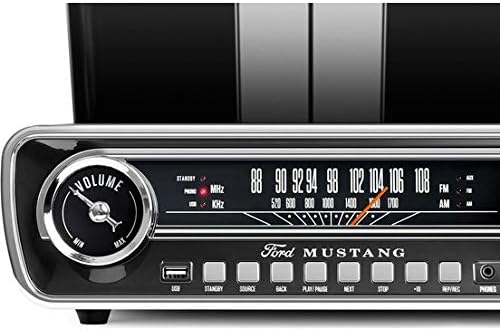
Image 3: A detailed view of the front control panel, including the volume knob, speedometer-style FM tuner, USB port, and playback buttons.
Turntable Operation
- Select Source: Press the 'SOURCE' button until 'PHONO' is selected.
- Select Speed: Set the speed selector switch (located near the tonearm) to the appropriate speed for your record (33 1/3, 45, or 78 RPM). Use the included 45 RPM adapter for 7-inch singles.
- Place Record: Place your record on the turntable platter.
- Start Playback: Gently lift the tonearm using the cue lever and position it over the desired track on the record. Lower the tonearm slowly onto the record.
- Adjust Volume: Rotate the 'VOLUME' knob to adjust the playback volume.
- Stop Playback: When the record finishes, the tonearm will automatically return to its rest position. You can also manually lift the tonearm and return it to the rest.
FM Radio Operation
- Select Source: Press the 'SOURCE' button until 'FM' is selected.
- Tune Station: Rotate the 'TUNING' knob to select your desired FM radio station. The speedometer-style dial will indicate the frequency.
- Adjust Volume: Rotate the 'VOLUME' knob to adjust the radio volume.
USB Recording and Playback
The Mustang LP allows you to record audio from the turntable or radio directly to a USB flash drive, and also play MP3 files from a USB drive.
- Insert USB Drive: Insert a USB flash drive into the USB port on the front panel.
- Select Source for Recording: Select either 'PHONO' or 'FM' as your source.
- Start Recording: Press the 'REC' button to begin recording. The recording indicator will illuminate.
- Stop Recording: Press the 'STOP' button to end the recording. The recorded file will be saved to your USB drive.
- USB Playback: Press the 'SOURCE' button until 'USB' is selected. Use the 'PLAY/PAUSE', 'BACK', 'NEXT', and 'STOP' buttons to navigate and play audio files on your USB drive.
Auxiliary Input
Connect external audio devices, such as smartphones or MP3 players, to the Mustang LP using a 3.5mm audio cable (not included).
- Connect Device: Plug one end of a 3.5mm audio cable into the 'AUX' input on the front panel of the Mustang LP and the other end into your external audio device's headphone or line-out jack.
- Select Source: Press the 'SOURCE' button until 'AUX' is selected.
- Start Playback: Begin playback on your external device.
- Adjust Volume: Adjust the volume using the 'VOLUME' knob on the Mustang LP and/or your external device.
Headphone Use
For private listening, connect standard 3.5mm headphones to the 'PHONES' jack on the front panel. The built-in speakers will automatically mute when headphones are connected.
Video 1: An overview of the ION Audio Ford Mustang LP, demonstrating its features and design. This video highlights the turntable, radio, USB, and auxiliary input functionalities.
Maintenance
Proper care ensures the longevity of your Mustang LP.
- Cleaning: Use a soft, dry cloth to clean the exterior of the unit. Avoid using harsh chemicals or abrasive cleaners.
- Dust Cover: Keep the dust cover closed when not in use to protect the turntable from dust and debris.
- Stylus Care: Periodically clean the stylus (needle) with a soft brush designed for turntable styli. Replace the stylus when it shows signs of wear to prevent damage to your records.
- Storage: Store the unit in a cool, dry place away from direct sunlight and extreme temperatures.
Troubleshooting
If you encounter issues with your Mustang LP, refer to the following common solutions:
- No Power: Ensure the power cable is securely connected to both the unit and a working power outlet. Confirm the volume knob is turned on and the 'STANDBY' button has been pressed.
- No Sound: Check the volume level on the unit and any connected external devices. If headphones are plugged in, unplug them to enable the built-in speakers. Ensure the correct source ('PHONO', 'FM', 'USB', 'AUX') is selected.
- Turntable Not Spinning: Verify the unit is powered on and the 'PHONO' source is selected. Check that all packing materials have been removed from the platter.
- Poor Radio Reception: Extend the FM antenna fully. Try repositioning the unit for better reception.
- USB Recording Issues: Ensure the USB drive is properly formatted (FAT32) and has sufficient free space.
Specifications
| Item Weight | 7.7 pounds |
| Product Dimensions | 14.75 x 13.45 x 4.2 inches |
| Item Model Number | Mustang LP |
| Color | Black |
| Compatible Devices | USB |
| Hardware Interface | USB |
| Signal Format | Analog |
| Power Source | Corded Electric |
| Voltage | 110 Volts |
| Brand | ION |
| Maximum Rotational Speed | 78 RPM |
| Included Components | Turntable, Dust Cover, 45 RPM Adapter |
| Special Feature | Speedometer-style FM tuning dial |
| Motor Type | AC Motor |
Warranty and Support
For warranty information and technical support, please refer to the warranty card included with your product or visit the official ION Audio website. Keep your purchase receipt as proof of purchase.