
1. Introduction
The Zmodo Outdoor Security Camera Wireless (2 Pack) provides a comprehensive monitoring solution for your home or business. This system features 1080p Full HD video, night vision, and motion detection capabilities. Designed for both indoor and outdoor use, it offers remote viewing via the Zmodo app and is compatible with Amazon Alexa and Google Assistant for voice control.
Key features include:
- Easy Setup: Connect cameras within minutes using the Zmodo app.
- True 1080p HD Live Video: Day and night viewing up to 65ft in the dark.
- Works with Alexa: Control your camera with voice commands.
- Smartz Eaze Cloud Recording: Receive video clips upon motion detection (14-day free trial included).
- Wall-mount Design: Flexible installation for optimal viewing angles.
2. What's in the Box
The Zmodo Outdoor Security Camera Wireless (2 Pack) package includes the following items:
- 2 x Zmodo Outdoor Cameras

3. Setup
Setting up your Zmodo Outdoor Security Camera is a straightforward process. Follow these steps for quick installation and configuration.
3.1 Physical Installation
- Choose a Location: Select a suitable location for your camera, ensuring it has a clear view of the area you wish to monitor and is within range of your Wi-Fi network. The camera is designed for wall mounting.
- Mount the Camera: Use the provided mounting bracket and screws to securely attach the camera to a wall or desired surface.
- Connect Power: Plug the camera's power adapter into a nearby electrical outlet.
- Attach Wi-Fi Antenna: Screw the Wi-Fi antenna into the designated port on the back of the camera.


3.2 App Configuration
- Download the Zmodo App: Download the free Zmodo app from your smartphone's app store (iOS or Android).
- Create an Account: Open the app and follow the on-screen instructions to create a new Zmodo account or log in if you already have one.
- Add Device: In the app, select the option to add a new device. Follow the prompts to connect your camera to your Wi-Fi network. This typically involves scanning a QR code on the camera or following guided steps.
- Name Your Camera: Assign a descriptive name to your camera (e.g., "Front Door Camera," "Backyard Camera") for easy identification.
3.3 Setup Videos
For visual guidance on the setup process, refer to the following videos:
4. Operating Instructions
Once your Zmodo camera is set up, you can begin monitoring your property and utilizing its smart features.
4.1 Live View and Playback
- Access Live Feed: Open the Zmodo app on your smartphone or tablet. Select the desired camera from your device list to view its live 1080p Full HD video feed.
- Night Vision: The camera automatically switches to night vision mode in low-light conditions, providing clear black and white video up to 65 feet.
- Cloud Storage: With the optional Smartz Eaze cloud recording plan, motion-triggered video clips are saved to the cloud. You can review, save, and share footage at any time. A 14-day free trial is available.


4.2 Motion Detection and Alerts
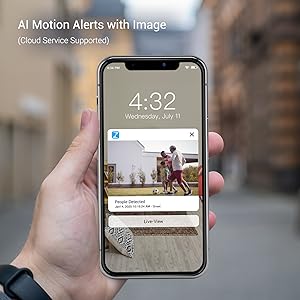
- Receive Alerts: The camera sends intelligent mobile alerts to your smartphone when motion is detected.
- AI Motion Detection: Advanced AI helps detect and identify humans, pets, and vehicles accurately, reducing false alerts.
4.3 Alexa Integration
The Zmodo camera is compatible with Amazon Alexa, allowing for convenient voice control.
- Voice Commands: Use commands like "Alexa, show me the front door" to view a live stream from your camera on compatible Alexa devices such as Echo Show or Fire TV.
- Update Firmware: Ensure your Zmodo product is updated to the latest device version for optimal interaction with Amazon Alexa.

4.4 Alexa Integration Video
Watch this video for detailed instructions on how to integrate your Zmodo camera with Amazon Alexa and Fire TV:
5. Maintenance
To ensure optimal performance and longevity of your Zmodo Outdoor Security Camera, follow these maintenance guidelines:
- Regular Cleaning: Periodically clean the camera lens with a soft, damp cloth to remove dust, dirt, or smudges that may affect image clarity. Avoid abrasive cleaners.
- Check Connections: Ensure all cables (power, antenna) are securely connected and free from damage.
- Firmware Updates: Regularly check for and install firmware updates through the Zmodo app to benefit from new features, improvements, and security enhancements.
- Weather Protection: While the camera is IP65 waterproof, ensure it is installed in a location that minimizes direct exposure to extreme weather conditions if possible, to prolong its lifespan.

6. Troubleshooting
If you encounter issues with your Zmodo camera, refer to the following common problems and solutions:
| Problem | Possible Solution |
|---|---|
| Camera offline/Cannot connect to Wi-Fi | Ensure the camera is powered on. Check your Wi-Fi signal strength at the camera's location. Restart your router and the camera. Re-add the camera through the Zmodo app. |
| Poor video quality | Clean the camera lens. Ensure adequate lighting for day vision. Check Wi-Fi signal strength; a weak signal can degrade video quality. |
| Motion alerts not received | Verify motion detection is enabled in the app settings. Check app notification settings on your phone. Ensure the camera has a clear view of the detection area. |
| Alexa integration not working | Ensure the Zmodo skill is enabled in the Alexa app and your Zmodo account is linked. Verify your Alexa device (Echo Show/Fire TV) is connected to the same network. Update camera firmware. |
7. Specifications
Detailed technical specifications for the Zmodo Outdoor Security Camera (Model ZM-W0002-2):
| Feature | Detail |
|---|---|
| Brand | Zmodo |
| Model Name | ZM-W0002-2 |
| Connectivity Technology | Cloud, Wi-Fi, 2.4GHz |
| Special Features | HD Resolution, Motion Sensor, Night Vision |
| Indoor/Outdoor Usage | Indoor, Outdoor |
| Compatible Devices | Alexa, Google Assistant |
| Mount Type | Wall Mount |
| Color | White |
| Form Factor | Bullet |
| Waterproof Rating | IP65 |
| Photo Sensor Resolution | 1080 Pixels |
| Video Capture Resolution | 1080p |
| Frame Rate | 25 fps |
| Viewing Angle | 90 Degrees |
| Optical Zoom | 4 x |
| Night Vision Range | 65 Feet |
| Power Source | Corded Electric |
| Voltage | 12 Volts |
| Wattage | 5 watts |
| Item Dimensions | 2.2 x 2.1 x 3.4 inches |
8. Warranty & Support
Warranty: The Zmodo Outdoor Security Camera comes with a 3-year manufacturer's warranty.
Customer Support: For technical assistance, troubleshooting, or warranty claims, please visit the official Zmodo website or contact their customer support team. Refer to the Zmodo app or packaging for the most up-to-date contact information.


