
1. Introduction
Thank you for purchasing the BLACK+DECKER 18V Lithium Cordless Drill Driver BDCDD186K2. This manual provides essential information for the safe and efficient operation, maintenance, and troubleshooting of your tool. Please read this manual carefully before use and keep it for future reference.
Safety First: Always wear appropriate personal protective equipment, such as safety glasses, gloves, and hearing protection, when operating power tools. Disconnect the battery before performing any adjustments or maintenance.
2. Product Overview
The BLACK+DECKER BDCDD186K2 is a versatile 18V lithium-ion cordless drill driver designed for various drilling and fastening tasks in wood and metal. It features a powerful motor, variable speed control, and multiple clutch settings for precise operation.

Figure 2.1: The BLACK+DECKER 18V Lithium Cordless Drill Driver BDCDD186K2.
Key Features:
- 18V Lithium-Ion Battery: Provides consistent power with minimal self-discharge and no memory effect.
- High Torque: 40N·m maximum tightening torque for demanding applications.
- 2-Speed Gearbox: Offers variable speed control (0-360 / 0-1400 RPM) for optimized performance across different materials.
- 11-Position Clutch: Allows precise torque adjustment to prevent over-driving screws and damage to materials, including a dedicated drill mode.
- Compact and Lightweight Design: Enhances user comfort and reduces fatigue during extended use.

Figure 2.2: Diagram illustrating the key features of the drill driver, including the high-performance transmission and quick-release hex chuck.
3. Setup
3.1 Charging the Battery
Your drill driver comes with two 1.5Ah lithium-ion batteries and a rapid charger. Ensure the battery is fully charged before first use.
- Connect the rapid charger to a standard power outlet.
- Slide the battery pack onto the charger until it clicks into place.
- The charging indicator light on the charger will illuminate. A full charge takes approximately 40 minutes.
- Once charging is complete, remove the battery from the charger.
Caution: Use only BLACK+DECKER specified chargers and batteries. Do not charge damaged batteries.

Figure 3.1: Included accessories: Rapid Charger, 1.5Ah Lithium-Ion Batteries (x2), and Kit Box.
3.2 Installing and Removing Bits
The drill driver features a 1-10mm chuck for various drill bits and driver bits.
- To install a bit, rotate the chuck counter-clockwise until the jaws are open wide enough to insert the bit.
- Insert the bit fully into the chuck.
- Rotate the chuck clockwise to tighten the jaws securely around the bit. Ensure the bit is centered and firmly held.
- To remove a bit, rotate the chuck counter-clockwise until the jaws release the bit.
4. Operating Instructions
4.1 Powering On/Off and Variable Speed Control
The tool is equipped with a variable speed trigger switch.
- To turn on, press the trigger switch. The speed increases as you press the trigger further.
- To turn off, release the trigger switch.
4.2 Gear Selection
The drill driver has a 2-speed gearbox for optimal performance.
- Gear 1 (Low Speed, High Torque): Select for heavy-duty drilling, driving large screws, or when maximum torque is required (0-360 RPM).
- Gear 2 (High Speed, Low Torque): Select for fast drilling in softer materials or driving smaller screws (0-1400 RPM).
To change gears, slide the gear selector switch located on top of the tool. Ensure the tool is stopped before changing gears.

Figure 4.1: The 2-speed gear selector switch allows speed adjustment according to the task.
4.3 Clutch Settings
The 11-position clutch allows you to adjust the torque output. This prevents over-driving screws and damaging the workpiece or screw head.
- Rotate the clutch collar to select the desired torque setting. Lower numbers indicate lower torque, suitable for smaller screws and softer materials. Higher numbers provide more torque for larger screws and harder materials.
- The drill symbol (drill mode) bypasses the clutch for maximum torque, ideal for drilling holes.

Figure 4.2: The 11-position clutch setting ring for precise torque control.
4.4 Drilling and Driving
- Drilling: Select the drill mode on the clutch collar. Choose the appropriate gear (Gear 1 for larger holes/harder materials, Gear 2 for smaller holes/softer materials). Apply steady, even pressure.
- Driving Screws: Select a clutch setting appropriate for the screw size and material. Start with a lower setting and increase if the screw is not driving fully. Use Gear 1 for larger screws and Gear 2 for smaller screws.

Figure 4.3: The drill driver in use for drilling into wood.

Figure 4.4: The drill driver in use for driving a screw.
5. Maintenance
5.1 Cleaning
- Regularly clean the ventilation slots on the tool to prevent overheating.
- Use a soft, damp cloth to wipe down the tool's exterior. Do not use harsh chemicals or abrasive cleaners.
- Keep the chuck jaws free of debris for proper bit gripping.
5.2 Storage
- Store the tool and batteries in a cool, dry place, away from direct sunlight and moisture.
- Always remove the battery from the tool before storage.
- Store batteries partially charged (around 50%) if storing for extended periods to prolong battery life.
- Use the provided kit box for organized and protected storage.
6. Troubleshooting
| Problem | Possible Cause | Solution |
|---|---|---|
| Tool does not start | Battery not charged or improperly inserted. | Charge the battery. Ensure battery is fully inserted until it clicks. |
| Reduced power or speed | Battery charge is low. | Recharge the battery. |
| Bit slips in chuck | Chuck not tightened sufficiently or jaws are dirty. | Tighten chuck firmly. Clean chuck jaws. |
| Overheating | Ventilation slots blocked. Continuous heavy use. | Clean ventilation slots. Allow tool to cool down. Reduce load. |
7. Specifications
| Feature | Specification |
|---|---|
| Model Number | BDCDD186K2 |
| Voltage | 18V |
| Battery Type | Lithium-Ion |
| Battery Capacity | 1.5Ah |
| Max Tightening Torque | 40 N·m |
| No-Load Speed (Gear 1) | 0-360 RPM |
| No-Load Speed (Gear 2) | 0-1400 RPM |
| Clutch Settings | 11 (including drill mode) |
| Chuck Size | 1-10 mm |
| Tool Dimensions (L x W x H) | 18 x 7.8 x 22.5 cm |
| Tool Weight (with battery) | 1.23 kg |
| Charger Type | Rapid Charger |
| Approx. Charge Time | 40 minutes |
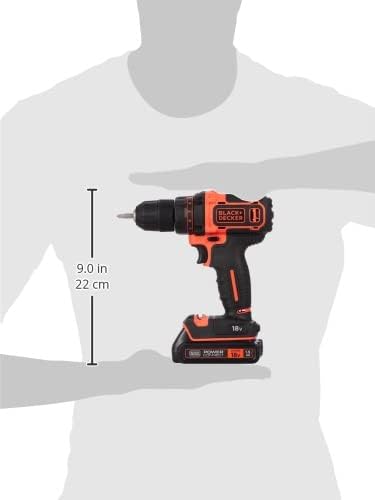
Figure 7.1: Approximate dimensions of the drill driver.
8. Warranty and Support
BLACK+DECKER products are manufactured to high-quality standards and are guaranteed against manufacturing defects. For specific warranty terms and conditions, please refer to the warranty card included with your product or visit the official BLACK+DECKER website.
For technical assistance, spare parts, or service, please contact BLACK+DECKER customer support through their official website or the contact information provided in your product packaging.
Online Resources:
- Official BLACK+DECKER Website: www.blackanddecker.com


