
1. Introduction
Thank you for choosing the UNIC UC18 Mini Projector. This compact and portable projector is designed to provide a versatile viewing experience for home entertainment, presentations, and more. Featuring an LED lighting system, built-in speaker, and multiple input options, the UC18 offers convenience and functionality. Please read this manual thoroughly to ensure proper setup, operation, and maintenance of your device.
2. Safety Information
- Power Supply: Use only the specified power adapter. Ensure the voltage matches the projector's requirements.
- Ventilation: Do not block ventilation openings. Ensure adequate space around the projector for proper airflow to prevent overheating.
- Moisture: Keep the projector away from water, rain, and excessive humidity. Do not operate with wet hands.
- Cleaning: Disconnect power before cleaning. Use a soft, dry cloth. Avoid liquid or aerosol cleaners.
- Handling: Handle the projector with care. Avoid dropping or subjecting it to strong impacts.
- Eye Protection: Do not look directly into the projector lens when the lamp is on, as the bright light can cause eye strain or damage.
- Disassembly: Do not attempt to disassemble or repair the projector yourself. Refer all servicing to qualified personnel.
3. Package Contents
Please check the package contents upon unboxing. If any items are missing or damaged, contact your retailer.
- UNIC UC18 Mini Projector
- Power Cable
- 3-in-1 AV Cable
- Remote Control (requires lithium battery, not included)
- User Manual
4. Product Overview
Projector Layout
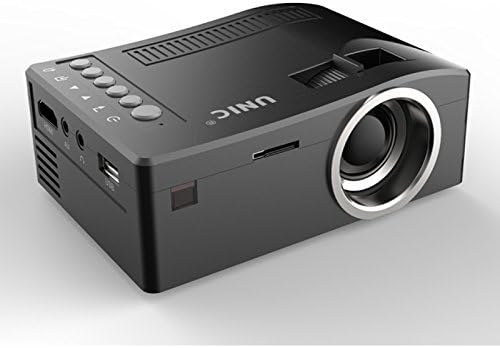
Front and side view of the UNIC UC18 Mini Projector, showing the lens, ventilation, and various ports.
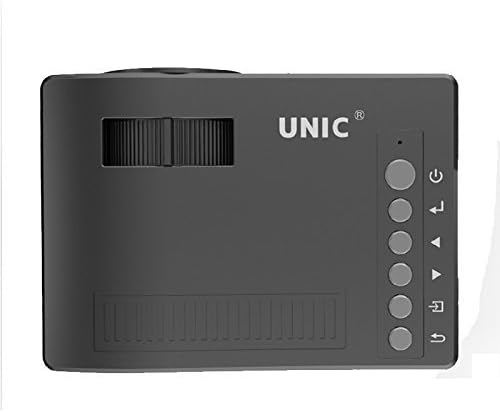
Top view of the UNIC UC18 Mini Projector, highlighting the control buttons and focus wheel.
Ports and Controls
The UNIC UC18 Mini Projector features a range of ports and controls for easy connectivity and operation:
- Lens: Projects the image onto the screen.
- Focus Wheel: Manual adjustment for image clarity.
- Power Button: Turns the projector on or off.
- Menu Button: Accesses the projector's settings menu.
- Navigation Buttons (Up/Down/Left/Right): Used to navigate menus and adjust settings.
- OK Button: Confirms selections in the menu.
- Source Button: Selects the input source (HDMI, USB, AV, TF).
- USB Port: Connects USB storage devices for media playback.
- HDMI Port: Connects to HDMI-enabled devices like laptops, gaming consoles, or media players.
- AV Port: Connects to devices using the included 3-in-1 AV cable.
- TF Card Slot: Inserts a TF (Micro SD) card for media playback.
- 3.5mm Headphone Jack: Connects external headphones or speakers.
- IR Receiver: Receives signals from the remote control.
5. Setup
5.1 Power Connection
- Connect the power cable to the projector's power input port.
- Plug the other end of the power cable into a suitable power outlet.
- The power indicator light on the projector will illuminate.
5.2 Connecting Input Devices
- HDMI: Connect an HDMI cable from your source device (e.g., laptop, DVD player) to the projector's HDMI port.
- USB: Insert a USB flash drive into the USB port.
- AV: Use the provided 3-in-1 AV cable to connect to devices with AV output. Match the yellow, white, and red connectors.
- TF Card: Insert a TF (Micro SD) card into the TF card slot.
5.3 Positioning the Projector
Place the projector on a stable, flat surface. For optimal image quality, position the projector perpendicular to the projection surface (wall or screen). The throw distance can range from 0.48 to 2.43 meters, producing a picture size from 12 to 66 inches.
6. Operating Instructions
6.1 Powering On/Off
Press the Power button on the projector or the remote control to turn the device on or off.
6.2 Adjusting Focus
After powering on, if the image appears blurry, rotate the manual focus wheel located near the lens until the image becomes clear and sharp.

Close-up of the manual focus wheel on the UNIC UC18 Mini Projector, located near the lens.
6.3 Selecting Input Source
Press the 'Source' button on the projector or remote control. Use the navigation buttons to select your desired input source (HDMI, USB, AV, TF) and press 'OK' to confirm.
6.4 Menu Navigation
Press the 'Menu' button to access the projector's settings. Use the navigation buttons to browse options and 'OK' to select. Press 'Menu' again to exit.
6.5 Audio Output
The projector has a built-in speaker. For private listening or connecting to external audio systems, plug headphones or external speakers into the 3.5mm headphone jack.
7. Maintenance
7.1 Cleaning the Lens
Use a soft, lint-free cloth specifically designed for optical lenses. Gently wipe the lens to remove dust or smudges. Avoid using abrasive materials or harsh chemicals.
7.2 Cleaning the Projector Body
Wipe the exterior of the projector with a soft, dry cloth. Do not use liquid cleaners or solvents.
7.3 Storage
When not in use for extended periods, store the projector in a cool, dry place, away from direct sunlight and extreme temperatures. Cover the lens to protect it from dust.
8. Troubleshooting
| Problem | Possible Cause | Solution |
|---|---|---|
| No image displayed | Power not connected; Incorrect input source; Loose cable connection | Check power cable; Select correct input source; Reconnect cables securely |
| Image is blurry | Focus not adjusted; Projector too close/far | Adjust the focus wheel; Reposition the projector within recommended throw distance |
| No sound | Volume too low; Muted; Audio cable not connected; Source device audio issue | Increase volume; Unmute; Check audio cable connection; Verify audio output on source device |
| Remote control not working | Batteries low/incorrectly inserted; Obstruction between remote and projector | Replace batteries (lithium battery required); Ensure clear line of sight to IR receiver |
| Projector overheats | Blocked ventilation; Prolonged use in hot environment | Ensure ventilation openings are clear; Operate in a well-ventilated area; Allow to cool down |
9. Specifications
Technical Specifications
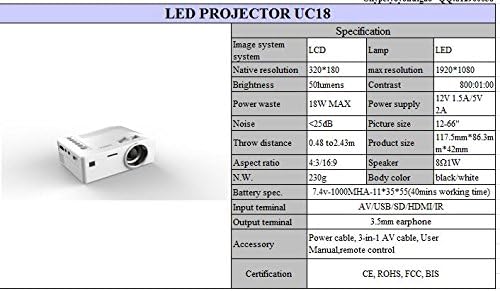
Detailed technical specifications for the UNIC UC18 Mini Projector, including resolution, contrast, and dimensions.
| Feature | Specification |
|---|---|
| Brand | UNIC |
| Model Name | UC18 |
| Display Technology | QVGA (LCD) |
| Native Resolution | 320 x 240 pixels |
| Maximum Supported Resolution | 1920 x 1080 pixels (1080P) |
| Brightness | 50 Lumens |
| Contrast Ratio | 500:1 |
| Aspect Ratio | 16:9 (also supports 4:3) |
| Throw Distance | 0.48m - 2.43m (1.57ft - 7.97ft) |
| Picture Size | 12 - 66 inches |
| Input Terminals | AV, USB, SD (TF), HDMI, IR |
| Output Terminal | 3.5mm Earphone Jack |
| Special Features | Built-In Speaker, Portable |
| Power Consumption | 24 Watts (Max 18W) |
| Power Supply | 12V 1.5A / 5V 2A |
| Noise Level | <25dB |
| Product Dimensions (L x W x H) | 117.5mm x 86.3mm x 42mm |
| Net Weight | 230g |
| Mounting Type | Wall Mount |
| Remote Control | Yes (battery not included) |
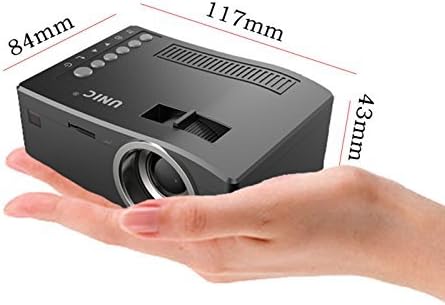
The UNIC UC18 Mini Projector held in a hand, illustrating its compact size and dimensions (117mm x 84mm x 43mm).
10. Warranty and Support
For warranty information or technical support, please refer to the documentation provided at the time of purchase or contact your retailer. Keep your proof of purchase for any warranty claims.