
TRAKK TR812
TRAKK GO Portable Bluetooth Speaker User Manual
Brand: TRAKK
Model: TR812
Introduction
Thank you for purchasing the TRAKK GO Portable Bluetooth Speaker. This manual provides detailed instructions for setting up, operating, and maintaining your speaker. The TRAKK GO is designed for robust indoor and outdoor use, featuring IP67 waterproof, dustproof, and shockproof capabilities, ensuring high-quality audio in various environments.

A front-angled view of the TRAKK GO portable Bluetooth speaker, showcasing its black rubberized exterior, silver trim, and mesh grille with the 'TRAKK' logo. Control buttons are visible on the top panel.
Package Contents
Please verify that all items listed below are included in your package:
- TRAKK GO Portable Bluetooth Speaker
- USB Charging Cable
- 3.5mm Audio Cable (AUX)
- Power Adapter
- Carrying Bag
- User Manual (this document)

An overhead view displaying all items included in the TRAKK GO speaker package: the speaker itself, a USB charging cable, a 3.5mm audio cable, a power adapter, a black carrying bag, and the printed owner's guide.
Product Features
- Advanced Connectivity: Bluetooth 4.0 for instant pairing with smartphones, tablets, and computers. Features NFC functionality and a 3.5mm AUX port.
- Extended Range: Wireless connection range of up to 33 feet (10 meters).
- Built-in Microphone: Allows for hands-free phone calls directly through the speaker.
- Durable Design: IP67 rated for waterproof, dustproof, and shockproof protection. Features a coated rubberized exterior and aluminum grill.
- Long Battery Life: Equipped with a 4400mAh battery, providing up to 12 hours of playtime.
- Power Bank Functionality: Can be used to charge other USB devices.
- Intuitive Controls: LED Power and Charging Status Indicator, with LED button backlights activated by a thermal sensor.
- High-Quality Audio: 20W output with MaxBass Technology for superior sound.

The TRAKK GO speaker resting on a muddy, wet surface, demonstrating its rugged and waterproof design. Water droplets are visible on its surface, highlighting its IP67 rating.

An artistic representation of the TRAKK GO speaker with musical notes and sound waves emanating from it, symbolizing its powerful sound and MaxBass technology.
Setup Guide
1. Charging the Speaker
Before first use, fully charge the TRAKK GO speaker. Connect the provided USB charging cable to the speaker's charging port and the other end to the power adapter. Plug the adapter into a wall outlet. The LED indicator will show charging status and turn off when fully charged.
2. Powering On/Off
Press and hold the Power button (usually marked with a power symbol) located on the top panel of the speaker until you hear an audible prompt or see the LED indicator light up.
To power off, press and hold the Power button again until the speaker powers down.
3. Bluetooth Pairing
- Ensure the speaker is powered on and in Bluetooth pairing mode (indicated by a flashing LED).
- On your device (smartphone, tablet, computer), enable Bluetooth and search for available devices.
- Select "TRAKK GO" from the list of found devices.
- Once paired, the speaker will provide an audible confirmation, and the LED indicator will become solid.
- If prompted for a password, enter "0000".
4. NFC Pairing (Near Field Communication)
If your device supports NFC, simply tap your NFC-enabled device against the NFC area on the TRAKK GO speaker to initiate pairing. Follow any on-screen prompts on your device.
5. AUX Connection
For non-Bluetooth devices, use the provided 3.5mm audio cable. Connect one end to the AUX port on the speaker and the other end to the audio output jack of your device. The speaker will automatically switch to AUX mode.
Operating Instructions
Control Buttons Overview
The TRAKK GO speaker features intuitive controls located on its top panel:
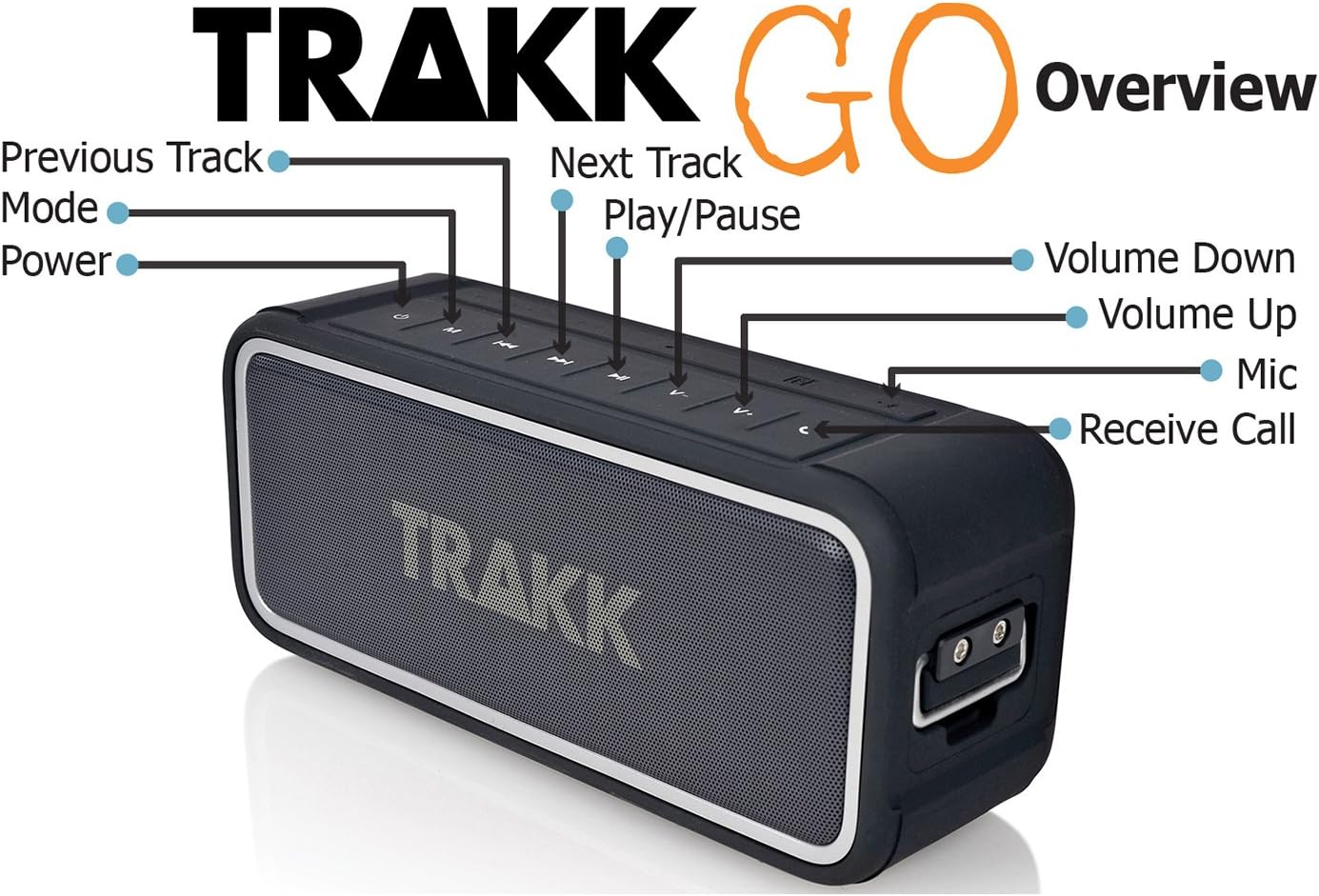
An overhead view of the TRAKK GO speaker, clearly labeling its control buttons: Power, Mode, Previous Track, Next Track, Play/Pause, Volume Down, Volume Up, Mic, and Receive Call.
- Power Button: Press and hold to power on/off.
- Mode Button: Short press to switch between Bluetooth and AUX modes.
- Play/Pause Button: Press to play or pause audio.
- Previous Track Button: Short press to go to the previous track.
- Next Track Button: Short press to go to the next track.
- Volume Up Button: Press to increase volume.
- Volume Down Button: Press to decrease volume.
- Receive Call Button: Press to answer or end a phone call. Press and hold to reject a call.
Making and Receiving Calls
When paired via Bluetooth, the TRAKK GO speaker can be used as a hands-free speakerphone:
- Answering a Call: Press the Receive Call button.
- Ending a Call: Press the Receive Call button.
- Rejecting a Call: Press and hold the Receive Call button.
- Redialing Last Number: Double-press the Receive Call button.
Using as a USB Power Bank
The TRAKK GO speaker can charge other USB-powered devices. Connect your device's USB charging cable to the USB output port on the speaker. The speaker's internal battery will then provide power to charge your device.
Maintenance and Care
Cleaning
To clean the speaker, use a soft, damp cloth. Do not use abrasive cleaners, alcohol, or chemical solvents, as these may damage the surface or internal components. Ensure all ports are dry before charging or connecting cables.
Waterproof and Dustproof Care (IP67)
The TRAKK GO is IP67 rated, meaning it is protected from dust ingress and can withstand immersion in water up to 1 meter for 30 minutes. While highly durable, follow these guidelines:
- Ensure the rubber flap covering the charging and AUX ports is securely closed before exposing the speaker to water or dust.
- Do not intentionally submerge the speaker for extended periods or beyond the specified depth.
- After exposure to saltwater or chlorinated water, rinse the speaker with fresh water and allow it to air dry completely before charging or using the ports.
- Avoid exposing the speaker to extreme temperatures.

The TRAKK GO speaker covered in water droplets, illustrating its waterproof capabilities. The speaker's black rubberized body and mesh grille are clearly visible.
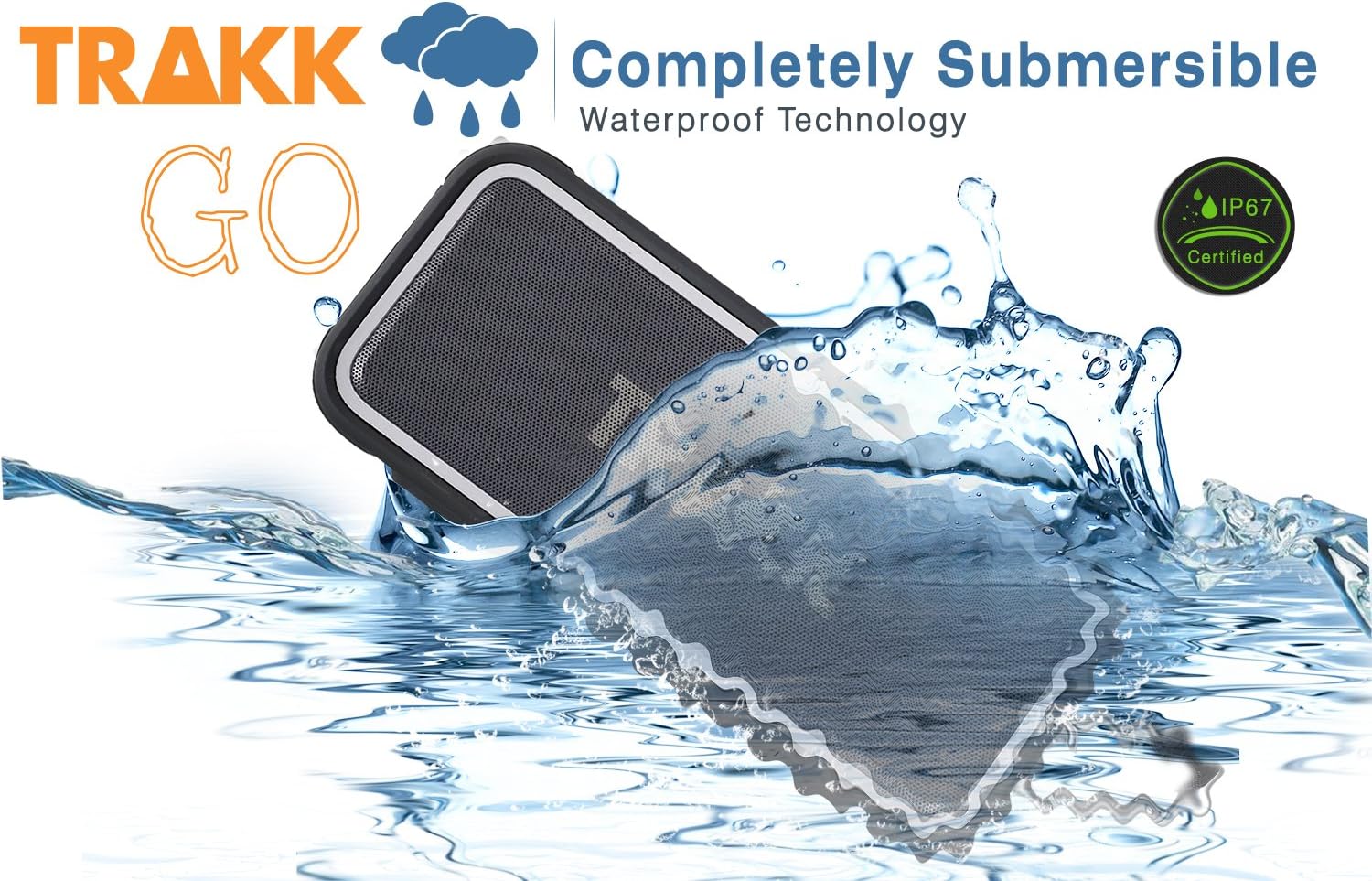
The TRAKK GO speaker partially submerged in water with a splash, emphasizing its completely submersible waterproof technology and IP67 certification.

The TRAKK GO speaker placed on a sandy beach with ocean waves gently washing over it, showcasing its suitability for outdoor and water-adjacent environments.
Storage
When not in use for extended periods, store the speaker in a cool, dry place, away from direct sunlight and extreme temperatures. It is recommended to charge the battery at least once every three months to maintain battery health.
Troubleshooting
| Problem | Possible Cause | Solution |
|---|---|---|
| Speaker does not power on. | Battery is depleted. | Charge the speaker fully using the provided USB cable and power adapter. |
| Cannot pair via Bluetooth. | Speaker is not in pairing mode; device Bluetooth is off; speaker is too far from device; interference. | Ensure speaker is in pairing mode (flashing LED). Turn Bluetooth off/on on your device. Move speaker closer to device. Avoid strong electromagnetic interference. |
| No sound from speaker. | Volume too low; incorrect input mode; device not playing audio. | Increase speaker and device volume. Press the Mode button to switch to the correct input (Bluetooth/AUX). Ensure audio is playing on your connected device. |
| Poor sound quality/distortion. | Low battery; device too far; audio source quality. | Charge the speaker. Move device closer to speaker. Try a different audio source or file. |
| Speaker not charging other devices. | Speaker battery too low; incorrect cable; device not compatible. | Ensure speaker has sufficient charge. Use the correct USB cable for your device. Some devices may draw too much power. |
Specifications
| Feature | Detail |
|---|---|
| Model Number | TR812 |
| Speaker Type | Wireless Portable Bluetooth Speaker |
| Connectivity | Bluetooth 4.0, NFC, 3.5mm AUX |
| Wireless Range | Up to 33 feet (10 meters) |
| Output Power | 20 Watts |
| Battery Capacity | 4400mAh Lithium Ion |
| Battery Life | Up to 12 hours (at 50% volume) |
| Waterproof Rating | IP67 (Waterproof, Dustproof, Shockproof) |
| Built-in Microphone | Yes |
| Dimensions (L x W x H) | 18.54 x 6.35 x 7.62 cm |
| Weight | 816 Grams |
| Material | Rubberized exterior, Aluminum grill |
Warranty and Support
Warranty Information
The TRAKK GO Portable Bluetooth Speaker comes with a 1-Year Limited Warranty from the date of purchase. This warranty covers manufacturing defects in materials and workmanship under normal use. It does not cover damage caused by misuse, accident, unauthorized modification, or external causes.
Please retain your proof of purchase for warranty claims.
Customer Support
For technical assistance, warranty claims, or general inquiries, please contact TRAKK Customer Support. Refer to the contact information provided on the TRAKK official website or your product packaging.
For the latest information and support resources, visit: www.trakk.com
Ask a question about this manual
Ask about setup, troubleshooting, compatibility, parts, safety, or missing instructions. Manuals+ will review the question and use this page’s manual context to help answer it.