
1. Introduction
Thank you for choosing the GoolRC TG3 2.4GHz 3CH Digital Radio Remote Control System. This system is engineered for high reception sensitivity and reliable control of your RC cars and boats. It features very low power consumption, stable performance, fast response speed, and strong anti-interference capabilities, allowing multiple devices and users to operate simultaneously without conflict. This manual will guide you through the installation, operation, and maintenance of your new remote control system.
2. Product Overview
The GoolRC TG3 system consists of a 3-channel transmitter and a compact receiver, designed for intuitive control and robust performance.

Figure 2.1: Main view of the GoolRC TG3 Transmitter. This image displays the ergonomic design of the remote control, featuring a steering wheel, trigger, and various control buttons.

Figure 2.2: Front view of the GoolRC TG3 Transmitter. This perspective highlights the trigger mechanism for throttle control and the steering wheel for directional input.

Figure 2.3: The GoolRC TG-3 Receiver. This small component receives signals from the transmitter and includes an antenna and a binding plug for initial setup.

Figure 2.4: Close-up of the transmitter's control panel. This image details the various trim dials (ST.TRIM, TH.TRIM), the bind button, and other auxiliary controls.
3. Specifications
3.1 Transmitter Specifications
- Brand: GoolRC
- Model Name: TG3
- Channels: 3CH
- Remote Control Frequency: 2.4 GHz
- Color: Black
- Material: Plastic
- Mode Type: RC Car / Boat
- RF Range: Less than 20dbm
- Low Voltage Warning: Yes (below 4V)
- Power Supply: 4 * 1.5V AA battery (not included)
- Dimensions: 225 * 135 * 75 mm
- Weight: 285g
3.2 Receiver Specifications
- Channels: 3CH
- Model Name: TG-3
- Model Type: RC Car / Boat
- Frequency: 2.4 GHz
- Power: 4.0 - 6.5V DC
- Dimensions: 30 * 18 * 13 mm
- Weight: 4g
- Compatibility: Suitable for 3-channel 2.4G transmitter
3.3 Package Contents
- 1 * GoolRC TG3 Transmitter
- 1 * TG-3 Receiver
- 1 * Paster (adhesive pad)
- 1 * Matching Line (binding cable)
- 1 * English Manual
Full Model Number: GAL4125753058427QU
4. Setup
4.1 Transmitter Battery Installation
- Locate the battery compartment cover on the bottom of the transmitter.
- Slide the cover open.
- Insert four (4) 1.5V AA batteries, ensuring correct polarity (+/-).
- Close the battery compartment cover securely.

Figure 4.1: Transmitter battery compartment. This image shows the open compartment where four AA batteries are to be inserted.
4.2 Receiver Connection and Binding
- Connect the receiver to your RC vehicle's Electronic Speed Controller (ESC) and steering servo according to your vehicle's instructions. Ensure correct channel allocation (e.g., CH1 for steering, CH2 for throttle).
- Power on your RC vehicle (which powers the receiver). The receiver's LED should flash, indicating it's ready for binding.
- Press and hold the 'BIND' button on the transmitter (refer to Figure 2.4 for location).
- While holding the 'BIND' button, turn on the transmitter.
- Release the 'BIND' button once the receiver's LED turns solid, indicating a successful bind.
- Turn off both the transmitter and the RC vehicle. Then, turn them back on in sequence (transmitter first, then vehicle) to confirm the binding.
5. Operating Instructions
The GoolRC TG3 transmitter provides precise control over your RC vehicle. Familiarize yourself with the controls shown below.
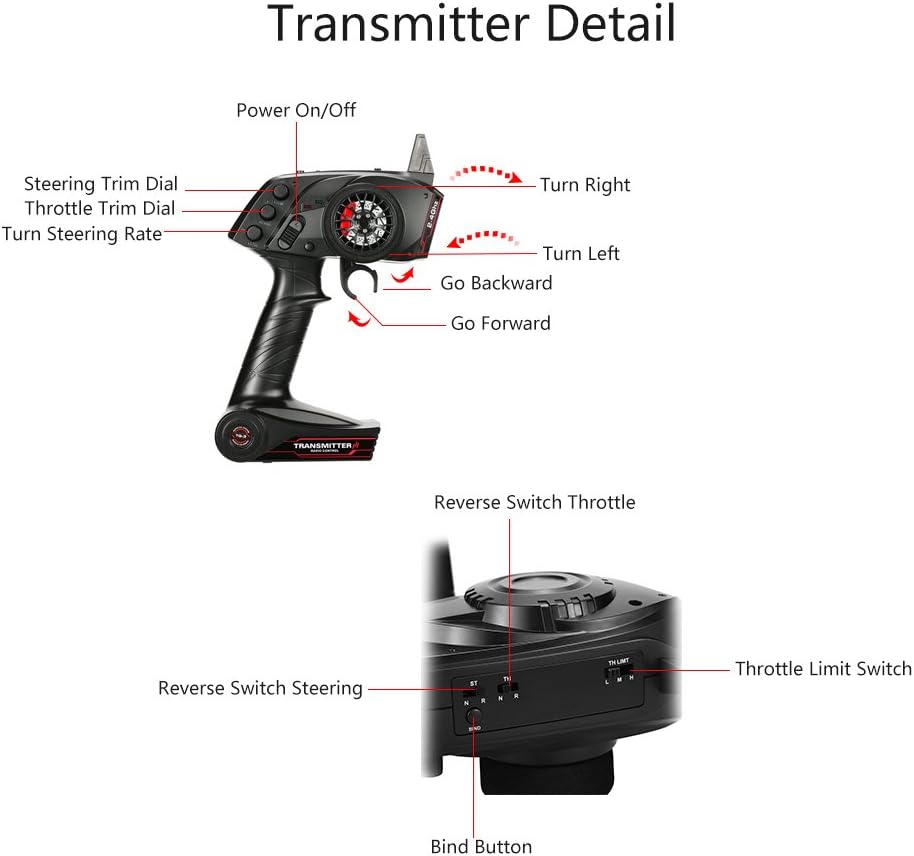
Figure 5.1: Transmitter Control Details. This diagram labels the Power On/Off switch, Steering Trim Dial, Throttle Trim Dial, Turn Steering Rate, Reverse Switch (Throttle and Steering), Throttle Limit Switch, and Bind Button.
5.1 Basic Controls
- Power On/Off: Located on the top left, this switch turns the transmitter on or off.
- Steering Wheel: Turn left or right to control the vehicle's direction.
- Throttle Trigger: Pull to go forward, push to go backward/brake.
5.2 Adjustment Controls
- Steering Trim Dial (ST.TRIM): Adjusts the neutral position of the steering. If the vehicle pulls to one side when the steering wheel is centered, use this dial to correct it.
- Throttle Trim Dial (TH.TRIM): Adjusts the neutral position of the throttle. If the vehicle moves slightly forward or backward when the throttle trigger is neutral, use this dial to correct it.
- Turn Steering Rate (ST.RATE): Adjusts the maximum steering angle.
- Throttle Limit Switch (TH.LIMIT): Limits the maximum throttle output, useful for beginners or in confined spaces.
- Reverse Switch (ST/TH): Reverses the direction of the steering or throttle channel. Adjust if your vehicle responds in the opposite direction to your input.

Figure 5.2: The GoolRC TG3 transmitter is compatible with both RC cars and boats, providing versatile control for various models.
6. Maintenance
- Cleaning: Use a soft, dry cloth to clean the transmitter and receiver. Avoid using solvents or harsh chemicals.
- Storage: Store the system in a cool, dry place away from direct sunlight and extreme temperatures. Remove batteries from the transmitter if storing for extended periods to prevent leakage.
- Avoid Moisture: While the product has some water resistance, avoid submerging the transmitter or exposing it to heavy rain. The receiver is rated as waterproof.
- Battery Care: Always use fresh, high-quality AA batteries for the transmitter. Replace them when the low voltage warning activates.
7. Troubleshooting
- No Power to Transmitter: Check if batteries are inserted correctly and are not depleted. Ensure the power switch is in the 'ON' position.
- No Response from Vehicle: Ensure both the transmitter and receiver are powered on. Verify that the binding process was successful. Check all connections between the receiver, ESC, and servo.
- Vehicle Moves Erratically: Re-bind the transmitter and receiver. Check for potential interference from other 2.4GHz devices. Ensure trim settings are neutral.
- Low Range: Check transmitter batteries. Ensure the receiver antenna is not damaged or obstructed.
- Steering/Throttle Reversed: Adjust the corresponding reverse switch (ST/TH) on the transmitter.
8. Warranty and Support
Specific warranty information for the GoolRC TG3 system is not provided in this manual. Please refer to your purchase documentation or contact your retailer for details regarding warranty coverage.
For technical support or further assistance, please contact GoolRC customer service through their official website or the retailer from whom you purchased the product. Always provide your product model (TG3) and any relevant purchase details when seeking support.
