
Alera RL7619M
Alera ALE Reception Lounge 700 Series Ganging Table User Manual
1. Introduction
Thank you for choosing the Alera ALE Reception Lounge 700 Series Ganging Table. This manual provides essential information for the proper setup, operation, and maintenance of your new ganging table. Designed to seamlessly integrate with coordinating guest chairs, this stylish wood table offers versatile configurations for reception areas, creating functional coffee tables or corner arrangements. Its durable woodgrain laminate surface is engineered for resistance against water, scratches, and dents, ensuring long-lasting performance.
2. Safety Information
Please read and understand all instructions before assembly and use. Keep this manual for future reference.
- Ensure all components are present and undamaged before beginning assembly.
- Assemble the table on a soft, clean surface to prevent scratches.
- Do not overtighten screws during assembly, as this may damage the material.
- Keep small parts away from children during assembly.
- Do not stand or sit on the table. It is designed for light items and beverages.
- Regularly check all connections and fasteners to ensure they remain secure.
3. Package Contents
Verify that all items listed below are included in your package:
- Alera ALE Reception Lounge 700 Series Ganging Table (Mahogany)
- Required assembly hardware (screws, brackets, etc.)
4. Setup and Assembly
The Alera 700 Series Ganging Table is designed for easy integration with Alera 700 Series guest chairs. Assembly typically involves attaching the table to the chairs using the provided reinforced brackets.
- Prepare Chairs: Position two Alera 700 Series guest chairs side-by-side, leaving adequate space between them for the ganging table. Ensure the chairs are stable and on a level surface.
- Position Table: Carefully place the ganging table between the two chairs. Align the table's attachment points with the corresponding points on the chair frames.
- Attach Brackets: Using the provided hardware, secure the reinforced brackets from the table to the chair frames. Ensure all screws are tightened firmly but do not overtighten. The table should feel stable and securely connected to both chairs.
- Verify Stability: Gently test the stability of the assembled unit. The ganging table should not wobble or feel loose.

Figure 4.1: The Alera 700 Series Ganging Table seamlessly connecting two lounge chairs to create a unified seating arrangement.
For corner configurations, additional chairs and tables may be required. The ganging table can be used to create a corner surface between two chairs positioned at a 90-degree angle.
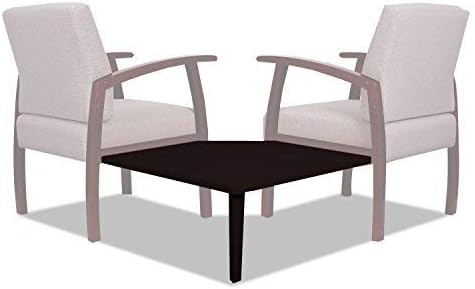
Figure 4.2: The Alera 700 Series Ganging Table used to form a corner surface, ideal for L-shaped seating layouts.
5. Operating Instructions
The Alera 700 Series Ganging Table functions as a convenient surface for items in a lounge or reception setting. Once assembled, it provides a stable area for:
- Placing beverages and small plates.
- Holding magazines, books, or remote controls.
- Supporting small electronic devices.
Avoid placing excessively heavy objects on the table to prevent damage or instability. The table is designed to complement the seating arrangement, not to bear heavy loads.
6. Care and Maintenance
To ensure the longevity and appearance of your Alera Ganging Table, follow these maintenance guidelines:
- Cleaning: Wipe the laminate surface with a soft, damp cloth. For stubborn spots, a mild, non-abrasive cleaner can be used. Avoid harsh chemicals, abrasive pads, or solvents, as these can damage the finish.
- Spills: Promptly wipe up any spills to prevent liquid from seeping into the laminate or causing stains.
- Heat Protection: Always use coasters or protective pads under hot items to prevent heat damage to the surface.
- Scratch Prevention: Avoid dragging sharp or rough objects across the table surface. Use felt pads under items that may scratch.
- Regular Inspection: Periodically check all screws and connections to ensure they remain tight. Retighten if necessary.

Figure 6.1: Detailed view of the durable mahogany woodgrain laminate surface, designed for easy cleaning and resistance to wear.
7. Troubleshooting
This section addresses common issues you might encounter with your ganging table.
- Table Wobbles:
- Ensure the table is on a level surface.
- Check all assembly screws and connections. Tighten any loose fasteners.
- Verify that the chairs it is ganged to are also stable and level.
- Surface Scratches:
- While the laminate is scratch-resistant, it is not scratch-proof. Use coasters and avoid dragging sharp objects.
- Minor scratches may be less noticeable with furniture polish designed for laminate surfaces.
- Difficulty Attaching:
- Ensure you are using Alera 700 Series guest chairs, as the ganging mechanism is designed specifically for this series.
- Review the assembly instructions carefully to ensure correct alignment of brackets and attachment points.
8. Product Specifications
| Feature | Detail |
|---|---|
| Brand | Alera |
| Model Name | Alera 700 |
| Model Number | RL7619M |
| Product Dimensions (D x W x H) | 21.65"D x 24.21"W x 1.57"H |
| Item Weight | 11.4 Pounds |
| Color | Mahogany |
| Material Type | Wood (Laminate Top) |
| Table Design | Coffee Table / Ganging Table |
| Style | Modern |
| Included Components | Ganging Table |
| UPC | 042167393243 |
9. Warranty and Support
For information regarding warranty coverage, replacement parts, or technical support, please contact Alera customer service. Details can typically be found on the Alera official website or through your original point of purchase.
Alera Customer Service: Please refer to the contact information provided with your purchase or visit the official Alera website for the most up-to-date support options.
Related documentsRL7619M


Ask a question about this manual
Ask about setup, troubleshooting, compatibility, parts, safety, or missing instructions. Manuals+ will review the question and use this page’s manual context to help answer it.