
VTech DS6151
VTech Two-Line Expandable Cordless Phone with Answering System User Manual
Brand: VTech | Model: DS6151
Introduction
This manual provides comprehensive instructions for the VTech Two-Line Expandable Cordless Phone with Answering System, model DS6151. It covers setup, operation, maintenance, and troubleshooting to ensure optimal performance and user experience. This system is designed for homes and small offices requiring two telephone lines and features an integrated digital answering system and expandable cordless handsets.
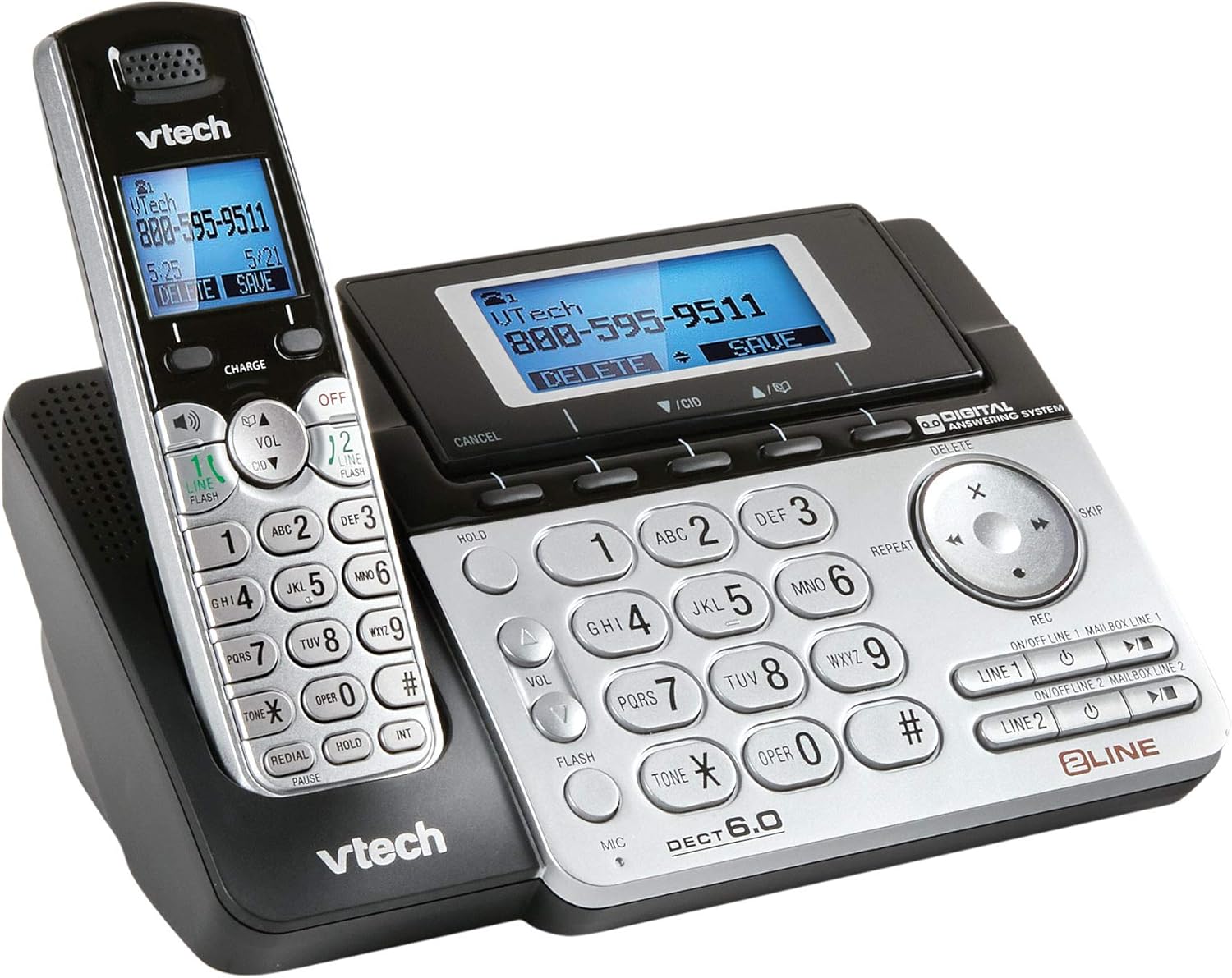
Image 1: The VTech Two-Line Expandable Cordless Phone System, showing the base unit and a cordless handset.
Package Contents
Verify that your package contains the following items:
- Cordless Handset(s)
- Base Unit
- AC Power Adapter for Base Unit
- Telephone Line Cords (2)
- Rechargeable Battery Pack(s) for Handset(s)
- Handset Battery Compartment Cover(s)
- Wall Mount Bracket (optional)
- User's Manual (this document)
Setup
1. Connecting the Base Unit
- Connect the small end of the AC power adapter to the power jack on the back of the base unit.
- Plug the large end of the AC power adapter into a standard electrical outlet.
- Position the power cord to prevent tripping hazards.
2. Installing Handset Batteries
- Open the battery compartment cover on the back of the cordless handset.
- Connect the battery pack plug securely into the jack inside the compartment.
- Place the battery pack with the label UP, as indicated.
- Replace the battery compartment cover, sliding it into place until it clicks.

Image 2: The VTech phone system from a different angle, highlighting the handset and base unit design.
3. Charging the Handset
Place the cordless handset in the base unit with the display facing up. The CHARGE light on the handset will illuminate, indicating proper charging. Allow the handset to charge for at least 16 hours before initial use.
4. Connecting Telephone Lines
- Plug one end of the first telephone line cord into the LINE 1 jack on the back of the base unit.
- Plug the other end of the cord into a telephone wall jack.
- Repeat for the second telephone line, connecting it to the LINE 2 jack and another telephone wall jack.
- Ensure all connections are secure.
Operating Instructions
Basic Call Functions
- Making a Call: Press LINE 1 or LINE 2, then dial the number.
- Answering a Call: Press TALK/FLASH or any line button when the phone rings.
- Ending a Call: Press OFF/CLEAR or place the handset in the base.
- Speakerphone: During a call, press SPEAKER to activate or deactivate the speakerphone.
- Hold: Press HOLD to place an active call on hold. Press the corresponding line button to resume.
Two-Line Operation
The system supports two independent telephone lines. You can switch between lines or use both simultaneously for conference calls.
- Switching Lines: During an active call on one line, press the other LINE button to answer an incoming call or make a new call on that line. The first call will be put on hold automatically.
- Conference Call: With two active calls (one on hold), press CONF (if available) or follow on-screen prompts to join both calls.
Answering System
The integrated digital answering system records messages for both lines.
- Turning On/Off: Press ANS ON/OFF on the base unit or through the handset menu.
- Playing Messages: Press PLAY/STOP on the base unit or access through the handset menu.
- Recording Greeting: Access the "Greeting" option in the answering system menu on the handset or base.
- Deleting Messages: Press DELETE during message playback or through the handset menu.
Directory/Phonebook
Store frequently called numbers for quick dialing.
- Adding an Entry: Navigate to the "Directory" menu, select "Add New Entry," and follow the prompts to enter a name and number.
- Dialing from Directory: Press DIR, scroll to the desired entry, and press TALK/FLASH or a LINE button.
Caller ID
Requires subscription to Caller ID service from your telephone service provider.
- Reviewing Caller ID Log: Press CID or CALL LOG to view recent calls.
- Calling Back: Select an entry from the Caller ID log and press TALK/FLASH or a LINE button.
Maintenance
Cleaning the Phone
Wipe the phone and base unit with a soft, slightly damp cloth. Do not use cleaning sprays or harsh chemicals, as they may damage the finish or electrical components.
Battery Care
- Use only the supplied or approved replacement battery packs.
- Do not dispose of batteries in a fire; they may explode.
- Do not open or mutilate the battery. Released electrolyte is corrosive and may cause burns or injury.
- Remove the battery if the phone is not used for extended periods.
Troubleshooting
| Problem | Solution |
|---|---|
| No dial tone. |
|
| Handset does not charge. |
|
| Poor sound quality. |
|
| Answering system not recording messages. |
|
Specifications
- Product Dimensions: 4.7 x 5.7 x 8.9 inches
- Item Weight: 1.4 pounds
- Model Number: DS6151
- Batteries: 2 AA batteries required (for handset)
- Telephone Type: Cordless
- Number of Lines: Two-Line Operation
- Answering System Type: Digital
- Power Source: Corded Electric (for base unit)
- Dialer Type: Single Keypad
- Compatible Devices: Two phone lines, answering machines, multiple cordless handsets, computers, VoIP services, fax machines
- Date First Available: November 21, 2013
Warranty and Support
For detailed warranty information, please refer to the warranty card included with your product or visit the official VTech website. For technical support, product registration, or to purchase accessories, please visit www.vtechphones.com or contact VTech customer service.
Important: This product contains chemicals known to the State of California to cause cancer and birth defects or other reproductive harm. Please handle with care and refer to safety guidelines.
Related documentsDS6151


Ask a question about this manual
Ask about setup, troubleshooting, compatibility, parts, safety, or missing instructions. Manuals+ will review the question and use this page’s manual context to help answer it.