
1. Introduction
Thank you for choosing the UHPPOTE 280KG 600Lbs Magnetic Lock, Model YM-280H. This magnetic lock is designed for secure access control applications, featuring a robust IP-68 waterproof design suitable for both indoor and outdoor use. It offers dual voltage compatibility (12V/24V DC) and includes an LED indicator for door status and lock signal output. This manual provides essential information for proper installation, operation, and maintenance of your magnetic lock.
2. Safety Information
- Always ensure power is disconnected before installation or maintenance to prevent electrical shock.
- Verify the correct voltage (12V DC or 24V DC) before connecting the wires to avoid damage to the unit.
- This device is designed for security applications. Ensure proper installation to maintain security integrity.
- Consult a qualified electrician or security professional if you are unsure about any installation steps.
3. Package Contents
Please check the package contents upon receipt to ensure all items are present:
- 1 x UHPPOTE Magnetic Lock (YM-280H)
- 1 x User Manual
- Installation Hardware (screws, brackets, etc. - implied by product type)
4. Product Overview
The UHPPOTE YM-280H magnetic lock is a robust security device. Key features include:
- IP-68 Waterproof Design: Suitable for both indoor and outdoor environments.
- Dual Voltage Operation: Compatible with 12V DC or 24V DC power inputs.
- LED Indicator: Provides visual feedback on door status (locked/unlocked).
- Signal Output Contact: Lock signal (NO/COM) for integration with access control systems.
- High Holding Force: 280kg (600Lbs) for strong security.
- Integrated Design: Enhanced anti-impact strength and faster installation compared to traditional designs.
- Application: Suitable for wooden doors, metal doors, and fireproof doors.
4.1 Product Components

Figure 1: Front view of the magnetic lock, showing the main body and wiring.
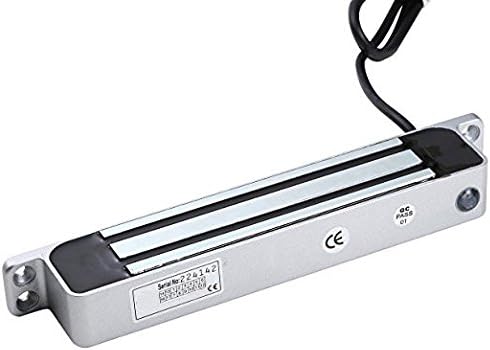
Figure 2: Rear view of the magnetic lock, displaying product labels and serial information.
5. Specifications
| Feature | Specification |
|---|---|
| Model | YM-280H |
| Operating Mode | NC mode (unlocked when power is removed), Fail-Safe mode |
| Dimensions (L x W x H) | 235mm x 26.5mm x 43mm (9.25in x 1.04in x 1.69in) |
| Input Voltage | DC12V or DC24V (selectable) |
| Current (12V) | 520mA |
| Current (24V) | 260mA |
| Holding Force | 280kg (600Lbs) |
| Signal Output | Lock signal (NO/COM) |
| LED Indicator | Red (locked), Green (not locked properly) |
| Operating Temperature | -10℃ to +55℃ (14℉ to 131℉) |
| Weight | 2.4KG (5.29lb) |
| Waterproof Rating | IP-68 |
| Suitable Door Types | Wooden door, metal door, fireproof door |

Figure 3: Detailed dimensions of the magnetic lock and armature plate.
6. Setup and Installation
Proper installation is crucial for the optimal performance and security of the magnetic lock. Refer to the diagrams below for guidance.
6.1 General Installation

Figure 4: General installation diagram, illustrating the placement of the magnetic lock on the door frame and the armature plate on the door leaf.
- Mount the main magnetic lock body onto the door frame.
- Mount the armature plate onto the door leaf, ensuring it aligns perfectly with the magnetic lock body when the door is closed.
- Ensure the screw of the armature plate is not fixed too tightly. Proper elasticity should be guaranteed for the rubber ring so that the armature plate can adjust itself to the appropriate position for maximum contact.
6.2 Wiring Diagram
Connect the magnetic lock to your power supply and access control system according to the appropriate voltage diagram below. Always verify the voltage before connecting wires.
A. 12V DC Input Wiring
- Red: 12V DC "+"
- Orange: 12V DC "+"
- Blue: 12V DC "-"
- Black: 12V DC "-"
- White: COM (Common for signal output)
- Green: NO (Normally Open for signal output)
B. 24V DC Input Wiring
- Red: 24V DC "+"
- Orange: 24V DC "+"
- Blue: 24V DC "-"
- Black: 24V DC "-"
- White: COM (Common for signal output)
- Green: NO (Normally Open for signal output)
The signal output (White/COM, Green/NO) can be connected to an access control panel or alarm system to indicate the lock status.
7. Operating Instructions
The UHPPOTE YM-280H magnetic lock operates in NC (Normally Closed) mode, meaning it is unlocked when power is removed (fail-safe). When power is applied, the electromagnet engages, securing the door.
- Locking: When power is supplied to the magnetic lock, the electromagnet activates, creating a strong magnetic bond with the armature plate, thus locking the door. The LED indicator will turn Red, indicating the door is locked.
- Unlocking: When power is removed (e.g., via an access control system, push button, or power failure), the magnetic field dissipates, allowing the door to be opened.
- LED Indicator:
- Red LED: Indicates the door is locked.
- Green LED: Indicates the door is not locked properly (e.g., door is ajar, or armature plate is not making full contact).
- Signal Output: The NO/COM contacts provide a signal indicating the lock's status, which can be integrated with other security systems.
8. Maintenance
Regular maintenance ensures the longevity and reliable operation of your magnetic lock.
- Cleaning: Keep the surface of the magnetic lock and the armature plate clean and free from dust, dirt, glue, or any foreign substances. A clean surface ensures maximum holding force. Use a soft, dry cloth for cleaning.
- Inspection: Periodically inspect the wiring for any signs of wear, damage, or loose connections.
- Armature Plate Adjustment: Ensure the armature plate has proper elasticity and can adjust itself to align correctly with the magnetic lock. The screw should not be overtightened.
- Environmental Protection: Although IP-68 rated, avoid prolonged exposure to extreme conditions or direct water jets if possible, especially for the wiring connections.
9. Troubleshooting
If you encounter issues with your magnetic lock, refer to the following troubleshooting guide:
| Problem | Possible Cause | Solution |
|---|---|---|
| Lock does not engage (door not securing) | No power or incorrect voltage. Armature plate misalignment. Dirty lock/armature plate surface. | Check power supply and wiring connections. Ensure correct 12V/24V DC input. Adjust armature plate for proper alignment and contact. Clean both surfaces thoroughly. |
| Green LED is on (door not locked properly) | Door not fully closed. Armature plate not making full contact. Obstruction between lock and plate. | Ensure the door is completely closed. Check armature plate adjustment and elasticity. Clean surfaces. Remove any debris or obstructions. |
| Lock is weak or inconsistent | Insufficient power. Surface contamination. Damaged wiring. | Verify power supply voltage and current. Ensure stable power. Clean the magnetic lock and armature plate surfaces. Inspect wiring for damage; repair or replace if necessary. |
| No LED indication | No power to the unit. Faulty LED. | Check power supply and wiring. Ensure the unit is receiving power. If power is confirmed, the LED might be faulty; contact support. |
If the problem persists after attempting these solutions, please contact customer support.
10. Warranty and Customer Support
10.1 Warranty Information
Specific warranty details for the UHPPOTE YM-280H magnetic lock are typically provided at the point of purchase or included with the product packaging. Please refer to your purchase documentation for warranty terms and conditions. Generally, UHPPOTE products are covered by a limited warranty against defects in materials and workmanship.
10.2 Customer Support
For technical assistance, troubleshooting beyond this manual, or warranty claims, please contact UHPPOTE customer support through the retailer where the product was purchased or visit the official UHPPOTE website for contact information.
When contacting support, please have your product model number (YM-280H) and purchase details readily available.


