
Introduction
This manual provides essential information for the safe and efficient operation of your DAEWOO KOM-9P2C Microwave Oven. Please read these instructions thoroughly before using the appliance and retain them for future reference. This microwave oven features a 29-liter (1.02 cubic feet) capacity, 1000 watts of power, and a durable stainless steel interior and exterior.
Key features include 20 programmable memories, the ability to program up to 3 cooking stages with a single touch, and 10 programmable buttons for convenience. The unit is designed for easy use with a digital panel and a ceramic platform inside.
Important Safety Instructions
When using electrical appliances, basic safety precautions should be followed, including the following:
- Read all instructions before using the appliance.
- Do not attempt to operate this oven with the door open as this can result in harmful exposure to microwave energy.
- Do not place any object between the oven front face and the door or allow soil or cleaner residue to accumulate on sealing surfaces.
- Do not operate the oven if it is damaged. It is particularly important that the oven door closes properly and that there is no damage to the: (1) door (bent), (2) hinges and latches (broken or loosened), (3) door seals and sealing surfaces.
- The oven should not be adjusted or repaired by anyone except properly qualified service personnel.
- Ensure the appliance is properly grounded.
- Do not heat liquids or other foods in sealed containers as they are liable to explode.
- Never use metal utensils or foil in the microwave, as this can cause arcing and damage the oven.
Setup
Unpacking
Carefully remove the microwave oven from its packaging. Remove all packing materials, including any protective film or tape. Inspect the oven for any damage. If the oven is damaged, do not operate it and contact customer support.
Placement
Place the microwave oven on a flat, stable surface that can support its weight (approximately 18 kg). Ensure there is adequate ventilation around the unit. Maintain a minimum clearance of 10 cm (4 inches) on the rear and sides, and 20 cm (8 inches) above the oven for proper airflow. Do not block any ventilation openings.
This microwave oven can be stacked to save space, provided proper ventilation and stability are maintained according to installation guidelines.
Power Connection
Plug the power cord into a grounded electrical outlet. The microwave operates on 230 Volts and requires a dedicated circuit. The power cord length is 1.40 meters.
Note: Do not use extension cords or adapters with this appliance.
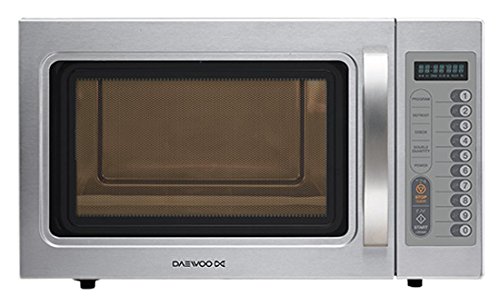
Image: The DAEWOO KOM-9P2C Microwave Oven with its door open, revealing the spacious stainless steel interior and the digital control panel on the right side.
Operating Instructions
The DAEWOO KOM-9P2C features a user-friendly digital panel with 10 programmable buttons.
Basic Operation
- Place Food: Place food in a microwave-safe container on the ceramic platform inside the oven.
- Close Door: Ensure the oven door is securely closed.
- Set Cooking Time: Use the numeric keypad or dedicated time buttons to enter the desired cooking time (maximum 60 minutes).
- Select Power Level: The oven offers 5 power levels. Press the "Power Level" button repeatedly to cycle through the options or use specific power level buttons if available.
- Start Cooking: Press the "Start" button to begin cooking.
- Stop/Pause: To pause cooking, open the door or press the "Stop/Cancel" button once. To cancel cooking completely, press "Stop/Cancel" twice.
Programmable Memories
The oven has 20 programmable memories, allowing you to save frequently used cooking settings. You can program up to 3 cooking stages for a single memory setting.
- Programming a Memory:
- Press the "Memory" button.
- Select a memory number (e.g., 1-20) using the numeric keypad.
- Enter the cooking time and power level for the first stage.
- If desired, press "Memory" again and enter the time and power for the second stage, and repeat for a third stage.
- Press "Start" to save the program.
- Using a Programmed Memory:
- Press the "Memory" button.
- Select the desired memory number.
- Press "Start" to begin cooking with the saved settings.
10 Programmable Buttons
Utilize the 10 dedicated programmable buttons for quick access to common cooking functions or pre-set programs. Refer to the specific labels on your control panel for their functions.
Maintenance
Cleaning the Oven
- Interior: After each use, wipe the interior with a damp cloth and mild detergent. For stubborn stains, heat a cup of water with lemon juice in the microwave for a few minutes, then wipe clean. The stainless steel interior is easy to clean.
- Exterior: Clean the exterior surfaces, including the stainless steel finish and handle, with a soft, damp cloth. Avoid abrasive cleaners or scouring pads that could scratch the surface.
- Door Seals: Keep the door seals and adjacent parts clean. Use a soft cloth and mild soap.
- Ceramic Platform: The ceramic platform can be removed for cleaning. Wash it with warm, soapy water or in a dishwasher. Ensure it is completely dry before placing it back in the oven.
Caution: Always unplug the microwave oven before cleaning.
Troubleshooting
| Problem | Possible Cause | Solution |
|---|---|---|
| Oven does not start. | Power cord not securely plugged in. Door not closed properly. Fuse blown or circuit breaker tripped. | Ensure power cord is plugged in. Close door firmly. Check household fuse or reset circuit breaker. |
| Food not heating. | Incorrect cooking time or power level set. Metal objects inside. | Adjust cooking time and power level. Remove any metal utensils or foil. |
| Light inside oven not working. | Bulb needs replacement. | Contact qualified service personnel for bulb replacement. |
| Unusual noise during operation. | Turntable not correctly placed. Food container too large. | Ensure ceramic platform is correctly seated. Use appropriate size containers. |
Specifications
- Model Number: KOM9P2C
- Brand: DAEWOO
- Color: Silver
- Capacity: 29 Liters (1.02 cubic feet)
- Power Output: 1000 Watts
- Power Consumption: 1100 Watts
- Voltage: 230 Volts
- Material: Stainless Steel (Interior and Exterior)
- Product Dimensions: 46 x 54 x 32 cm (Length x Width x Height)
- Product Weight: 18 kg
- Control Type: Digital Touch
- Max Cooking Time: 60 minutes
- Power Levels: 5
- Programmable Memories: 20 (up to 3 stages)
- Cord Length: 1.40 meters
Warranty and Support
For warranty information, service, or technical support, please refer to the warranty card included with your product or contact DAEWOO customer service. Keep your purchase receipt as proof of purchase.
You can visit the official DAEWOO store on Amazon for more information: DAEWOO Store