
1. Introduction
Thank you for choosing the Sinji SIWC-0108 Indoor Smart Wi-Fi Camera. This manual provides detailed instructions for the installation, operation, and maintenance of your camera. Please read this manual thoroughly before using the product to ensure correct usage and optimal performance. Keep this manual for future reference.
2. Package Contents
Please check the package contents upon unboxing. If any items are missing or damaged, contact your retailer.
- Sinji SIWC-0108 Smart Wi-Fi Camera
- Power Adapter
- USB Power Cable
- Mounting Kit (screws, wall plugs)
- User Manual
3. Product Overview
Familiarize yourself with the components of your Sinji SIWC-0108 camera.

Image 3.1: Front view of the Sinji SIWC-0108 camera, showing the lens, microphone, and status indicators.
- Camera Lens: Captures video footage.
- Microphone (MIC): For audio input and two-way communication.
- Wi-Fi Status Indicator (WIFI): Indicates Wi-Fi connection status.
- Power Indicator (POWER): Shows power status.
- Infrared LEDs: For night vision functionality (visible as red lights in low light).
- MicroSD Card Slot: For local video storage (supports up to 128GB).
- Reset Button: Used to reset the camera to factory settings (typically a small pinhole button).
- Power Port: Connects to the power adapter.
- Mounting Base: Allows for flexible positioning on a flat surface or wall mounting.
4. Setup
4.1 Physical Installation
The camera can be placed on a flat surface or mounted to a wall or ceiling. Choose a location that provides the desired viewing angle and is within range of your Wi-Fi network.
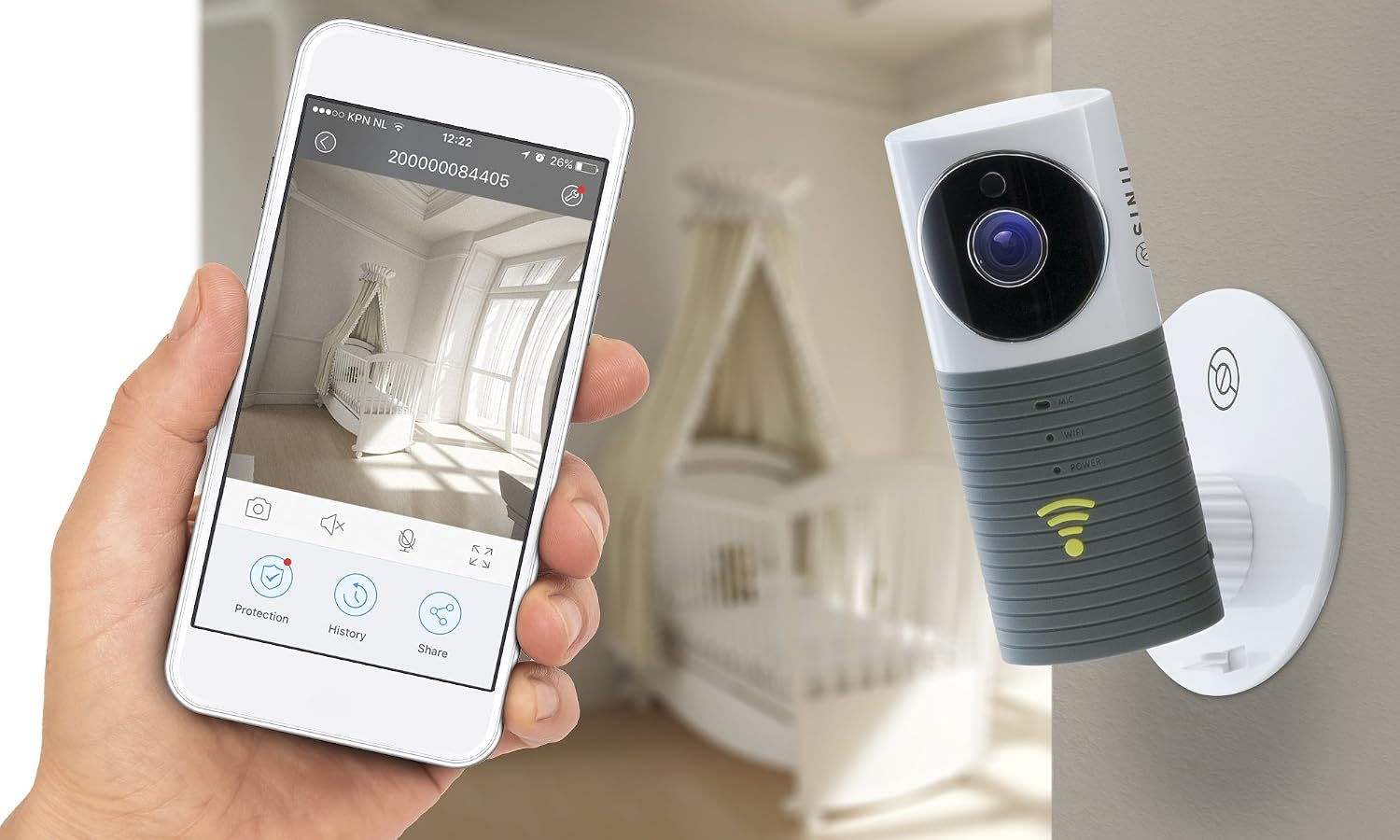
Image 4.1: The Sinji SIWC-0108 camera shown mounted on a wall, with a smartphone displaying its live feed, illustrating typical installation and usage.
- Desktop Placement: Place the camera on a stable, flat surface. Adjust the angle as needed.
- Wall/Ceiling Mounting:
- Mark the desired drilling points using the mounting base as a template.
- Drill holes and insert wall plugs.
- Secure the mounting base to the wall/ceiling with screws.
- Attach the camera to the mounting base.
4.2 Power Connection
Connect the USB power cable to the camera's power port and plug the power adapter into a standard electrical outlet. The camera will power on, and the POWER indicator will light up.
4.3 App Installation and Wi-Fi Pairing
To control and view your camera, you need to install the dedicated Sinji Smart Home app on your smartphone or tablet.
- Download the App: Search for "Sinji Smart Home" (or similar, based on common practice for these devices) in your device's app store (App Store for iOS, Google Play Store for Android).
- Create an Account: Open the app and follow the on-screen instructions to register a new account or log in if you already have one.
- Add Device: In the app, select "Add Device" or the "+" icon. Choose "Smart Camera" or a similar option.
- Reset Camera (if needed): If the Wi-Fi indicator is not blinking, press and hold the reset button for 5-10 seconds until you hear a prompt or see the indicator blinking rapidly.
- Connect to Wi-Fi: Follow the app's instructions to connect the camera to your 2.4GHz Wi-Fi network. This usually involves scanning a QR code generated by the app with the camera lens or entering Wi-Fi credentials.
- Completion: Once connected, the Wi-Fi indicator will turn solid, and the camera will appear in your app's device list.
5. Operating Instructions
This section covers the basic functions of your Sinji Smart Wi-Fi Camera.
5.1 Live View
Open the Sinji Smart Home app and select your camera from the device list to access the live video feed. You can view the real-time footage from anywhere with an internet connection.

Image 5.1: A smartphone screen showing the Sinji camera app, displaying a live view of a bedroom, demonstrating the user interface.
5.2 Video Recording and Playback
The camera supports continuous recording or event-triggered recording to a MicroSD card (up to 128GB, not included). You can also record manually via the app.
- Manual Recording: Tap the record icon in the live view interface to start/stop recording directly to your phone.
- MicroSD Card Recording: Insert a formatted MicroSD card into the camera's slot. Configure recording settings (e.g., continuous, motion-triggered) in the app's settings menu.
- Playback: Access recorded footage via the "History" or "Playback" section in the app.
5.3 Motion Detection and Alerts
The camera can detect motion and send alerts to your smartphone. This feature is crucial for security monitoring.

Image 5.2: The Sinji SIWC-0108 camera with its infrared lights active, capturing an image of a person in a dimly lit room, demonstrating its motion detection and night vision capabilities.
- Enable Motion Detection: Go to the camera settings in the app and enable "Motion Detection" or "Activity Detection."
- Adjust Sensitivity: Set the motion detection sensitivity to avoid false alarms.
- Receive Alerts: Ensure app notifications are enabled on your smartphone to receive instant alerts when motion is detected.
5.4 Two-Way Audio
Utilize the built-in microphone and speaker for two-way communication. Tap the microphone icon in the live view to speak through the camera, and listen to audio from the camera's environment.
5.5 Night Vision
The camera automatically switches to night vision mode in low-light conditions, using infrared LEDs to provide clear black-and-white video footage.
6. Maintenance
- Cleaning: Use a soft, dry cloth to clean the camera lens and body. Do not use liquid cleaners or abrasive materials.
- Software Updates: Regularly check the Sinji Smart Home app for firmware updates. Keeping your camera's firmware updated ensures optimal performance and security.
- MicroSD Card: If using a MicroSD card, periodically check its status and format it if necessary to maintain recording quality and prevent data corruption.
7. Troubleshooting
| Problem | Possible Solution |
|---|---|
| Camera offline/Cannot connect to Wi-Fi |
|
| No video recording |
|
| Motion detection alerts not received |
|
| Poor image quality |
|
8. Specifications
| Feature | Detail |
|---|---|
| Model Number | SIWC-0108 |
| Brand | Sinji |
| Dimensions (L x W x H) | 8.5 x 8.5 x 11 cm |
| Weight | 240 g |
| Connectivity Technology | Wireless (Wi-Fi) |
| Wireless Communication Technology | Wi-Fi |
| Power Source | Electric with cord |
| Wattage | 5 watts |
| Memory Storage Capacity | 128 GB (MicroSD card, not included) |
| International Protection Rating | IP54 |
| Compatible Devices | Desktop (via app on PC/Mac) |
9. Warranty and Support
For warranty information and technical support, please refer to the documentation provided with your purchase or contact your retailer. Keep your proof of purchase for warranty claims.
