
Nitecore Nitecore-SC2-Charger
Nitecore Superb Charger SC2 User Manual
Model: Nitecore-SC2-Charger
1. Introduction
The Nitecore Superb Charger SC2 is an advanced, intelligent battery charger designed for a wide range of rechargeable batteries. It features selectable 3A charging speed, automatic current selection based on battery capacity, and independent charging slots for efficient and safe charging.
This manual provides essential information for the safe and effective operation, maintenance, and troubleshooting of your Nitecore SC2 charger. Please read it thoroughly before first use and retain it for future reference.
2. Safety Precautions
- Always read all instructions and warnings before using the charger.
- This charger is designed for rechargeable Li-ion, IMR, LiFePO4, Ni-MH, and Ni-Cd batteries only. Do not attempt to charge non-rechargeable batteries.
- Ensure the correct battery type and voltage are selected before charging. Incorrect settings can damage batteries or the charger.
- Keep the charger away from water, high humidity, and high temperatures. Operate in a well-ventilated area.
- Do not disassemble, modify, or short-circuit the charger.
- Unplug the charger from the power source when not in use or before cleaning.
- The charger features reverse polarity protection and short circuit prevention. However, always ensure batteries are inserted with correct polarity.
- Temperature monitoring is integrated to prevent overheating. If the charger becomes excessively hot, disconnect it immediately.
- Keep out of reach of children.
3. Product Features
- Automatic current selection based on battery capacity.
- Capable of charging two batteries simultaneously.
- Each battery slot controls and charges independently.
- Automatically detects battery power status and displays charging progress.
- Integrated USB port compatible with all USB devices for charging.
- Automatically stops charging upon completion.
- Reverse polarity protection and short circuit prevention.
- Li-ion battery restoration function.
- Overtime charging protection.
- Features temperature monitoring to prevent overheating.
- Constructed from fire retardant / flame resistant PC material.
- Designed for optimal heat dissipation.
- Certified by RoHS, CE, FCC, and CEC.
4. Setup
Follow these steps to set up your Nitecore SC2 charger:
- Unpack the Charger: Carefully remove the Nitecore SC2 charger and all accessories from its packaging. Inspect for any signs of damage.
- Connect Power: Connect the provided AC power cord to the charger's input port and then plug it into a standard wall outlet (AC 100-240V). Alternatively, you can use a DC 12V 2.5A power source.
- Initial Power-On: The charger's display will illuminate, indicating it is powered on and ready for use.

Figure 4.1: Front view of the Nitecore SC2 charger, showing the display and battery slots.
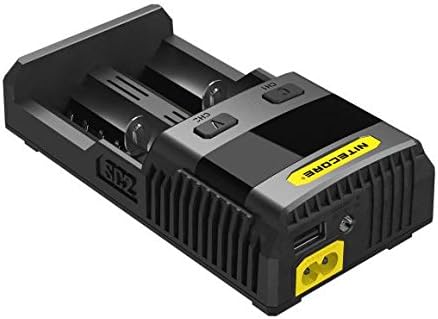
Figure 4.2: Side view of the Nitecore SC2 charger, illustrating the power input and USB output ports.
5. Operating Instructions
The Nitecore SC2 charger is designed for intuitive operation:
- Insert Batteries: Insert one or two compatible rechargeable batteries into the charging slots. Ensure correct polarity (+/-) as indicated on the charger. The charger will automatically detect the battery type and begin charging.
- Monitor Charging Progress: The digital display will show real-time charging status, including battery type, voltage, charging current, and charging time. Each slot operates independently.
- Select Charging Speed (Optional): The SC2 offers selectable charging speeds up to 3A. Refer to the charger's interface for options to adjust the charging current if desired.
- USB Output Function: The integrated USB port (5V 2.1A) allows you to charge external USB devices simultaneously while charging batteries. Connect your USB device using a compatible cable.
- Li-ion Battery Restoration: If a Li-ion battery is over-discharged, the SC2 may attempt to restore it. If restoration is successful, the charger will proceed with normal charging.
- Charging Completion: The charger will automatically stop charging when the batteries are fully charged. The display will indicate completion. Remove the batteries once charging is complete.

Figure 5.1: Nitecore SC2 charger in operation with batteries.
6. Maintenance
Proper maintenance ensures the longevity and optimal performance of your Nitecore SC2 charger:
- Cleaning: Disconnect the charger from the power source before cleaning. Use a soft, dry cloth to wipe the surface of the charger. Do not use abrasive cleaners or solvents.
- Storage: When not in use, store the charger in a cool, dry place, away from direct sunlight and extreme temperatures.
- Avoid Impact: Protect the charger from drops and impacts, which can damage internal components.
- Ventilation: Ensure the ventilation slots are clear of dust and debris to maintain proper heat dissipation.
7. Troubleshooting
If you encounter issues with your Nitecore SC2 charger, refer to the following common problems and solutions:
| Problem | Possible Cause | Solution |
|---|---|---|
| Charger not powering on | No power supply; faulty cable; power outlet issue | Check power cord connection; try a different outlet; ensure power is available. |
| Battery not charging | Incorrect battery insertion; incompatible battery; battery fault; poor contact | Re-insert battery with correct polarity; ensure battery type is supported; clean battery contacts; try a different battery. |
| Charger overheating | Poor ventilation; excessive ambient temperature; internal fault | Ensure charger is in a well-ventilated area; move to a cooler environment; if problem persists, discontinue use and contact support. |
| Display shows error message | Battery fault; short circuit; over-voltage | Remove and re-insert battery; try a different battery; if error persists, contact support. |
8. Specifications
- Input Voltage: AC 100-240V 50/60Hz 0.9A (MAX) 30W, DC 12V 2.5A
- Output Voltage (Battery): 4.35V ±1% / 4.2V ±1% / 3.7V ±1% / 1.48V ±1%
- Output Voltage (USB): 5V 2.1A
- Output Current: 3A+2A MAX
- Compatible with:
- Li-ion/IMR/LiFePO4: 10340, 10350, 10440, 10500, 12340, 12500, 12650, 13450, 13500, 13650, 14350, 14430, 14500, 14650, 16500, 16340(RCR123), 16650, 17350, 17500, 17650, 17670, 18350, 18490, 18500, 18650, 18700, 20700, 21700, 22500, 22650, 25500, 26500, 26650
- Ni-MH(NiCd): AA, AAA, AAAA, C, D
- Dimensions: 6.10 × 3.16 × 1.73 inches (155mm × 80mm × 44mm)
- Weight: 9.28oz (263g) (without batteries and power cord)
- Certifications: RoHS, CE, FCC, CEC
9. Warranty and Support
The Nitecore SC2 charger is manufactured with high-quality materials and is insured worldwide by Ping An Insurance (Group) Company of China, Ltd.
For warranty claims, technical support, or any inquiries regarding your Nitecore product, please contact the authorized Nitecore dealer from whom you purchased the product or visit the official Nitecore website for support information.
You can also visit the Nitecore Store on Amazon for additional resources.
Related documentsNitecore-SC2-Charger


Ask a question about this manual
Ask about setup, troubleshooting, compatibility, parts, safety, or missing instructions. Manuals+ will review the question and use this page’s manual context to help answer it.