
Introduction
The Fujifilm X-T2 is a high-performance mirrorless digital camera designed for advanced photography and videography. It features a splash-resistant body, a large OLED electronic viewfinder, and a 24.3MP X-Trans CMOS III APS-C sensor. The camera supports 4K video recording and offers various Film Simulation modes for creative expression.
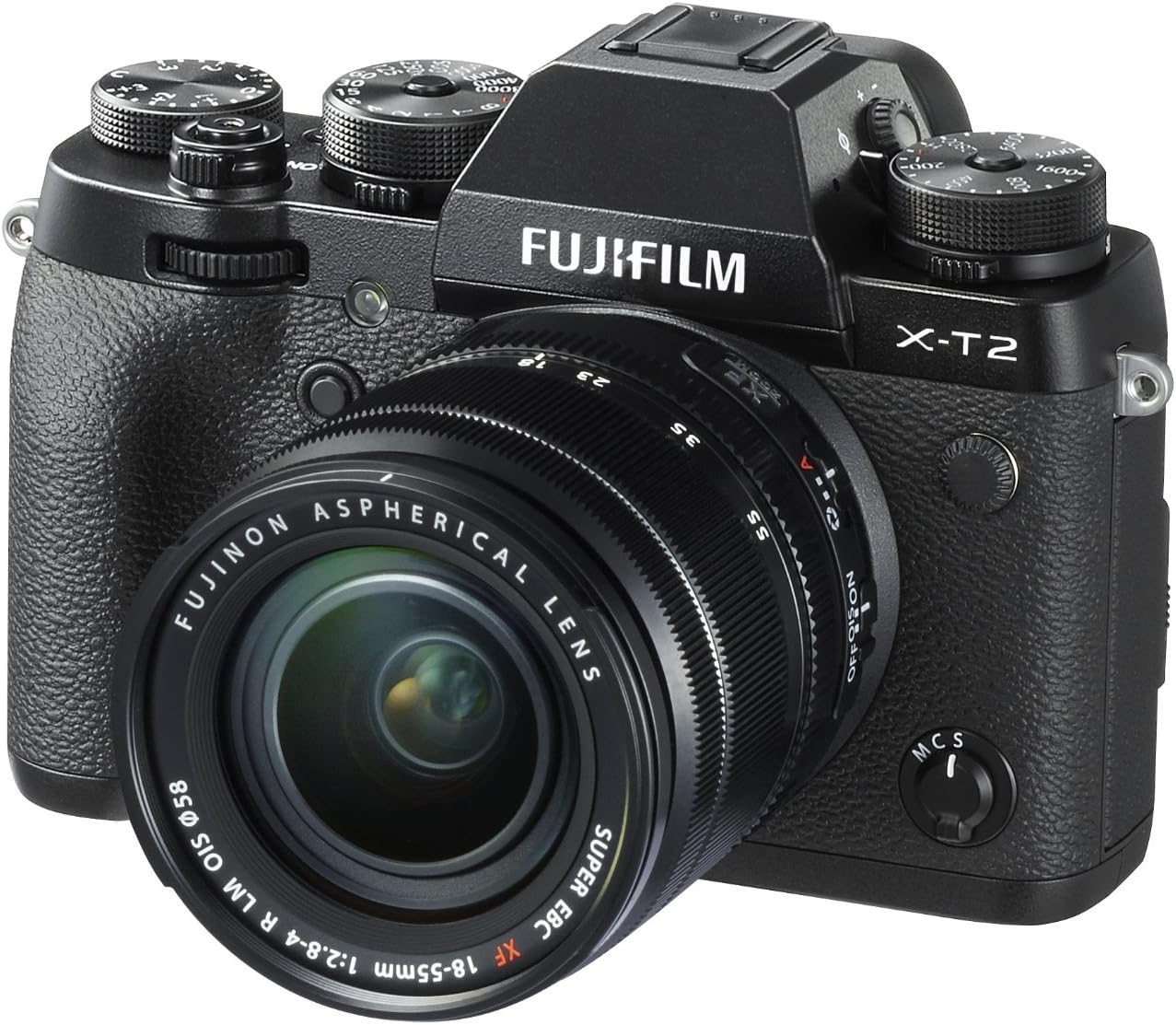
Key Features
- 24.3MP X-Trans CMOS III APS-C Sensor: Reduces moiré and false colors to improve image quality.
- X-Processor Pro Engine: Increases response times, achieves faster AF, lower noise, and better color.
- Durable Construction: Dust and moisture-resistant body with approximately 63 points of weather sealing; Freeze resistance to 14°F (-10°C).
- High-Precision OLED Viewfinder: 0.48-inch, 2.36 million dot OLED viewfinder featuring a magnification of 0.77x and ultra-fast Real Time Viewfinder with a lag-time of 0.005 seconds.
- 4K Video Recording: Full 4K 3840x2160 30P/25P/24P shooting (requires a card with UHS Speed Class 3 or higher).
- Tilting LCD Monitor: Tempered glass 1.04 million dot high-precision 3-inch tilting LCD monitor with three-directional tilt.
- Power Supply: NP-W126S Li-ion battery (included).
Initial Setup
Unpacking and Inspection
Carefully unpack all components and ensure the following items are present:
- Camera Body
- XF 18-55mm F2.8-4.0 Lens
- NP-W126S Li-ion battery
- Battery Charger
- Shoulder Strap
- Body Cap
- Lens Caps (front and rear)
- Lens Hood
Attaching the Lens
- Remove the body cap from the camera and the rear lens cap from the lens.
- Align the white dot on the lens with the white dot on the camera body.
- Mount the lens by rotating it clockwise until it clicks into place.
Inserting the Battery and Memory Card
- Open the battery/memory card compartment cover.
- Insert the NP-W126S battery with the correct orientation until it locks.
- Insert a compatible SD memory card (UHS Speed Class 3 or higher recommended for 4K video) into the slot until it clicks.
- Close the compartment cover securely.


Operating Instructions
Powering On/Off
To power on the camera, rotate the ON/OFF switch located on the top plate.
Basic Photography Modes
The X-T2 offers various shooting modes controlled by the top dials:
- Shutter Speed Dial: Adjusts the shutter speed. Rotate to select values from 1/8000s to 1s, or 'A' for automatic.
- ISO Dial: Adjusts the ISO sensitivity. Rotate to select values or 'A' for automatic.
- Aperture Ring: Located on the lens, rotate to adjust the aperture (F-number).

Autofocus System
The camera features an advanced autofocus system with custom settings for various scenarios:
- AF-C Custom Settings: Access these settings via the menu to optimize continuous autofocus for different subject movements (e.g., accelerating/decelerating subjects, erratically moving subjects).
- AF Selection Joystick: Use the joystick on the rear of the camera to quickly select autofocus points.
Video Recording
The X-T2 supports 4K video recording:
- Ensure a UHS Speed Class 3 or higher memory card is used for 4K recording.
- Video can be recorded internally or output via HDMI to an external device.
Maintenance and Care
Proper maintenance ensures the longevity and optimal performance of your camera.
- Keep the camera and lens clean. Use a soft, lint-free cloth for the body and a lens cleaning solution with a microfiber cloth for optical surfaces.
- Avoid exposing the camera to extreme temperatures, humidity, or dust for prolonged periods.
- When not in use, store the camera with lens caps attached in a dry, cool place.
- Regularly check for firmware updates from the Fujifilm website to ensure your camera has the latest features and performance enhancements.
Troubleshooting
This section addresses common issues you might encounter.
Camera Does Not Power On
- Ensure the battery is fully charged and correctly inserted.
- Check if the battery contacts are clean.
Images Are Blurry
- Verify that the lens is properly attached and the focus mode is set correctly (AF for autofocus, MF for manual focus).
- Check shutter speed; use a faster shutter speed or image stabilization in low light.
4K Video Recording Issues
- Confirm that a UHS Speed Class 3 or higher memory card is being used.
- Check available memory card space.
Specifications
| Feature | Detail |
|---|---|
| Product Dimensions | 8.1 x 11.4 x 5.7 inches |
| Item Weight | 4.2 ounces |
| Item Model Number | X-T2 w/XF18-55 F2.8-4.0 Lens |
| Batteries | 1 Lithium Metal batteries required. (included) |
| Manufacturer | Fujifilm |
| Compatible Mountings | Fujifilm X |
| Photo Sensor Technology | CMOS |
| Supported File Format | JPEG, RAW |
| Image Stabilization | Digital |
| Maximum Focal Length | 55 Millimeters |
| Optical Zoom | 1 x |
| Maximum Aperture | 2.8 f |
| Expanded ISO Minimum | 100 |
| Metering Description | Average, Evaluative, Spot |
| Date First Available | July 6, 2016 |
Warranty and Support
For warranty information, please refer to the warranty card included with your product or visit the official Fujifilm website.
For technical support, product registration, or service inquiries, please contact Fujifilm customer service or visit their support portal.


