
1. Introduction
Thank you for purchasing the Vanco JHIU0019 3-Port HDMI Switch. This device allows you to connect up to three HDMI source devices to a single HDMI display, eliminating the need to constantly swap cables. With support for high-definition resolutions up to 1080p, 3D content, and HDCP compliance, this switch provides a convenient and high-quality solution for managing your HDMI connections. Please read this manual thoroughly before installation and operation to ensure optimal performance and safety.
2. Product Features
- Connects up to three HDMI source devices to one HDMI display.
- Supports high-definition resolutions up to 1080p.
- Digital 3D compatible.
- H.D.C.P. (High-bandwidth Digital Content Protection) compliant.
- Sleek, compact design for easy integration into any setup.
- Easy push-button controls for switching between inputs.
- LED indicators for active input selection.
- Color: Black.
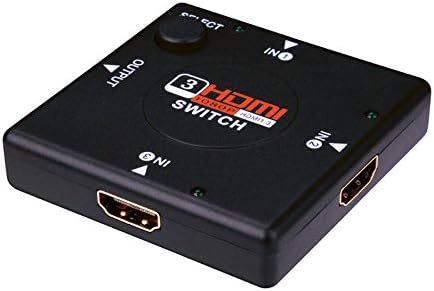
Figure 2.1: Front view of the Vanco JHIU0019 3-Port HDMI Switch, showing the input/output ports and select button.
3. Package Contents
Please verify that all items are present and in good condition upon opening the package:
- 1x Vanco JHIU0019 3-Port HDMI Switch
- 1x User Manual
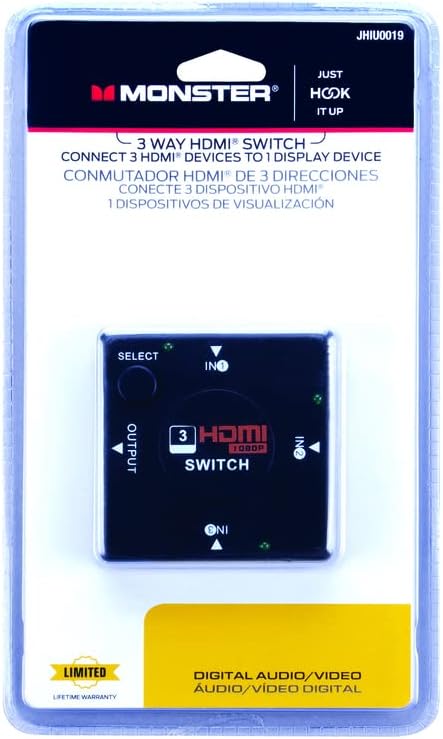
Figure 3.1: Packaging of the Vanco JHIU0019 HDMI Switch, indicating a 3-way switch for HDMI devices.
4. Setup Instructions
Follow these steps to set up your Vanco JHIU0019 HDMI Switch:
- Prepare Devices: Ensure all HDMI source devices (e.g., Blu-ray player, game console, cable box) and your HDMI display (e.g., TV, monitor, projector) are powered off before making connections.
- Connect Source Devices: Connect up to three HDMI source devices to the HDMI input ports labeled 'IN1', 'IN2', and 'IN3' on the Vanco JHIU0019 switch using high-quality HDMI cables.
- Connect Display: Connect your HDMI display to the HDMI output port labeled 'OUTPUT' on the Vanco JHIU0019 switch using a high-quality HDMI cable.
- Power On: Power on your HDMI display first, then power on your HDMI source devices. The switch typically draws power from the connected HDMI devices and does not require an external power adapter.
- Verify Connection: The switch will automatically detect the active input or you can manually select it using the 'SELECT' button.
5. Operating Instructions
Operating the Vanco JHIU0019 HDMI Switch is straightforward:
- Automatic Input Selection: The switch is designed to automatically detect and switch to the most recently activated HDMI source device.
- Manual Input Selection: To manually switch between connected HDMI source devices, press the 'SELECT' button located on the top of the switch. Each press will cycle through the available inputs (IN1, IN2, IN3).
- LED Indicators: Small LED lights next to each input label ('IN1', 'IN2', 'IN3') will illuminate to indicate which HDMI input is currently active and being displayed.
6. Maintenance
To ensure the longevity and optimal performance of your HDMI switch, follow these maintenance guidelines:
- Cleaning: Use a soft, dry cloth to clean the exterior of the switch. Do not use liquid cleaners or aerosols, as they may damage the device.
- Environment: Keep the switch in a cool, dry place, away from direct sunlight, heat sources, and excessive moisture.
- Handling: Avoid dropping or subjecting the switch to strong impacts.
- Cable Management: Ensure HDMI cables are not excessively bent or strained, as this can damage the cables or the switch's ports.
7. Troubleshooting
If you encounter issues with your Vanco JHIU0019 HDMI Switch, refer to the following troubleshooting tips:
- No Picture/Signal:
- Ensure all HDMI cables are securely connected to both the source devices, the switch, and the display.
- Verify that the correct input is selected on the HDMI switch (check the LED indicator). Press the 'SELECT' button to cycle through inputs.
- Confirm that your display is set to the correct HDMI input channel.
- Try connecting the source device directly to the display to rule out cable or source device issues.
- Restart all connected devices (source, switch, display) by powering them off and on again.
- Flickering Picture or Poor Quality:
- Ensure you are using high-quality HDMI cables. Longer cables may require active or higher gauge cables.
- Check for interference from other electronic devices.
- Reduce the resolution of the source device if possible, to see if the issue persists.
- No Audio:
- Verify that the audio settings on your source device are correctly configured for HDMI output.
- Ensure your display's audio is not muted or set to an extremely low volume.
- Check all HDMI cable connections.
8. Specifications
| Model | JHIU0019 |
| Brand | Vanco |
| Color | Black |
| Connector Type | HDMI Female (3 Inputs, 1 Output) |
| Supported Resolution | Up to 1080p |
| HDMI Version | HDMI 1.3 |
| HDCP Compliance | Yes |
| 3D Support | Yes |
| Material | Copper (internal wiring) |
| Dimensions (L x W x H) | 2.79 x 12.7 x 21.34 cm (approximate) |
| Weight | 90.72 g (approximate) |
9. Warranty and Support
The Vanco JHIU0019 3-Port HDMI Switch comes with a Limited Lifetime Warranty, as indicated on the product packaging. This warranty covers defects in materials and workmanship under normal use. For warranty claims or technical support, please contact Vanco customer service through their official website or the contact information provided with your purchase documentation.
Please retain your proof of purchase for warranty purposes.


