
1. Introduction
The TES 1340 Hot-Wire Anemometer is a portable, high-precision instrument designed for measuring air velocity and air flow volume. Utilizing a sensitive hot-wire probe, it provides accurate readings for various applications including HVAC system analysis, clean room monitoring, environmental studies, and industrial ventilation assessments. This manual provides detailed instructions for the proper setup, operation, and maintenance of your TES 1340 Anemometer.

Figure 1.1: Front view of the TES 1340 Hot-Wire Anemometer with its hot-wire probe. This image displays the front of the TES 1340 Hot-Wire Anemometer, showing its digital display, control buttons, and the connected telescoping hot-wire probe. The display indicates a reading of 13.31 m/s.
2. Safety Information
Please read and understand all safety instructions before operating the TES 1340 Anemometer. Failure to follow these instructions may result in injury or damage to the instrument.
- Do not expose the instrument to extreme temperatures, humidity, or direct sunlight.
- Avoid dropping or subjecting the instrument to severe impact.
- Keep the hot-wire probe clean and free from dust or debris to ensure accurate measurements.
- Do not attempt to disassemble or modify the instrument. Refer all servicing to qualified personnel.
- Remove batteries if the instrument is not used for an extended period to prevent leakage.
3. Package Contents
Verify that all items listed below are present in your TES 1340 Hot-Wire Anemometer package:
- TES 1340 Hot-Wire Anemometer Unit
- Hot-Wire Telescoping Probe
- Instruction Manual
- AAA Batteries (6 included)
- Carrying Case
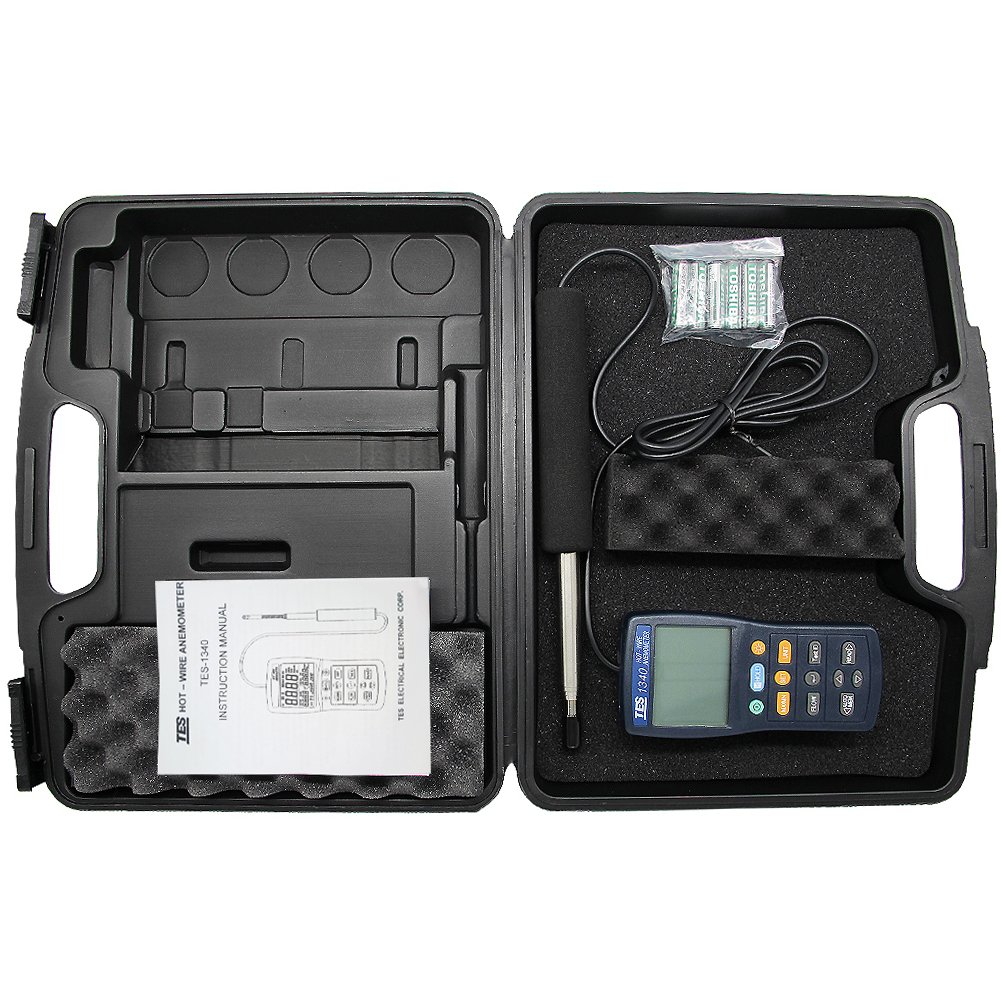
Figure 3.1: Contents of the TES 1340 Hot-Wire Anemometer package. An overhead view of the TES 1340 Hot-Wire Anemometer package contents, including the meter, the hot-wire probe, an instruction manual, AAA batteries, and a protective carrying case.
4. Product Overview
The TES 1340 consists of a main meter unit and a detachable hot-wire telescoping probe. The meter unit features a large LCD display, control buttons for various functions, and a battery compartment. The probe is designed for precise air velocity measurements in ducts and other confined spaces.
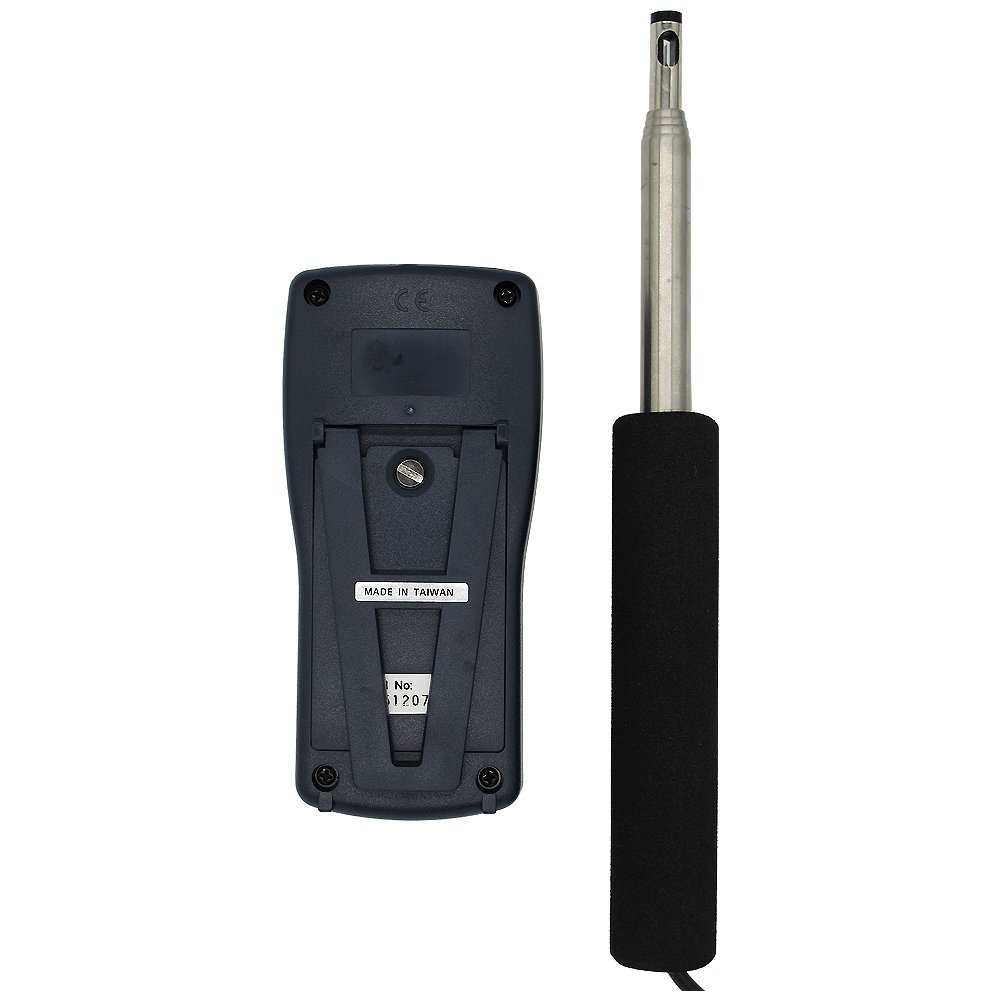
Figure 4.1: Back view of the TES 1340 Hot-Wire Anemometer. The back view of the TES 1340 Hot-Wire Anemometer, revealing the battery compartment cover and the 'MADE IN TAIWAN' label. The probe connection is also visible.
5. Setup
5.1. Battery Installation
- Locate the battery compartment cover on the back of the meter unit (refer to Figure 4.1).
- Use a screwdriver to open the battery compartment.
- Insert six (6) AAA batteries, observing the correct polarity (+/-) as indicated inside the compartment.
- Replace the battery compartment cover and secure it with the screw.
5.2. Connecting the Probe
- Align the connector of the hot-wire probe with the input port on the top of the meter unit.
- Gently push the connector into the port until it is firmly seated. Do not force the connection.
6. Operating Instructions
6.1. Powering On/Off
- To power on the device, press the POWER button.
- To power off, press and hold the POWER button until the display turns off.
6.2. Measurement Modes and Units
The TES 1340 supports various measurement modes and units for air velocity and flow volume.
- Velocity Measurement: The device measures air velocity in m/s, ft/min, knots, km/hr, mph, and Bft (Beaufort scale). Use the UNIT button to cycle through these units.
- Air Flow Volume: The device can calculate air flow volume. Refer to the specific instructions in the device's on-screen menu for setting duct dimensions if required for flow volume calculations.
6.3. Data Hold and Recording Functions
- Data Hold: Press the HOLD button to freeze the current reading on the display. Press again to release.
- Maximum/Minimum/Average: Press the MX/MN button to display the maximum, minimum, or average recorded values during a measurement session.
- Instant / Avg / V max flow measurement: These functions allow for real-time, averaged, or peak velocity measurements. Consult the on-screen menu and corresponding buttons for activation.
6.4. Backlight
Press the LIGHT button to activate the display backlight for improved visibility in low-light conditions. Press again to turn it off.

Figure 6.1: TES 1340 Hot-Wire Anemometer held in hands. This image shows the TES 1340 Hot-Wire Anemometer being held by two hands, providing a clear perspective on its compact size and ergonomic design. The probe is extended, demonstrating its operational length.
7. Maintenance
7.1. Cleaning
- Wipe the meter unit with a soft, dry cloth. Do not use abrasive cleaners or solvents.
- Carefully clean the hot-wire sensor on the probe using a soft brush or compressed air to remove dust or lint. Avoid touching the sensor directly.
7.2. Battery Replacement
When the low battery indicator appears on the display, replace all six AAA batteries as described in Section 5.1.
7.3. Storage
Store the TES 1340 Anemometer in its protective carrying case in a cool, dry place when not in use. Remove batteries if storing for extended periods.
8. Troubleshooting
If you encounter issues with your TES 1340 Anemometer, refer to the following common problems and solutions:
| Problem | Possible Cause | Solution |
|---|---|---|
| Device does not power on. | Dead or incorrectly installed batteries. | Check battery polarity; replace with new AAA batteries. |
| Inaccurate or unstable readings. | Dirty hot-wire sensor; probe not fully connected; strong electromagnetic interference. | Clean the hot-wire sensor; ensure probe is securely connected; move away from sources of interference. |
| Display shows 'Err' or blank. | Internal error; extreme environmental conditions. | Power off and restart the device. If the problem persists, contact customer support. Ensure operation within specified temperature/humidity ranges. |
9. Specifications
Key technical specifications for the TES 1340 Hot-Wire Anemometer:
- Model Number: YQ TES-1340
- Product Dimensions: 5.91 x 2.83 x 1.38 inches
- Item Weight: 8.29 ounces
- Batteries: 6 AAA batteries (included)
- Manufacturer: TES Electrical Electronic Corp.
- Probe Type: Hot-Wire Telescoping Probe
- Measurement Functions: Air Velocity (m/s, ft/min, knots, km/hr, mph, Bft), Air Flow Volume, Data Hold, Max/Min/Avg.
- Response: Fast response probe.
10. Warranty and Support
The TES 1340 Hot-Wire Anemometer is covered by a manufacturer's warranty against defects in materials and workmanship. For specific warranty terms and conditions, please refer to the documentation included with your purchase or visit the official TES website.
For technical support, troubleshooting assistance, or service inquiries, please contact TES customer service through their official channels. Contact information can typically be found on the manufacturer's website or in the warranty card.


