
AiM MyChron5 2T
AiM MyChron 5 2T Dash Logger User Manual
Model: MyChron5 2T | Brand: AiM Sports, LLC
Introduction
The AiM MyChron 5 2T is an advanced dash logger designed for motorsports applications, providing comprehensive data acquisition and display capabilities. This device integrates GPS for track mapping and lap timing, WiFi for data download, and includes two temperature sensors for monitoring Engine Gas Temperature (EGT) and Water Temperature. With its intuitive interface and robust design, the MyChron 5 2T assists drivers in optimizing performance by providing real-time data and post-session analysis.
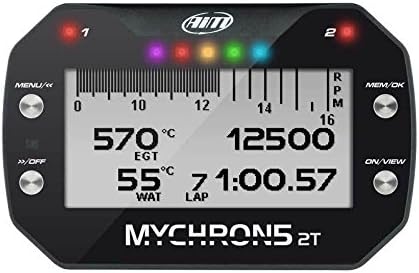
Figure 1: Front view of the AiM MyChron 5 2T Dash Logger, showing the display with RPM, EGT, Water Temperature, and lap time, along with control buttons and indicator lights.
Setup
1. Unboxing and Components
Carefully unpack all components. The standard package includes:
- AiM MyChron 5 2T Dash Logger unit
- GPS antenna
- EGT sensor
- Water temperature sensor
- Power cable
- USB cable for PC connection
- Mounting bracket and hardware
2. Mounting the Device
Select a secure and visible location on your vehicle's dashboard or steering wheel. Use the provided mounting bracket and hardware to firmly attach the MyChron 5 2T. Ensure the device is positioned to minimize glare and allow easy access to buttons.
3. Connecting Sensors
Connect the EGT and water temperature sensors to their respective ports on the MyChron 5 2T. Ensure connections are secure to prevent data loss or inaccurate readings. The GPS antenna should be mounted with a clear view of the sky for optimal signal reception.
- EGT Sensor: Install in the exhaust manifold according to engine manufacturer specifications.
- Water Temperature Sensor: Install in the cooling system, typically in a radiator hose or engine block.
- GPS Antenna: Mount on a flat surface with an unobstructed view of the sky.
4. Initial Power-On
Connect the power cable to a suitable 12V power source on your vehicle. Press the ON/VIEW button to power on the device. The MyChron 5 2T will perform a self-test and display the main screen. Configure initial settings such as units (Celsius/Fahrenheit, km/h/mph) and time zone via the MENU options.
Operating Instructions
1. Basic Navigation
The MyChron 5 2T features four primary buttons for navigation:
- MENU/<<: Enters the menu, navigates back, or decreases values.
- >>/OFF: Navigates forward, increases values, or powers off the device (long press).
- MEM/OK: Confirms selections, accesses memory, or changes display pages.
- ON/VIEW: Powers on the device, or cycles through various display views.

Figure 2: Angled view of the AiM MyChron 5 2T, highlighting the button layout and display showing lap data and RPM.
2. Display Modes and Customization
The MyChron 5 2T offers various customizable display pages. Use the ON/VIEW button to cycle through real-time data displays, including:
- RPM (Revolutions Per Minute) with shift lights
- Engine Gas Temperature (EGT)
- Water Temperature
- Lap times (current, best, predictive)
- Speed (via GPS)
- Gear position (if connected)
The display background color can be customized for better visibility in different lighting conditions.

Figure 3: Examples of the AiM MyChron 5 2T display with various customizable background colors, enhancing readability.
3. Data Logging and Analysis
The device automatically logs data during operation. To download data for analysis:
- Ensure the MyChron 5 2T is powered on.
- Activate WiFi on the device via the menu.
- Connect your PC or mobile device to the MyChron 5 2T's WiFi network.
- Use the AiM Race Studio 3 software (available for download from the manufacturer's website) to connect and download logged data.
- Alternatively, connect the device directly to your PC using the provided USB cable.
Race Studio 3 allows for in-depth analysis of lap times, sensor data, GPS trajectories, and more, providing valuable insights for performance improvement.

Figure 4: Screenshot of the AiM Race Studio 3 software, demonstrating its capabilities for visualizing and analyzing logged data, including lap traces and sensor graphs.
Maintenance
- Cleaning: Use a soft, damp cloth to clean the display and casing. Avoid abrasive cleaners or solvents.
- Sensor Inspection: Regularly inspect sensor cables and connections for wear or damage. Ensure sensors are securely mounted.
- Firmware Updates: Periodically check the AiM Sports website for firmware updates. Updating the firmware can improve performance, add features, and resolve bugs. Follow the instructions provided by AiM for safe updating.
- Storage: When not in use for extended periods, store the MyChron 5 2T in a dry, cool environment, away from direct sunlight and extreme temperatures.
Troubleshooting
| Problem | Possible Cause | Solution |
|---|---|---|
| Device does not power on. | No power supply; loose power cable; internal battery depleted. | Check power connections. Ensure vehicle power is on. If applicable, charge internal battery or connect to external power. |
| Inaccurate or no sensor readings (EGT/Water Temp). | Sensor not connected properly; damaged sensor/cable; incorrect sensor configuration. | Verify sensor connections. Inspect cables for damage. Check sensor settings in the device menu. |
| No GPS signal or inaccurate lap times. | GPS antenna obstructed; poor satellite visibility; antenna not connected. | Ensure GPS antenna has a clear view of the sky. Check antenna connection to the device. Operate in an open area. |
| Cannot connect via WiFi. | WiFi not enabled on device; incorrect network selection; interference. | Enable WiFi in the MyChron 5 2T menu. Ensure you are connecting to the correct network name. Try restarting both devices. |
Specifications
- Model: MyChron5 2T
- Manufacturer: AIM Sports, LLC
- Screen Size: 5 Inches
- Material: Stainless Steel
- Display Features: Wireless connectivity
- Included Sensors: EGT (Engine Gas Temperature), Water Temperature
- Connectivity: GPS, WiFi, USB
- Internal Memory: 4GB
- First Available: July 1, 2016
Warranty and Support
For detailed warranty information, please refer to the documentation provided with your purchase or visit the official AiM Sports, LLC website. Warranty terms typically cover manufacturing defects for a specified period from the date of purchase.
For technical support, troubleshooting assistance beyond this manual, or spare parts, please contact AiM Sports, LLC directly through their official website or authorized distributors. Keep your purchase receipt and product serial number ready when contacting support.
Official Website: www.aim-sportline.com
Ask a question about this manual
Ask about setup, troubleshooting, compatibility, parts, safety, or missing instructions. Manuals+ will review the question and use this page’s manual context to help answer it.