Introduction
This manual provides essential instructions for the setup, operation, and maintenance of your HCDZ Replacement Remote Control. This remote is designed to function as a direct replacement for various Samsung Smart 3D LCD LED HDTV models, offering simple, out-of-the-box functionality without the need for complex programming.
Please note that batteries are not included with this remote control. You will need two (2) AA batteries for operation.
Setup
1. Battery Installation
To begin using your remote control, you must first install the batteries.
- Locate the battery compartment on the back of the remote control.
- Slide the battery compartment cover downwards or press the latch and lift to open.
- Insert two (2) AA batteries, ensuring the positive (+) and negative (-) terminals align correctly with the markings inside the compartment.
- Replace the battery compartment cover, ensuring it clicks securely into place.
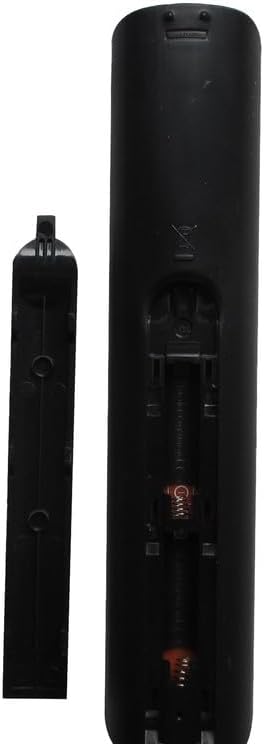
Image: Battery compartment of the HCDZ Replacement Remote Control, showing where to insert two AA batteries.
2. Initial Operation
This HCDZ replacement remote control is designed for immediate use with compatible Samsung TV models. Once batteries are correctly installed, the remote should function without any additional programming or setup steps.
Point the remote control towards your Samsung TV and press the Power button to turn on or off your television.
Operating Instructions
The HCDZ Replacement Remote Control provides standard functions for your Samsung Smart 3D LCD LED HDTV. Familiarize yourself with the button layout for optimal use.

Image: Back view of the HCDZ Replacement Remote Control. The front features standard TV control buttons.
- Power Button: Turns the TV on or off.
- Number Buttons (0-9): For direct channel selection.
- Volume Up/Down: Adjusts the TV's volume level.
- Channel Up/Down: Changes the TV channel sequentially.
- Mute Button: Silences the TV audio.
- Input/Source Button: Cycles through available input sources (HDMI, AV, etc.).
- Navigation Pad (Up, Down, Left, Right, Enter): Used for menu navigation and selection.
- Menu/Smart Hub Button: Accesses the TV's main menu or Smart Hub features.
- Back/Exit Button: Returns to the previous screen or exits a menu.
- Playback Controls (Play, Pause, Stop, Rewind, Fast Forward): For media playback functions.
Specific button functions may vary slightly depending on your Samsung TV model. Refer to your TV's original manual for detailed information on its features.
Maintenance
Battery Replacement
Replace batteries when the remote's performance degrades or it stops responding. Always replace both batteries simultaneously with new AA batteries. Do not mix old and new batteries, or different types of batteries.
Cleaning
To clean the remote control, gently wipe its surface with a soft, dry cloth. For stubborn dirt, slightly dampen the cloth with water. Avoid using harsh chemicals, abrasive cleaners, or excessive moisture, as these can damage the remote.
Storage
Store the remote control in a cool, dry place away from direct sunlight and extreme temperatures. If the remote will not be used for an extended period, it is advisable to remove the batteries to prevent leakage and potential damage.
Troubleshooting
| Problem | Possible Cause | Solution |
|---|---|---|
| Remote is not working. | Dead or incorrectly installed batteries. | Check battery orientation. Replace with two new AA batteries. |
| Remote is unresponsive after battery change. | Remote may need a soft reset. | Remove batteries. Hold the Power button on the remote for 3 seconds. Reinsert batteries. |
| Remote works intermittently. | Weak batteries or obstruction between remote and TV. | Replace batteries. Ensure a clear line of sight to the TV's IR receiver. |
| Certain buttons do not function. | Button malfunction or TV model incompatibility for specific advanced functions. | Ensure the remote is compatible with your specific TV model. If basic functions fail, the remote may be faulty. |
Specifications
- Model Number: HCDZ-9732
- Brand: HCDZ
- Compatible Devices: Samsung Smart 3D LCD LED HDTV Televisions (Specific models listed in header)
- Connectivity Technology: Infrared (IR)
- Power Source: 2 x AA Batteries (not included)
- Special Feature: Universal replacement, no programming required
- Item Weight: Approximately 3.98 ounces (112.8 grams)
- Package Dimensions: Approximately 9.2 x 4 x 1 inches
Warranty Information
This HCDZ Replacement Remote Control is typically covered by a standard manufacturer's warranty against defects in materials and workmanship. Please retain your purchase receipt as proof of purchase. For specific warranty terms and conditions, or to make a warranty claim, please contact the seller or manufacturer directly.
Warranty coverage usually does not include damage caused by misuse, accidents, unauthorized repairs, or normal wear and tear.
Support
Should you encounter any issues or have questions regarding your HCDZ Replacement Remote Control that are not addressed in this manual, please contact the retailer or manufacturer for assistance.
For general inquiries or troubleshooting tips, you may also refer to the product page where you purchased the item or visit the HCDZ brand store on Amazon: HCDZ Store


