
1. Introduction
This manual provides essential information for the proper installation, operation, and maintenance of your Runleader RL-TS003 PT100 Temperature Sensor. Please read this manual thoroughly before use to ensure optimal performance and safety. The RL-TS003 is a waterproof PT100 temperature sensor designed for various applications, including lawnmowers, ATVs, UTVs, motorcycles, tractors, trucks, trailers, chainsaws, and marine environments. It is compatible with Runleader products featuring temperature measurement functions, such as the TM series and RL-HM035T.
2. Safety Information
- Always disconnect power to the main device before attempting any installation or maintenance of the sensor.
- Ensure proper insulation for all electrical connections to prevent short circuits or electrical hazards.
- Avoid exposing the sensor to temperatures outside its specified operating range to prevent damage and ensure accurate readings.
- Do not modify the sensor or its wiring. Unauthorized modifications can void the warranty and lead to malfunction.
- Keep the sensor and its components out of reach of children.
3. Package Contents
Verify that all items are present and undamaged upon opening the package:
- 1 x Runleader RL-TS003 PT100 Temperature Sensor with integrated cable and connector.
4. Product Overview
The Runleader RL-TS003 is a robust and waterproof PT100 temperature sensor designed for precise temperature measurement in demanding environments. It features a durable probe, a flexible cable, and a standard electrical connector for easy integration with compatible Runleader display units.
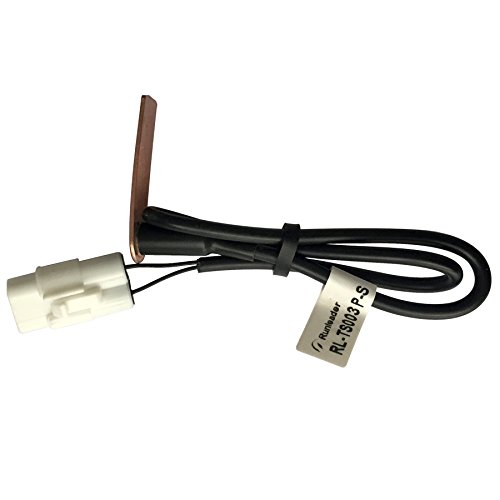
This image displays the Runleader RL-TS003 PT100 temperature sensor. It features a copper-colored probe, a black insulated cable, and a white electrical connector at the end. The cable is secured with a small black tie.
5. Setup and Installation
The RL-TS003 sensor is designed for straightforward installation. Follow these steps for proper setup:
- Step 1: Identify Connection Point: Locate the appropriate temperature input port on your compatible Runleader device (e.g., TM series, RL-HM035T). Refer to your device's manual for specific port identification.
- Step 2: Connect Sensor: Carefully plug the white connector of the RL-TS003 sensor into the corresponding port on your Runleader device. Ensure the connection is firm and fully seated to prevent intermittent readings.
- Step 3: Mount Sensor Probe: Position the PT100 probe in the desired location for temperature measurement. This could be in engine oil, water coolant, or any other medium where temperature monitoring is required. Ensure the probe makes good, consistent contact with the surface or medium to be measured for accurate readings.
- Step 4: Secure Wiring: Route the sensor cable away from any moving parts, high-heat areas, or sharp edges that could damage the insulation. Use cable ties or appropriate fasteners to secure the wiring, preventing it from snagging or interfering with other components.
This video demonstrates the connection of a similar sensor to a digital thermometer display. While not specific to the RL-TS003, it illustrates the general process of connecting a temperature sensor to a display unit and powering it on. This can be helpful for understanding the context of the RL-TS003 sensor's application.
6. Operating Instructions
Once the RL-TS003 sensor is correctly installed and connected to a compatible Runleader temperature display unit, it will automatically begin transmitting temperature data. No further configuration is typically required for the sensor itself.
- Temperature Display: Refer to the instruction manual of your specific Runleader display unit for details on how to power it on, read, and interpret the temperature values shown.
- Continuous Monitoring: The sensor provides continuous temperature monitoring as long as it is connected and the display unit is operational.
7. Maintenance
The Runleader RL-TS003 sensor is designed to be durable and waterproof (IP68 rated), requiring minimal maintenance to ensure long-term performance.
- Cleaning: Periodically inspect the sensor probe for any accumulation of dirt, debris, or corrosion. If cleaning is necessary, gently wipe the probe with a soft, damp cloth. Do not use abrasive cleaners or harsh chemicals, as these can damage the sensor material.
- Inspection: Regularly check the sensor cable and its connector for any signs of wear, cuts, cracks, or corrosion. Ensure the cable insulation is intact. If any damage is observed, replace the sensor to maintain accuracy and safety.
- Mounting Security: Verify that the sensor remains securely mounted in its intended position. Loose mounting can lead to inaccurate readings or physical damage.
8. Troubleshooting
If you encounter issues with your RL-TS003 temperature sensor, refer to the following troubleshooting guide:
- No Temperature Reading / 'Err' Display on Device:
- Check all connections: Ensure the sensor's white connector is securely and fully plugged into the compatible Runleader display device.
- Inspect cable integrity: Verify that the sensor cable is not damaged, cut, or pinched. A damaged cable can interrupt the signal.
- Device compatibility: Confirm that the sensor is connected to a Runleader device that supports temperature measurement with a PT100 sensor.
- Power supply: Ensure the display device is properly powered on and receiving adequate power.
- Inaccurate or Fluctuating Readings:
- Sensor placement: Check the sensor's placement. Ensure the probe is making proper and consistent contact with the medium being measured. Air pockets or poor contact can lead to incorrect readings.
- External interference: Verify that the sensor is not exposed to external heat sources or strong electromagnetic fields that could interfere with its readings.
- Calibration: If your display unit supports calibration, consult its manual for instructions on how to calibrate the temperature reading.
9. Specifications
| Model | RL-TS003 |
| Sensor Type | PT100 |
| Waterproof Rating | IP68 |
| Material | Acrylonitrile Butadiene Styrene (ABS) |
| Item Weight | 20 Grams |
| Package Dimensions | 8.7 x 4.5 x 2.2 cm |
| Manufacturer | Ningbo Jiangbei Run Leader Electronics Co.,Ltd |
| UPC | 713095428580 |
10. Warranty and Support
For warranty information, technical assistance, or any product-related inquiries, please contact Runleader customer service directly. You can typically find contact details on the official Runleader website or through your point of purchase. Please retain your purchase receipt as proof of purchase for any warranty claims.