
Introduction
This manual provides comprehensive instructions for the HCDZ Replacement Remote Control. This remote is specifically designed to function as a direct replacement for the original remote controls of Onkyo TX-SA578 and RC-707M Network Home Theater Audio Video A/V AV Receivers.
It operates using infrared (IR) technology and requires no complex programming or setup beyond battery installation.
Setup
To begin using your HCDZ Replacement Remote Control, follow these simple steps for battery installation:
- Locate the Battery Compartment: Turn the remote control over. The battery compartment is typically located on the back, often with a sliding cover.
- Open the Cover: Gently slide the battery compartment cover downwards or in the direction indicated by an arrow to open it.
- Insert Batteries: Insert two (2) AA batteries (not included) into the compartment. Ensure the positive (+) and negative (-) terminals of the batteries align correctly with the markings inside the compartment. Incorrect insertion can prevent the remote from functioning.
- Close the Cover: Slide the battery compartment cover back into place until it clicks securely.
Once batteries are installed, the remote control is ready for immediate use with your compatible Onkyo receiver. No additional programming or code entry is required.
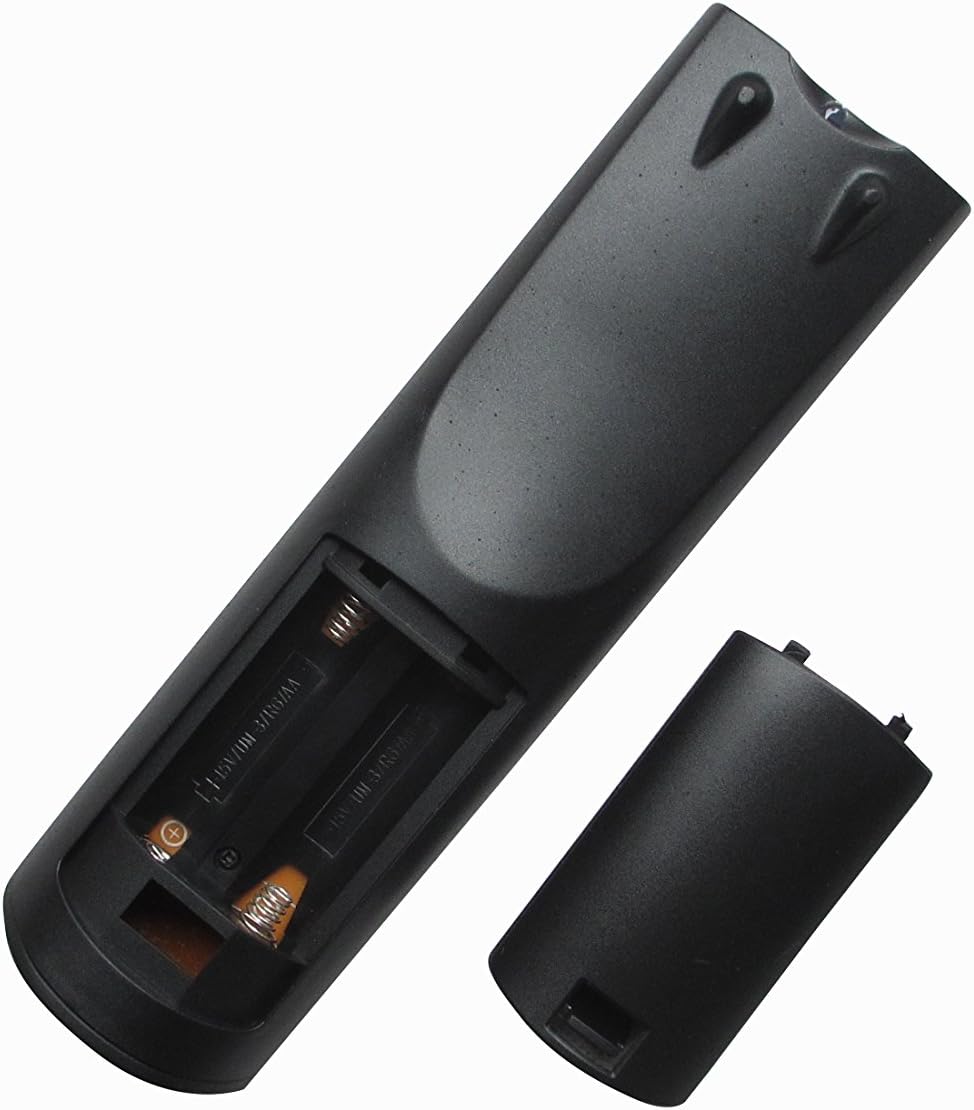
Image: The back of the HCDZ replacement remote control with the battery compartment cover removed, revealing the slots for two AA batteries. This illustrates where to insert the batteries.
Operating Instructions
The HCDZ Replacement Remote Control provides intuitive button control for your Onkyo receiver. Ensure there is a clear line of sight between the remote's infrared emitter (located at the front of the remote) and the IR sensor on your receiver.

Image: Front view of the HCDZ replacement remote control, displaying its array of buttons for controlling an Onkyo home theater receiver.
Basic Functions:
- Power On/Off: Press the POWER button to turn your Onkyo receiver on or off.
- Volume Control: Use the VOLUME + and VOLUME - buttons to adjust the audio output level.
- Input Selection: Utilize the INPUT or dedicated input buttons (e.g., DVD, CD, TV/SAT) to switch between different audio/video sources connected to your receiver.
- Navigation: Use the directional arrow buttons (UP, DOWN, LEFT, RIGHT) and the ENTER or OK button for menu navigation on your receiver's display.
- Mute: Press the MUTE button to temporarily silence the audio. Press again to restore sound.
Refer to your Onkyo receiver's original user manual for specific functions of other buttons on the remote, as their operation will mimic the original remote.
Maintenance
Proper care and maintenance will ensure the longevity and reliable performance of your remote control.
- Battery Replacement: Replace batteries when the remote's performance degrades or it stops responding. Always replace both batteries simultaneously with new AA batteries. Do not mix old and new batteries, or different types of batteries.
- Cleaning: To clean the remote, gently wipe its surface with a soft, dry cloth. For stubborn dirt, slightly dampen the cloth with water or a mild, non-abrasive cleaner. Avoid using harsh chemicals, solvents, or abrasive materials, as these can damage the remote's finish or internal components.
- Storage: Store the remote control in a cool, dry place away from direct sunlight, extreme temperatures, and high humidity. If the remote will not be used for an extended period, it is advisable to remove the batteries to prevent leakage.
- Protection: Avoid dropping the remote or exposing it to liquids.

Image: The back of the HCDZ replacement remote control with the battery compartment securely closed, illustrating its sleek design.
Troubleshooting
If you encounter issues with your HCDZ Replacement Remote Control, please refer to the following troubleshooting tips:
- Remote Not Responding:
- Check Batteries: Ensure the batteries are inserted correctly with the correct polarity (+/-). Replace old or depleted batteries with fresh AA batteries.
- Line of Sight: Verify that there is a clear, unobstructed path between the remote control and the IR sensor on your Onkyo receiver. Obstacles can block the infrared signal.
- Distance: Ensure you are within the effective operating range of approximately 10 meters (33 feet) from the receiver.
- Receiver Power: Confirm that your Onkyo receiver is powered on and functioning correctly.
- No Programming Needed: This remote control is a direct replacement and does not require any programming codes. If it's not working, the issue is likely battery-related or an obstruction, not a programming requirement.
- Interference: Bright sunlight or strong fluorescent lighting can sometimes interfere with infrared signals. Try operating the remote in different lighting conditions if you suspect interference.
If the problem persists after trying these steps, please refer to the Support section for further assistance.
Specifications
| Brand | HCDZ |
| Model Number | HCDZ-9536 |
| Compatible Devices | Onkyo TX-SA578, Onkyo RC-707M Network Home Theater Audio Video A/V AV Receivers |
| Connectivity Technology | Infrared (IR) |
| Max Number of Supported Devices | 1 |
| Controller Type | Button Control |
| Maximum Range | 10 Meters (approximately 33 feet) |
| Batteries Required | 2 x AA batteries (not included) |
| Special Feature | Ergonomic design |
Warranty Information
Specific warranty details for this HCDZ replacement remote control are not provided in this manual. Please refer to the product packaging or contact the seller directly for information regarding warranty coverage and terms.
Support
Should you have any questions, require further assistance, or encounter issues not covered in this manual, please do not hesitate to contact the seller or manufacturer directly. They can provide specialized support for your product.
For general inquiries, you may also visit the HCDZ Store on Amazon: HCDZ Store