
Introduction
This manual provides detailed instructions for the setup, operation, maintenance, and troubleshooting of your Beetel M57 CLI Corded Phone. Please read this manual carefully to ensure proper use and to maximize the features of your new telephone.
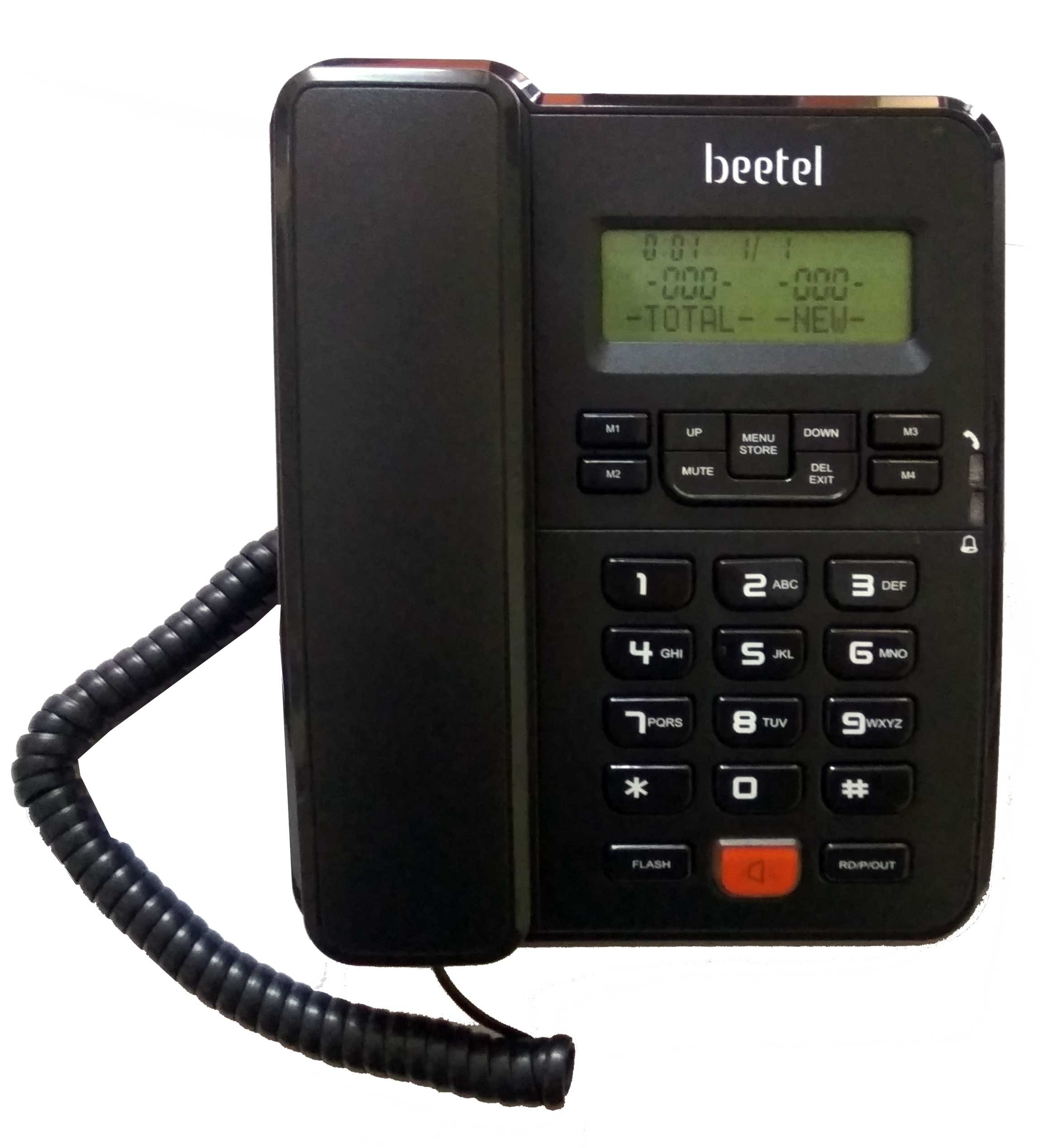
Figure 1: Beetel M57 CLI Corded Phone. This image displays the complete phone unit, including the base with its keypad and LCD screen, and the attached handset.
Setup
Follow these steps to set up your Beetel M57 corded phone:
- Connect the Telephone Line: Plug one end of the telephone line cord into the TEL socket on the back of the phone base and the other end into your wall telephone jack.
- Connect the Handset: Plug the coiled cord into the HANDSET socket on the side of the phone base and the other end into the handset.
- Install Batteries: The phone requires 3 AAA batteries (not included) for Caller ID and memory functions. Open the battery compartment on the underside of the phone, insert the batteries according to the polarity markings, and close the compartment.
- Initial Power-Up: Once connected, the LCD display should light up, indicating the phone is ready for use.
Operating Instructions
Basic Call Functions
- Making a Call: Lift the handset, wait for a dial tone, and dial the desired number. Alternatively, you can pre-dial the number and then lift the handset or press the Speakerphone button.
- Receiving a Call: When the phone rings, lift the handset or press the Speakerphone button to answer.
- Redial: Press the REDIAL button to call the last dialed number.
- Flash Function: Use the FLASH button for call waiting or to access network services. The flash time is programmable (100/300/600/1000 ms).
- Pause Function: Use the PAUSE button to insert a pause in a dialing sequence.
Caller ID (CLI)
- The phone supports FSK/DTMF Caller ID systems.
- Call Waiting CLI is available for FSK Type-II.
- Incoming call numbers will be displayed on the LCD screen.
LCD Display and Settings
- The LCD display shows 16 digits and 16 characters.
- LCD Contrast: There are 5 levels of LCD contrast selectable via the menu.
- Language: Menu selectable in English or Spanish.
Memory Functions
- Phone Book: Store up to 50 numbers in the phone book. Refer to the on-screen menu for adding, editing, and deleting entries.
- Incoming Call Memory: Stores up to 50 incoming call numbers.
- Outgoing Call Memory: Stores up to 10 outgoing call numbers.
- One-Touch Memory (M1-M4): Program up to 4 frequently called numbers for quick dialing. Consult the menu for programming instructions.
Speakerphone and Volume Control
- 2-Way Speakerphone: Press the SPEAKER button to activate the hands-free speakerphone.
- Speakerphone Volume: Adjustable receive volume for the speakerphone.
- Handset Volume: 2 levels of handset receive volume control selectable.
Ringing and Other Settings
- Ring Melody: 5 kinds of normal ring melodies selectable.
- Ringing Volume: 3 levels of ringing volume control selectable.
- Ring LED Indication: An LED light indicates an incoming call.
- In-Use LED Indication: An LED light indicates when the phone is in use.
- Area Code Setting: 5 digits area code setting.
- Long Distance Code Setting: 5 digits long distance code setting.
- Tone/Pulse Dialing: Switchable between Tone and Pulse dialing modes.
- Mute Function: Toggle mute function during a call.
Maintenance
To ensure the longevity and proper functioning of your Beetel M57 phone, follow these maintenance guidelines:
- Cleaning: Wipe the phone's surface with a soft, damp cloth. Do not use harsh chemicals or abrasive cleaners.
- Battery Replacement: Replace the 3 AAA batteries when the Caller ID or memory functions become unreliable or the display dims. Ensure correct polarity.
- Environment: Keep the phone away from direct sunlight, heat sources, and excessive moisture.
- Handling: Avoid dropping the phone or subjecting it to strong impacts.
Troubleshooting
If you encounter issues with your Beetel M57 phone, refer to the following common problems and solutions:
| Problem | Possible Cause | Solution |
|---|---|---|
| No dial tone | Telephone line not connected properly or service issue. | Check all cable connections. Test with another phone if possible. Contact your telephone service provider. |
| Caller ID not displaying | Batteries are low or not installed. Caller ID service not activated. | Ensure 3 AAA batteries are correctly installed and charged. Contact your service provider to confirm Caller ID service is active. |
| Speakerphone microphone not working | Possible defect or specific setting. | Ensure the microphone is not obstructed. If the issue persists, contact customer support. |
| Phone does not ring | Ringer volume set to minimum or off. | Adjust the ringer volume using the controls on the phone base. |
| LCD display is dim or blank | Low or dead batteries. LCD contrast setting. | Replace the 3 AAA batteries. Adjust the LCD contrast setting via the phone's menu. |
Specifications
Key technical specifications for the Beetel M57 CLI Corded Phone:
- Brand: Beetel
- Model: M57
- Colour: Black
- Telephone Type: Corded
- Caller ID: Yes (FSK/DTMF Compatible, Call Waiting CLI for FSK Type-II)
- LCD Display: 16-Digit and 16-Character, 5 Levels of Contrast
- Phone Book Capacity: 50 Numbers
- Incoming Call Memory: 50 Numbers
- Outgoing Call Memory: 10 Numbers
- One-Touch Memory: 4 (M1 ~ M4)
- Speakerphone: 2-Way with Adjustable Receive Volume
- Handset Volume: 2 Levels Selectable
- Ring Melodies: 5 Types Selectable
- Ringing Volume: 3 Levels Selectable
- Dialing Mode: Tone / Pulse Switchable
- Flash Time: Programmable (100/300/600/1000 ms)
- Power Source: Corded Electric (requires 3 AAA batteries for certain features)
- Material: Plastic
- Item Weight: Approximately 0.62 Pounds
Warranty and Support
For warranty information and customer support, please refer to the documentation provided at the time of purchase or visit the official Beetel website. Keep your purchase receipt as proof of purchase for any warranty claims.
If you require further assistance or have questions not covered in this manual, please contact Beetel customer service.