
1. Introduction
The Baomain WLCA12-2-Q is an adjustable rotary roller lever limit switch designed for precise position detection, travel limitation, and safety protection in industrial automation and mechanical equipment. Its robust construction and IP66 rating ensure reliable operation in demanding environments.
2. Safety Information
WARNING: Electrical shock hazard. Always disconnect power before installation, maintenance, or inspection.
- Installation and wiring should only be performed by qualified personnel in accordance with all local and national electrical codes.
- Ensure proper grounding to prevent electrical hazards.
- Do not exceed the specified voltage and current ratings.
- Verify all connections are secure before applying power.
- This device is not intended for use in explosive atmospheres.
3. Product Features
- Adjustable Rotary Lever Actuator: Equipped with a rotary roller lever that can be adjusted in length, allowing for optimal adaptation to different cams and industrial machine configurations.
- High Load Performance: Supports up to 10 A at 380 V AC, making it suitable for direct control of power circuits or as an input signal for PLCs and contactors in demanding industrial settings.
- Robust and Durable Construction: Features a high-quality metallic alloy casing that provides excellent heat dissipation and mechanical resistance, ensuring thousands of operational cycles without failure.
- Waterproof and Dustproof Design (IP66): Its water, oil, and dust-resistant structure ensures stable operation in environments with chips or coolants, ideal for applications like CNC machines, conveyor belts, and lifting systems.
- Versatile Contacts (1 Normally Open + 1 Normally Closed): Includes a double-circuit contact block that allows for simultaneous switching of signals, facilitating integration into various automation and safety control systems.
4. Package Contents
- 1 x Baomain WLCA12-2-Q Limit Switch
- 1 x M20x1.5 Cable Gland (for cable entry)
5. Specifications
| Specification | Value |
|---|---|
| Model Number | WLCA12-2-Q |
| Brand | Baomain |
| Operating Mode | ON-OFF |
| Current Rating | 10 A |
| Operating Voltage | 380 Volts |
| Contact Type | 1 Normally Open (NO) + 1 Normally Closed (NC) |
| Terminal Type | Screw Terminal |
| Material (Housing) | Plastic, Metal Alloy |
| Material (Contact) | Copper, Silver Alloy |
| Item Dimensions (L x W x H) | 8.5 x 13 x 4.5 cm |
| Mounting Type | Surface Mount |
| Actuator Type | Rotary Roller Lever |
| Number of Positions | 2 |
| Upper Temperature Rating | 70 Degrees Celsius |
| International Protection (IP) Rating | IP66 |
| Compliant Specification | IEC 60669-2-1:2002 |
6. Setup and Installation
6.1 Mounting
The Baomain WLCA12-2-Q limit switch is designed for surface mounting. Ensure the mounting surface is stable and free from vibrations. Use appropriate fasteners (not included) to secure the switch firmly through the designated mounting holes on the housing.
6.2 Wiring
Refer to the wiring diagram below for correct electrical connections. The switch features both Normally Open (NO) and Normally Closed (NC) contacts.
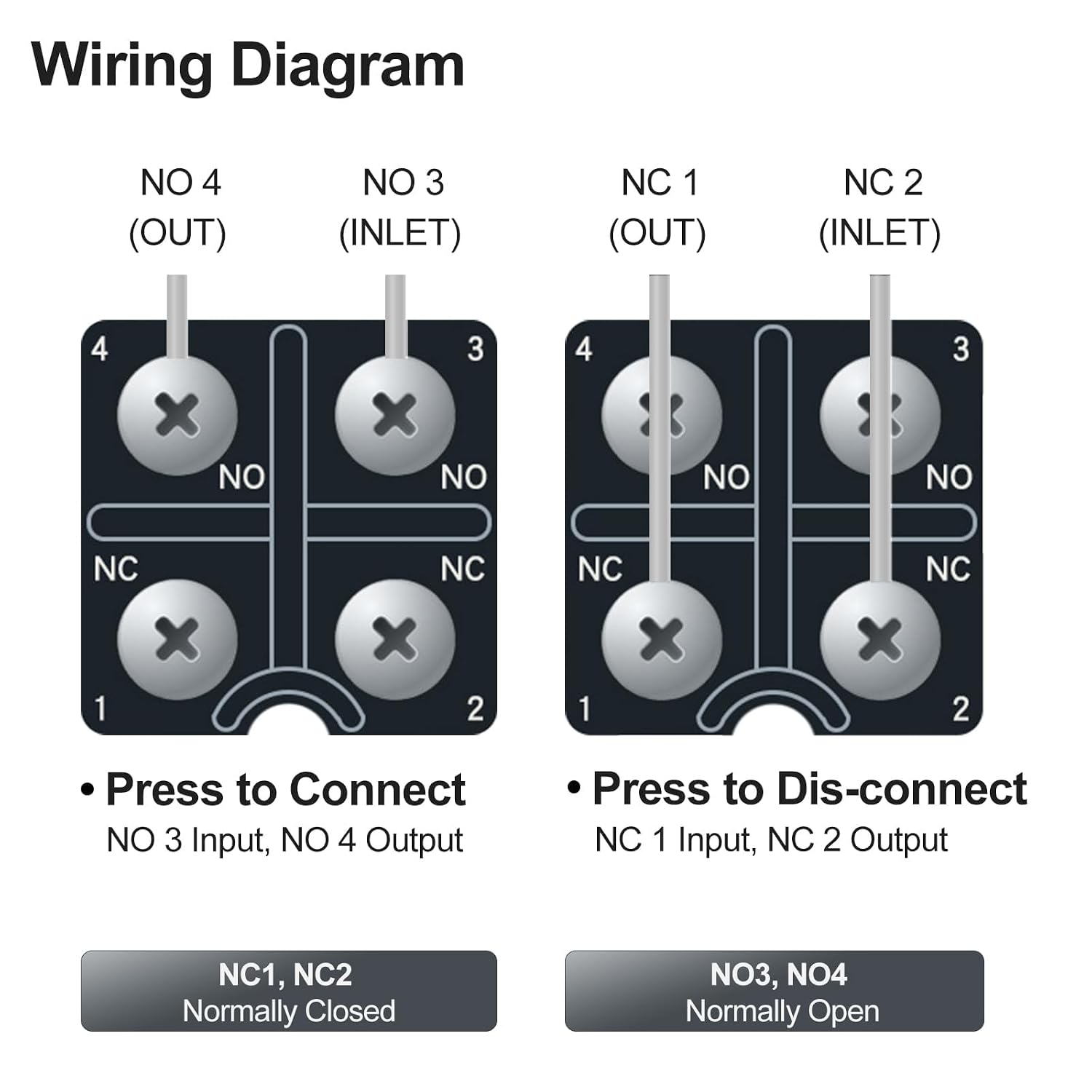
Figure 1: Wiring Diagram. This diagram illustrates the internal connections for the Normally Open (NO) and Normally Closed (NC) contacts. NO 3 and NO 4 are for Normally Open circuits (press to connect). NC 1 and NC 2 are for Normally Closed circuits (press to disconnect).

Figure 2: Detailed Wiring and Dimensional Drawing. This technical drawing provides precise measurements and wiring terminal locations for installation planning.
- Normally Open (NO) Contacts: Connect your circuit to terminals NO 3 (Inlet) and NO 4 (Output). The circuit will close (connect) when the actuator is pressed.
- Normally Closed (NC) Contacts: Connect your circuit to terminals NC 1 (Inlet) and NC 2 (Output). The circuit will open (disconnect) when the actuator is pressed.
- Use the provided M20x1.5 cable gland to ensure a waterproof and secure cable entry.
- Ensure all screw terminals are tightened securely to prevent loose connections and potential arcing.
6.3 Actuator Adjustment
The rotary roller lever can be adjusted in length and angle to suit specific application requirements. Loosen the adjustment screws on the lever arm, position the roller to the desired length and angle, and then securely tighten the screws.

Figure 3: Actuator Adjustment. The image shows the rotary roller lever with arrows indicating its adjustable range, up to 90 degrees in either direction from the center position.
7. Operating Instructions
The limit switch operates by detecting the physical presence or movement of an object. When an object makes contact with the rotary roller lever, the lever rotates, actuating the internal switch mechanism. This changes the state of the NO and NC contacts, sending a signal to the connected control system.
- Ensure the roller lever is positioned correctly to be actuated by the target object at the desired point.
- The switch provides a tactile response upon actuation.
- The IP66 rating ensures reliable operation even when exposed to water jets or dust, making it suitable for harsh industrial environments.

Figure 4: Product Dimensions. This image provides key dimensions of the limit switch in both inches and millimeters, useful for installation planning.
8. Maintenance
Regular maintenance helps ensure the longevity and reliable operation of your limit switch.
- Inspection: Periodically inspect the switch for any signs of physical damage, wear on the roller lever, or corrosion.
- Cleaning: Clean the exterior of the switch with a damp cloth. Avoid using harsh chemicals or abrasive materials that could damage the housing or seals.
- Electrical Connections: Check all wiring connections for tightness and ensure there are no loose wires.
- Actuator Function: Verify that the roller lever moves freely and returns to its original position without obstruction.
9. Troubleshooting
9.1 Switch Not Actuating
- Check Mechanical Alignment: Ensure the target object is making proper contact with the roller lever and causing sufficient rotation. Adjust the lever position if necessary.
- Obstruction: Inspect for any debris or foreign objects obstructing the lever's movement.
9.2 No Electrical Signal
- Power Supply: Verify that power is supplied to the circuit connected to the switch.
- Wiring: Double-check all wiring connections against the diagram (Figure 1) for correctness and tightness. Ensure no wires are loose or incorrectly terminated.
- Contact Integrity: If possible and safe, test the continuity of the NO and NC contacts with a multimeter when the switch is actuated and unactuated.
9.3 Intermittent Operation
- Loose Connections: Re-tighten all terminal screws.
- Vibration: Ensure the switch is securely mounted and not subject to excessive vibration that could cause false actuation or connection issues.
- Wear: Inspect the roller and lever for excessive wear that might affect consistent actuation.
10. Applications
The Baomain WLCA12-2-Q limit switch is versatile and suitable for a wide range of industrial and mechanical applications requiring reliable position detection and control.

Figure 5: Application Examples. This image displays common uses for the limit switch, including Material Handling, Tower Cranes, General Machinery, and CNC Machinery.
- Material Handling: For detecting the position of goods on conveyor belts or automated guided vehicles.
- Tower Cranes: To limit the travel range of crane components for safety and operational control.
- General Machinery: In various machines for end-of-travel detection, safety interlocks, or sequence control.
- CNC Machinery: For precise tool or workpiece positioning and collision avoidance.
11. Warranty and Support
For specific warranty details, please refer to the documentation provided at the time of purchase or contact your vendor. For technical support or inquiries, please reach out to Baomain customer service through their official channels.