
1. Product Overview
The tomtoc 360° Protective Laptop Sleeve Bag is designed to provide comprehensive protection for your electronic devices. It features advanced design elements to safeguard against impacts, scratches, and spills, ensuring your device remains secure during transport.
- CornerArmor Patent: Unique design at the bottom corners offers enhanced drop protection.
- 360° Protection: Thick internal plush lining and protective padding around the zipper absorb shocks and prevent scratches.
- Durable & Compact: Constructed with a reliable YKK zipper for secure and long-lasting use, and a compact form factor for easy portability.
- Accessory Pocket: A convenient front pocket provides storage for essential accessories.
2. Compatibility and Setup
This sleeve is custom-made for a perfect fit with specific devices. Please verify your device model against the compatibility chart below to ensure optimal protection.

Figure 2.1: Compatibility Chart. Refer to this chart to confirm your device's compatibility with the tomtoc sleeve, including specific models like 12-inch MacBook Retina, 10.9-inch iPad Air 4, and 11-inch iPad Pro.
2.1 Inserting Your Device
- Ensure your device is powered off or in sleep mode before insertion.
- Gently slide your laptop or tablet into the main compartment of the sleeve. The plush lining should cradle the device.
- Close the YKK zipper completely to secure your device. Ensure no cables or other items are caught in the zipper.

Figure 2.2: Device Insertion and Accessory Pocket. This image demonstrates the main compartment for your device and the convenient front pocket for storing chargers, cables, and other small accessories.
3. Daily Use and Protection Features
The tomtoc sleeve is engineered for everyday protection and convenience.
3.1 CornerArmor Technology
The patented CornerArmor design provides extra padding at the bottom corners, which are most vulnerable to drops. This acts as a protective bumper, absorbing impact forces.
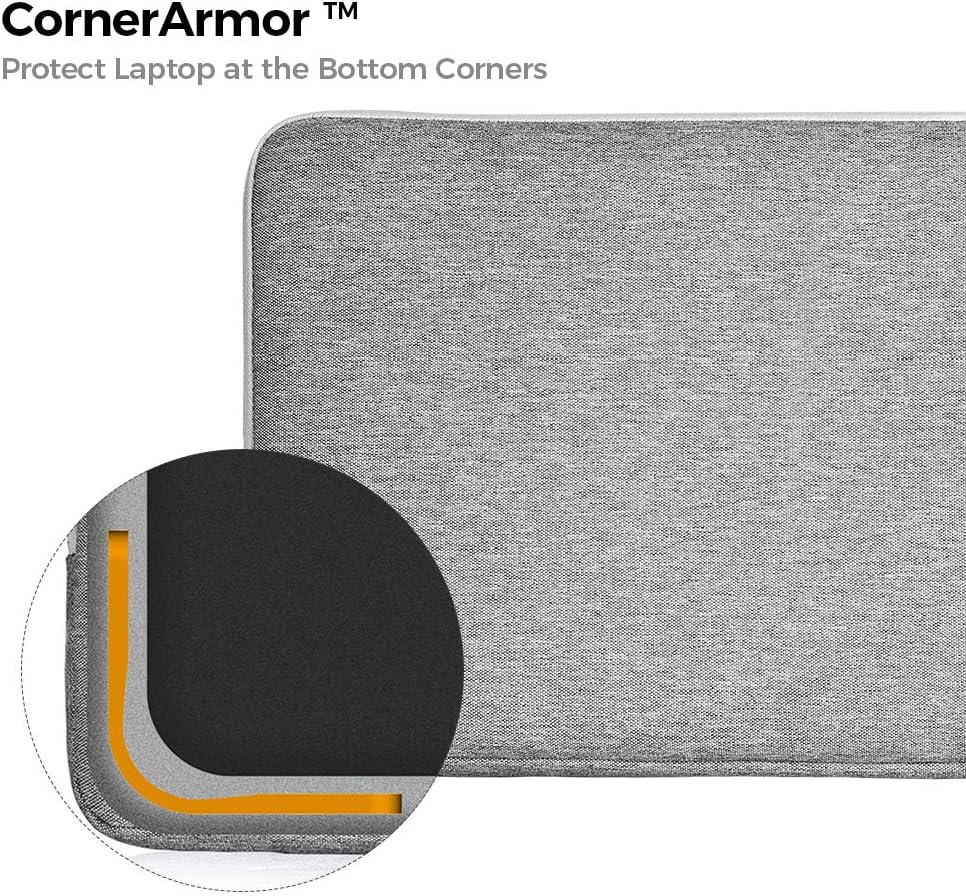
Figure 3.1: CornerArmor Protection. The CornerArmor patent design provides enhanced protection for the laptop's bottom corners, similar to a car airbag system.
3.2 360° Interior Protection
The interior of the sleeve features a thick, soft plush lining that cushions your device from all sides. Additionally, protective padding runs along the zipper line to prevent any potential scratches from the metal teeth.

Figure 3.2: Plush Interior Lining. The thick internal plush lining offers superior shock absorption and 360-degree protection around the zipper to prevent scratches.
3.3 Accessory Pocket
Utilize the front pocket for convenient storage of small items such as charging cables, power adapters, smartphones, or pens. This keeps your essentials organized and easily accessible.
3.4 YKK Zipper Durability
The sleeve is equipped with a high-quality YKK zipper, known for its smooth operation and long-term reliability. Always ensure the zipper is fully closed to secure your device.

Figure 3.3: YKK Zipper Detail. The sleeve features a high-quality YKK zipper, ensuring secure closure and long-lasting durability for daily use.
4. Maintenance
Proper care will extend the life and appearance of your tomtoc sleeve.
- Cleaning: For light dirt, wipe the exterior with a damp cloth and mild soap. For tougher stains, a soft brush can be used gently. Avoid harsh chemical cleaners.
- Drying: Air dry the sleeve completely. Do not use a machine dryer or direct heat, as this can damage the material.
- Storage: Store the sleeve in a cool, dry place away from direct sunlight when not in use.
- Zipper Care: Keep the zipper free from debris. If it becomes stiff, a small amount of zipper lubricant can be applied.
5. Troubleshooting
If you encounter any issues with your tomtoc sleeve, consider the following common solutions:
- Device Does Not Fit: Double-check the internal dimensions of the sleeve against your device's dimensions. Refer to the compatibility chart in Section 2.
- Zipper Sticking: Ensure no fabric or foreign objects are caught in the zipper teeth. Gently try to move the zipper back and forth. If it becomes stiff, apply a small amount of zipper lubricant.
- Sleeve Appears Damaged: Inspect the sleeve for any visible tears or damage. If the protective features are compromised, consider replacing the sleeve to ensure continued device protection.
6. Specifications
| Feature | Detail |
|---|---|
| Brand | tomtoc |
| Model Number | A13-B01G |
| ASIN | B01HCF11SU |
| Internal Dimensions | 11.04” x 7.74“ x 0.52” |
| Item Dimensions | 12 x 1 x 8.5 inches |
| Item Weight | 6.4 Ounces |
| Material | Nylon |
| Shell Type | Soft |
| Additional Features | Anti-Slip, CornerArmor Patent |
7. Warranty and Support
tomtoc products are manufactured with quality and durability in mind. For information regarding warranty coverage, product support, or to report any issues, please contact tomtoc customer service through their official website or the retailer where the product was purchased.
Please retain your proof of purchase for warranty claims.
