
1. Product Overview
This manual provides instructions for the Cutex Upper Knife, part number 50143403. This component is designed as a replacement upper knife for various Bernina and Bernette portable home serger/overlock machines. The upper knife works in conjunction with the lower knife to trim fabric edges cleanly before stitching, ensuring professional-looking seams.
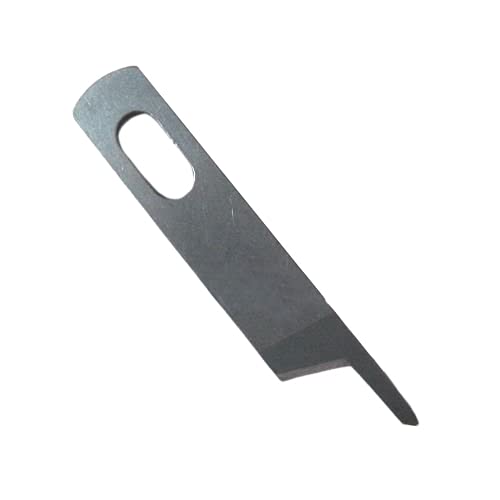
Image: The Cutex Upper Knife, part number 50143403, designed for Bernina and Bernette serger machines.
2. Compatibility
The Cutex Upper Knife (Part # 50143403) is compatible with the following Bernina and Bernette serger models:
- Bernina & Bernette Funlock 003, 003D, 004, 004D, 006D, 007D, 008D, 009D
- Bernina & Bernette 700D, 800D, 800DLM, 1100D, 1200DA, 1300DC
- Bernina & Bernette MO-334, MO-334D, MO-335
- Bernina & Bernette 2000DE, 2500DCE
- Bernina & Bernette MO-613, MO-623, MO-634, MO-634D, MO-634DE, MO-654DE, MO-655, MO-655DE, MO-664, MO-664D
This list is not exhaustive. If your model is not listed, please verify compatibility with your machine's manual or the manufacturer.
3. Installation (Setup)
Replacing the upper knife requires careful attention to detail. Always refer to your specific serger machine's instruction manual for precise, model-specific knife replacement procedures. The following are general guidelines:
- Safety First: Turn off and unplug your serger machine from the power outlet before beginning any installation or maintenance.
- Access the Knife Area: Open the front cover or side panel of your serger to access the knife mechanism.
- Remove Old Knife: Loosen the screw(s) holding the upper knife in place. Carefully remove the old knife, noting its orientation. Dispose of the old knife safely.
- Install New Knife: Position the new Cutex Upper Knife (Part # 50143403) in the knife holder, ensuring it is correctly seated and oriented as per your serger's manual.
- Secure Knife: Tighten the screw(s) firmly to secure the new knife. Do not overtighten.
- Check Alignment: Verify that the upper knife is correctly aligned with the lower knife. There should be a small, consistent gap between the cutting edges when the knives are in their cutting position. Refer to your serger manual for specific alignment instructions.
- Test: Close the machine covers, plug in the serger, and perform a test stitch on a scrap piece of fabric to ensure proper cutting and stitching.
4. Operation
The upper knife is an integral part of your serger's cutting mechanism. When the machine is in operation, the upper knife moves in a shearing motion against the stationary lower knife, trimming the fabric edge precisely before the needles form the stitch. Proper operation relies on a sharp, correctly installed, and well-maintained knife.
- Clean Cuts: A sharp upper knife ensures clean, even cuts on fabric edges, preventing fraying and contributing to a professional finish.
- Fabric Feed: Ensure fabric is fed smoothly and evenly into the serger to allow the knives to cut effectively.
- Knife Engagement: Confirm that the knife engagement lever (if present on your model) is set correctly for cutting.
5. Maintenance
To ensure the longevity and optimal performance of your Cutex Upper Knife and your serger, follow these maintenance tips:
- Regular Cleaning: Periodically clean the area around the upper and lower knives to remove lint, thread snippets, and fabric dust. Use a small brush or vacuum cleaner designed for sewing machines.
- Inspect for Sharpness: Regularly check the cutting edge of the upper knife. A dull knife can cause skipped stitches, frayed edges, or difficulty in cutting fabric. Replace the knife if it shows signs of dullness or damage.
- Avoid Hard Objects: Be careful not to sew over pins, needles, or other hard objects, as this can chip or dull the knife edge.
- Storage: When not in use, ensure the serger is covered to protect it from dust and debris, which can accumulate around the knife area.
6. Troubleshooting
If you experience issues with fabric cutting, consider the following troubleshooting steps related to the upper knife:
- Fabric Not Cutting Cleanly:
- Dull Knife: The most common cause. Replace the upper knife (and often the lower knife simultaneously for best results) if it is dull or damaged.
- Incorrect Alignment: Ensure the upper and lower knives are correctly aligned according to your serger's manual. Misalignment can prevent proper shearing action.
- Lint Buildup: Excessive lint around the knife area can interfere with cutting. Clean thoroughly.
- Fabric Fraying After Cut:
- This often indicates a dull knife or improper knife alignment.
- Knife Not Engaging:
- Check if the knife engagement lever (if applicable) is in the correct position.
- Ensure the knife is securely installed and not loose.
For persistent issues, consult your serger's comprehensive troubleshooting guide or contact a qualified service technician.
7. Specifications
| Brand | Cutex |
| Model Number / Part Number | 50143403 |
| Item Weight | 3.2 ounces |
| UPC | 747465121603 |
| ASIN | B01HC7GJQ2 |
8. Warranty and Support
For specific warranty information regarding this Cutex product, please refer to the product packaging or contact Cutex customer support directly. Warranty terms typically cover manufacturing defects.
For technical assistance with your Bernina or Bernette serger machine, including detailed knife replacement procedures or machine-specific troubleshooting, always consult your machine's official instruction manual or contact the respective manufacturer's support channels.
Cutex Store: Visit the Cutex Store on Amazon