
1. Introduction
The I-Tech T-One Medi Sport is a sophisticated 4-channel electrostimulator designed for athletes and individuals seeking independent rehabilitation. This medical device, classified as Class IIA CE0068, offers a wide range of programs and features to support muscle stimulation, pain relief, and aesthetic treatments. It allows for the connection of up to 8 electrodes simultaneously and supports dual-user operation.
2. Safety Information
Please read all safety warnings and instructions carefully before using the I-Tech T-One Medi Sport. Improper use can lead to injury or device malfunction.
- Do not use this device if you have a pacemaker, implanted defibrillator, or other metallic or electronic implants.
- Consult a physician before use if you have any medical conditions, including but not limited to heart disease, epilepsy, cancer, or are pregnant.
- Do not apply electrodes over the carotid sinus nerves (front of the neck), on the head, or over areas of broken skin.
- Keep the device out of reach of children.
- Use only the electrodes and accessories supplied or recommended by I-Tech.
- Discontinue use immediately if you experience any discomfort, pain, or adverse reactions.
- Do not operate the device near water or in damp environments.
3. Package Contents
Verify that all items listed below are present in your package:
- I-Tech T-One Medi Sport Electrostimulator with 4-channel graphic color display
- 4 Electrode connection cables (allowing connection of up to 8 electrodes)
- Simplified square self-adhesive electrodes
- Rectangular self-adhesive electrodes
- Circular self-adhesive electrodes
- Iontophoresis equipment
- Rechargeable NI-MH battery
- Battery charger
- User manual
- Electrode positioning manual

Image: The complete I-Tech T-One Medi Sport kit, including the device, cables, various electrodes, charger, and manuals, laid out for inspection.
4. Device Features
The T-One Medi Sport is equipped with advanced features for effective and safe electrostimulation:
- 4 Independent Channels: Allows for simultaneous treatment of up to four different muscle groups or areas with individual intensity control.
- Constant Current Generator: Ensures stable current delivery even with changes in skin impedance, and automatically stops the device if an electrode detaches.
- Biphasic and Compensated Square Wave Generator: Prevents galvanic effects by ensuring equal and constant current flow between positive and negative poles.
- Single-Phase Wave Generator: Specifically for iontophoresis programs.
- 2+2 Function (Dual User): Enables two users to undergo different treatments simultaneously.
- Backlit Graphic Color Display: Provides clear visibility of program information and settings.
- User Feedback System: Detects if electrodes are properly connected to the user.
- Intuitive Keyboard: Simple and easy-to-use controls for program selection and adjustments.
- On-Screen User Guide: Quick usage instructions directly accessible on the display.
- Rechargeable Battery: Operates on a 4.8-volt rechargeable NI-MH battery.
- Treatment Customization: Allows selection for male/female specific treatments.
- Adjustable Intensity: From 1 to 120 mA.
- Wave Frequency: From 1 to 1200 Hz.
- Pulse Width: From 20 to 450 µs.
- Treatment Time: Adjustable from 1 to 90 minutes.
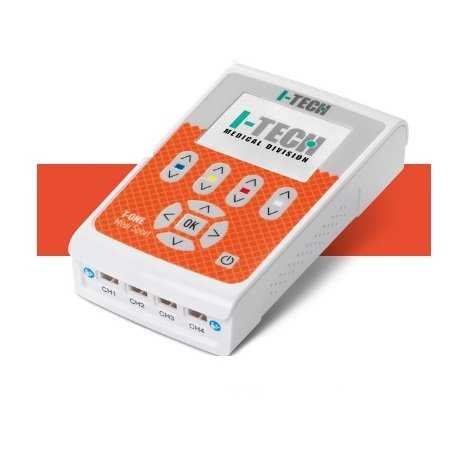
Image: A close-up view of the I-Tech T-One Medi Sport electrostimulator, highlighting its display and control buttons.
5. Setup
5.1 Charging the Battery
- Connect the charger to the device's charging port.
- Plug the charger into a standard electrical outlet.
- Allow the battery to fully charge before first use. The display will indicate charging status.
5.2 Connecting Electrodes
- Ensure the device is turned off.
- Connect the electrode cables to the four output channels (CH1, CH2, CH3, CH4) on the device.
- Attach the self-adhesive electrodes to the ends of the cables. Each channel can support two electrodes.
- Carefully apply the electrodes to clean, dry skin in the desired treatment area. Refer to the electrode positioning manual for specific guidance.

Image: The I-Tech T-One Medi Sport device inside its open carrying case, showing the connection points for electrode cables and organized accessories.
6. Operating Instructions
6.1 Power On/Off
Press and hold the power button to turn the device on or off.
6.2 Program Selection
Use the navigation buttons to browse through the available program categories and select your desired program. The device offers:
- 10 REHA Programs: For rehabilitation purposes.
- 16 TENS Programs: For pain relief (Transcutaneous Electrical Nerve Stimulation).
- 20 NEMS Programs: For muscle strengthening and recovery (Neuromuscular Electrical Stimulation).
- 18 BEAUTY Programs: For aesthetic treatments.
- 22 Dual User Programs (2+2): Specific programs designed for two users simultaneously.
- 12 Free TENS/NEMS Memories: For custom program storage.
6.3 Intensity Adjustment
After selecting a program and starting the treatment, gradually increase the intensity for each channel using the dedicated intensity buttons. Adjust the intensity to a comfortable level, where you feel a strong but non-painful muscle contraction or tingling sensation. The device provides user feedback if electrodes are not properly connected.
6.4 Treatment Time
The treatment duration can be adjusted from 1 to 90 minutes, depending on the selected program and your specific needs.
7. Electrode Placement
Correct electrode placement is crucial for effective and safe treatment. Please refer to the dedicated Electrode Positioning Manual included with your device for detailed diagrams and instructions for various muscle groups and conditions. Always ensure electrodes are applied to clean, dry, and intact skin.
8. Maintenance
8.1 Cleaning the Device
Wipe the device surface with a soft, damp cloth. Do not use abrasive cleaners or immerse the device in water.
8.2 Electrode Care
After each use, gently remove electrodes from the skin and place them back on their protective film. Store them in a sealed bag to prevent drying. Replace electrodes when they lose their adhesiveness or become damaged.
8.3 Storage
Store the device and accessories in the provided carrying case in a cool, dry place, away from direct sunlight and extreme temperatures.

Image: The I-Tech T-One Medi Sport device's carrying case, closed and ready for storage or transport.
9. Troubleshooting
| Problem | Possible Cause | Solution |
|---|---|---|
| Device does not turn on | Low battery or discharged battery | Charge the battery fully. |
| No sensation or weak sensation | Electrodes not properly attached; Intensity too low; Electrodes dried out | Ensure electrodes are firmly on clean skin; Increase intensity gradually; Replace old electrodes. |
| Device stops during treatment | Electrode detachment detected; Low battery | Re-attach electrodes firmly; Charge the battery. |
| Skin irritation under electrodes | Poor skin preparation; Allergic reaction to electrode gel; Overuse | Clean skin thoroughly before use; Try hypoallergenic electrodes; Reduce treatment frequency/duration. Consult a doctor if irritation persists. |
10. Specifications
- Model: T-One Medi Sport
- Manufacturer: IACER
- Item Number: 28402
- ASIN: B01H70VE50
- Dimensions: 29.5 x 21.5 x 9 cm
- Weight: 1.5 kg
- Channels: 4 independent channels (up to 8 electrodes)
- Current Type: Constant current generator
- Waveform: Biphasic and compensated square wave, single-phase wave (for iontophoresis)
- Intensity: 1 to 120 mA adjustable
- Frequency: 1 to 1200 Hz
- Pulse Width: 20 to 450 µs
- Treatment Time: 1 to 90 minutes
- Display: Backlit graphic color display
- Battery: 4.8 Volt rechargeable NI-MH battery
- Medical Device Class: IIA CE0068
11. Warranty and Support
For warranty information and technical support, please refer to the documentation provided with your purchase or contact I-Tech customer service. Keep your proof of purchase for warranty claims.


