
Ozeri ZK20
Ozeri ZK20 Touch III Multifunction Digital Kitchen Scale
User Instruction Manual
Introduction
Thank you for purchasing the Ozeri ZK20 Touch III Multifunction Digital Kitchen Scale. This scale is designed for precision and convenience in your kitchen, featuring a built-in calorie counter for common food items, a large high-contrast LED display, and touch-sensitive controls. Please read this manual thoroughly before use to ensure proper operation and maintenance.
Safety Precautions
- Do not immerse the scale in water or other liquids. The surface is tempered glass and can be wiped clean, but the internal components are not waterproof.
- Avoid dropping the scale or subjecting it to strong impacts, as this may damage the precision sensors.
- Do not use abrasive cleaners or harsh chemicals on the scale's surface.
- Keep the scale away from extreme temperatures and direct sunlight.
- This scale is intended for household use only.
- Ensure the scale is placed on a flat, stable surface during use to ensure accurate readings.
Package Contents
- Ozeri ZK20 Touch III Digital Kitchen Scale
- 4 x AAA Batteries
- Instruction Manual (this document)
Setup
1. Battery Installation
Locate the battery compartment on the underside of the scale. Open the cover and insert the 4 AAA batteries, ensuring the correct polarity (+/-) as indicated inside the compartment. Close the battery cover securely.

Image: Side view of the Ozeri ZK20 Touch III Digital Kitchen Scale, showing its slim profile. The battery compartment is located on the underside.
2. Placement
Place the scale on a hard, flat, and stable surface. Uneven surfaces can affect the accuracy of measurements.
Operating Instructions
Power On/Off
To turn on the scale, simply press the power button (usually integrated with the 'MODE' or 'ON/OFF' button). The display will light up. The scale will automatically turn off after 2 minutes of inactivity to conserve battery life.
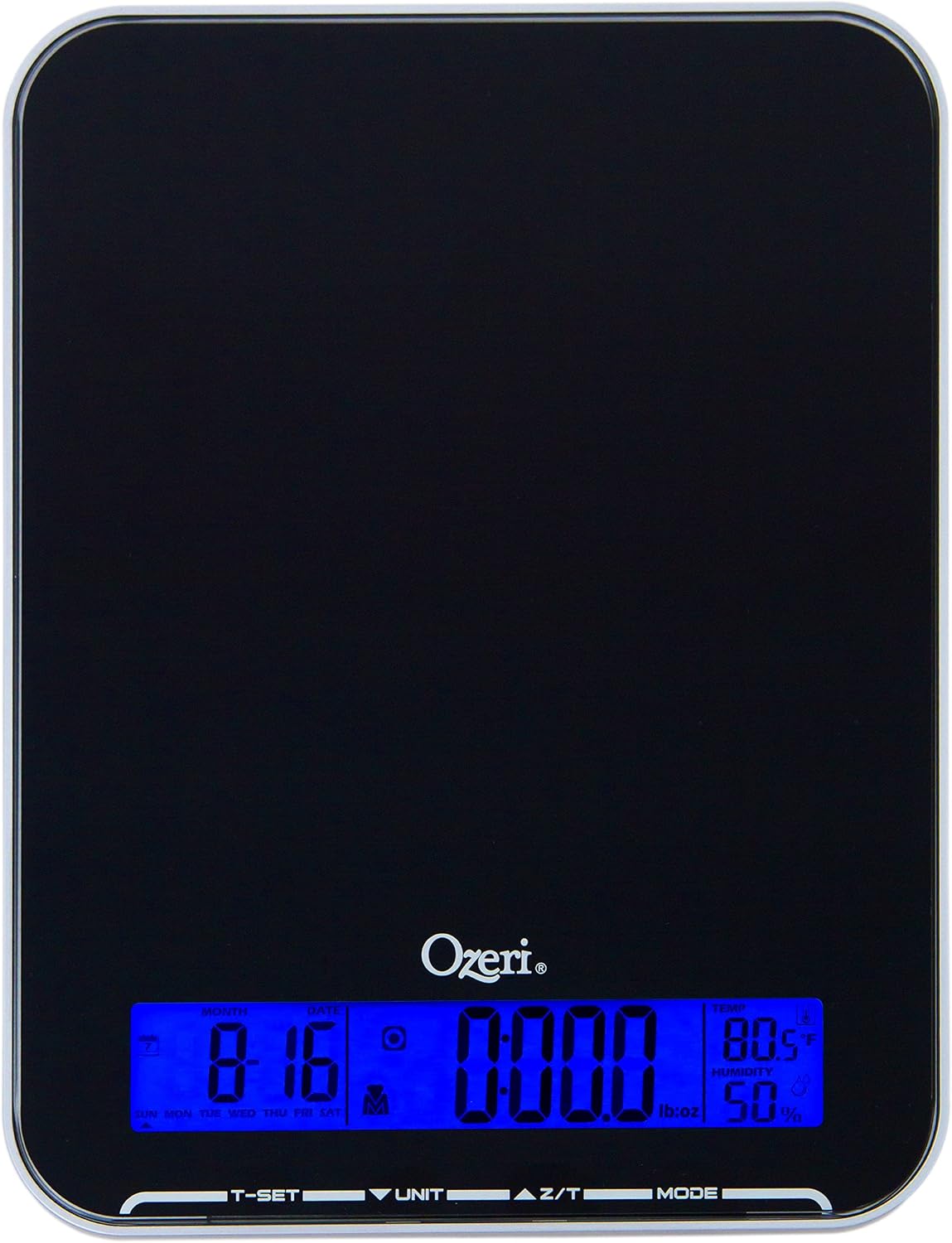
Image: Top-down view of the Ozeri ZK20 Touch III Digital Kitchen Scale, showcasing its sleek black tempered glass surface and the illuminated blue LCD display at the bottom.
Unit Conversion
Press the 'UNIT' button to cycle through the available measurement units: ounces (oz), pounds (lb), grams (g), and milliliters (ml). The selected unit will be displayed on the screen.
Tare Function
The Tare function allows you to subtract the weight of a container or previously added ingredients. Place an empty container on the scale, then press the 'Z/T' (Zero/Tare) button. The display will reset to zero. You can then add ingredients, and the scale will show only the net weight of the ingredients.
Calorie Counter
The Ozeri ZK20 features a built-in calorie counter for 7 commonly weighed food items: butter, sugar, flour, eggs, chocolate, chicken, and beef. To use this feature:
- Ensure the scale is on and zeroed.
- Place one of the 7 specified food items directly on the weighing platform.
- Press the 'MODE' button repeatedly until the desired food item's icon or indicator appears on the display.
- The scale will instantly display the estimated caloric (Kcal) value for the weighed portion.

Image: The Ozeri ZK20 Touch III Digital Kitchen Scale displaying a weight measurement for butter curls, demonstrating its calorie counting feature for specific food items.
Additional Features (Clock, Alarm, Thermometer, Humidity Indicator, Calendar)
The scale also integrates additional useful functions. Use the 'T-SET' button to access and set the clock, alarm, and calendar. The display will show temperature and humidity readings automatically.

Image: The Ozeri ZK20 Touch III Digital Kitchen Scale with visual icons highlighting its additional features: Thermometer, Clock, Alarm, Humidity Indicator, and Calendar, all displayed on the LCD screen.
Maintenance
Cleaning
Wipe the scale's tempered glass surface with a soft, damp cloth. For stubborn stains, a mild detergent can be used, followed by wiping with a clean, damp cloth. Do not use abrasive cleaners or immerse the scale in water.
Storage
Store the scale in a cool, dry place. Avoid placing heavy objects on the scale when not in use, as this may affect sensor calibration over time.
Battery Replacement
When the display shows a 'Lo' indicator, it's time to replace the batteries. Follow the battery installation steps in the 'Setup' section.
Troubleshooting
| Problem | Possible Cause | Solution |
|---|---|---|
| Scale does not turn on | Dead or incorrectly installed batteries | Check battery polarity or replace with new AAA batteries. |
| Display shows 'Lo' | Low battery power | Replace all 4 AAA batteries. |
| Display shows 'O-Ld' | Overload (weight exceeds maximum capacity) | Remove some weight from the scale. The maximum capacity is 22 lbs (10 kg). |
| Inaccurate readings | Scale not on a flat surface, or external interference | Ensure the scale is on a hard, flat, stable surface. Avoid strong vibrations or air currents. Recalibrate by turning off and on. |
| Calorie counter not working | Incorrect food item or mode selection | Ensure you are weighing one of the 7 supported food items and have selected the correct mode using the 'MODE' button. |
Specifications
- Model: ZK20
- Color: Black
- Material: Tempered Glass
- Product Dimensions: 22.35 x 17.53 x 2.03 cm
- Item Weight: 544 g
- Maximum Weight Capacity: 22 lbs (10 kg)
- Measurement Units: oz, lb, g, ml
- Display Type: High-contrast LCD, touchscreen
- Power Source: 4 x AAA Batteries (included)
- Special Features: High Precision Sensors, Large Display, Smart, Touch Buttons, Unit Convert, Built-in Calorie Counter (for 7 food items), Tare Function, Auto-off function, Low Battery and Overload indicators.
Warranty and Support
Ozeri products are manufactured to high-quality standards. For warranty information or technical support, please refer to the contact details provided with your purchase documentation or visit the official Ozeri website. Please retain your proof of purchase for warranty claims.
Ask a question about this manual
Ask about setup, troubleshooting, compatibility, parts, safety, or missing instructions. Manuals+ will review the question and use this page’s manual context to help answer it.