
Schneider Electric S530409
Schneider Electric Odace Double USB Wall Outlet User Manual
Model: S530409
Product Overview
The Schneider Electric Odace Double USB Wall Outlet (Model S530409) is designed to provide convenient USB charging capabilities directly from your wall. This grey aluminum outlet features two USB ports, allowing you to charge multiple devices simultaneously. It is suitable for various residential and commercial applications, offering a clean and integrated charging solution.
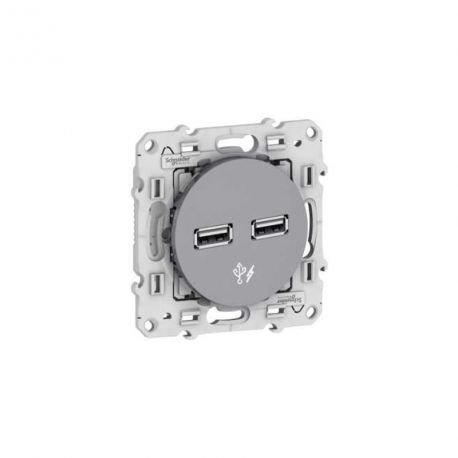
Image: Front view of the Schneider Electric Odace Double USB Wall Outlet, showcasing its two USB ports and grey aluminum finish.
Safety Information
WARNING: Installation should only be performed by a qualified electrician. Disconnect power at the circuit breaker before installation or servicing. Failure to follow these instructions may result in serious injury or death.
- Ensure the power supply is turned off before beginning any installation.
- Do not exceed the specified electrical ratings of the device.
- Use appropriate personal protective equipment (PPE) during installation.
- This device is intended for indoor use only.
Setup and Installation
- Turn Off Power: Locate the circuit breaker controlling the outlet where you intend to install the USB wall outlet. Turn off the power to that circuit. Verify power is off using a voltage tester.
- Remove Old Outlet (if applicable): Carefully remove the existing wall plate and unscrew the old outlet from the electrical box. Disconnect the wires, noting their connections (hot, neutral, ground).
- Wire the New Outlet: Connect the wires from the electrical box to the corresponding terminals on the Schneider Electric USB wall outlet. Typically:
- Black or Red wire (Hot) to the brass or dark-colored screw terminal.
- White wire (Neutral) to the silver or light-colored screw terminal.
- Green or bare copper wire (Ground) to the green screw terminal.
- Mount the Outlet: Carefully fold the wires into the electrical box and secure the new USB wall outlet to the box using the provided screws.
- Install Wall Plate: Attach the decorative wall plate over the installed outlet.
- Restore Power: Turn the power back on at the circuit breaker.
- Test: Plug a USB device into the outlet to ensure it charges correctly.
Operating Instructions
The Schneider Electric Odace Double USB Wall Outlet is designed for simple operation. Once installed and powered, it functions as a standard USB charging port.
- Charging Devices: Insert the USB charging cable of your device into either of the two USB ports on the outlet.
- Simultaneous Charging: You can charge two USB-powered devices simultaneously.
- Compatibility: The outlet is compatible with most USB-powered devices, including smartphones, tablets, and other small electronics that charge via USB.
- Charging Indicator: There is no specific charging indicator light on this model; charging status is typically displayed on your connected device.
Maintenance
The Schneider Electric Odace Double USB Wall Outlet requires minimal maintenance.
- Cleaning: To clean the surface of the outlet, wipe with a soft, damp cloth. Do not use abrasive cleaners, solvents, or harsh chemicals, as these may damage the finish or internal components. Ensure power is off before cleaning.
- Inspection: Periodically inspect the outlet for any signs of damage, such as cracks, discoloration, or loose connections. If any damage is observed, disconnect power and have the outlet inspected or replaced by a qualified electrician.
- No User-Serviceable Parts: There are no user-serviceable parts inside this device. Do not attempt to open or repair the unit.
Troubleshooting
| Problem | Possible Cause | Solution |
|---|---|---|
| Device not charging. | No power to the outlet. Faulty USB cable. Device not compatible. Overloaded circuit. | Check circuit breaker and ensure it is ON. Try a different USB cable. Verify device requires 5V USB charging. Disconnect other devices and try again. |
| Slow charging. | High power demand from device. Using a non-optimal USB cable. | Ensure the device is not drawing more current than the outlet can provide (5V). Use a high-quality USB cable designed for charging. |
| Outlet feels warm. | Normal operation under load. Overload. | Slight warmth is normal during charging. If it's excessively hot, disconnect devices and consult a qualified electrician. |
If troubleshooting steps do not resolve the issue, contact Schneider Electric customer support or a qualified electrician.
Specifications
- Model: S530409
- Brand: Schneider Electric
- Voltage: 5 Volts (USB Output)
- Total Power Outlets: 2 (USB Ports)
- Material: Aluminum
- Compatible Devices: All USB-powered devices
- Package Dimensions: 8.27 x 5.91 x 3.94 inches
- Item Weight: 3.53 ounces
- Country of Origin: Italy
- First Available: December 5, 2023
Warranty and Support
For warranty information and technical support, please refer to the official Schneider Electric website or contact their customer service department. Keep your proof of purchase for warranty claims.
Schneider Electric Customer Support:
- Visit the official Schneider Electric website for contact details specific to your region.
- Online resources and FAQs may also be available.
Related documentsS530409


Ask a question about this manual
Ask about setup, troubleshooting, compatibility, parts, safety, or missing instructions. Manuals+ will review the question and use this page’s manual context to help answer it.