Introduction
The FERVE F-2920 Tetra RF Battery Charger is a versatile and robust device designed for charging and maintaining 12V and 24V lead-acid batteries. It supports various battery types including Liquid (Liq), Gel, and AGM, with capacities ranging from 80 to 225 Ah. This charger features both automatic and manual operating modes, along with a powerful RF filter to protect vehicle electronics during charging. Please read this manual thoroughly before operating the device to ensure safe and efficient use.
Safety Information
Important Safety Instructions:
- Always wear eye protection and protective clothing when working with batteries.
- Ensure adequate ventilation in the charging area to prevent accumulation of explosive gases.
- Never smoke or allow sparks or flames in the vicinity of the battery or charger.
- Connect the charger to a grounded outlet only.
- Do not operate the charger if it has been dropped, damaged, or exposed to moisture.
- Keep out of reach of children.
- Disconnect the AC power before connecting or disconnecting the battery clamps.
- Refer to the vehicle's or battery's manual for specific charging instructions.
Product Overview
The FERVE F-2920 is engineered for reliability and performance. Key features include:
- Dual Voltage Compatibility: Charges both 12V and 24V lead-acid batteries.
- Multiple Battery Types: Compatible with Liquid (Liq), Gel, and AGM batteries.
- Adjustable Charging Current: Selectable 10A or 20A charging rates.
- Automatic and Manual Modes: Offers flexibility for various charging needs.
- RF Filter Protection: Safeguards vehicle electronics from interference during charging.
- Battery Capacity Range: Suitable for batteries from 80 Ah to 225 Ah.
Components:
- Main Charger Unit
- Power Cord
- Battery Clamps (Red for positive, Black for negative)
- Control Panel with display and selector switches
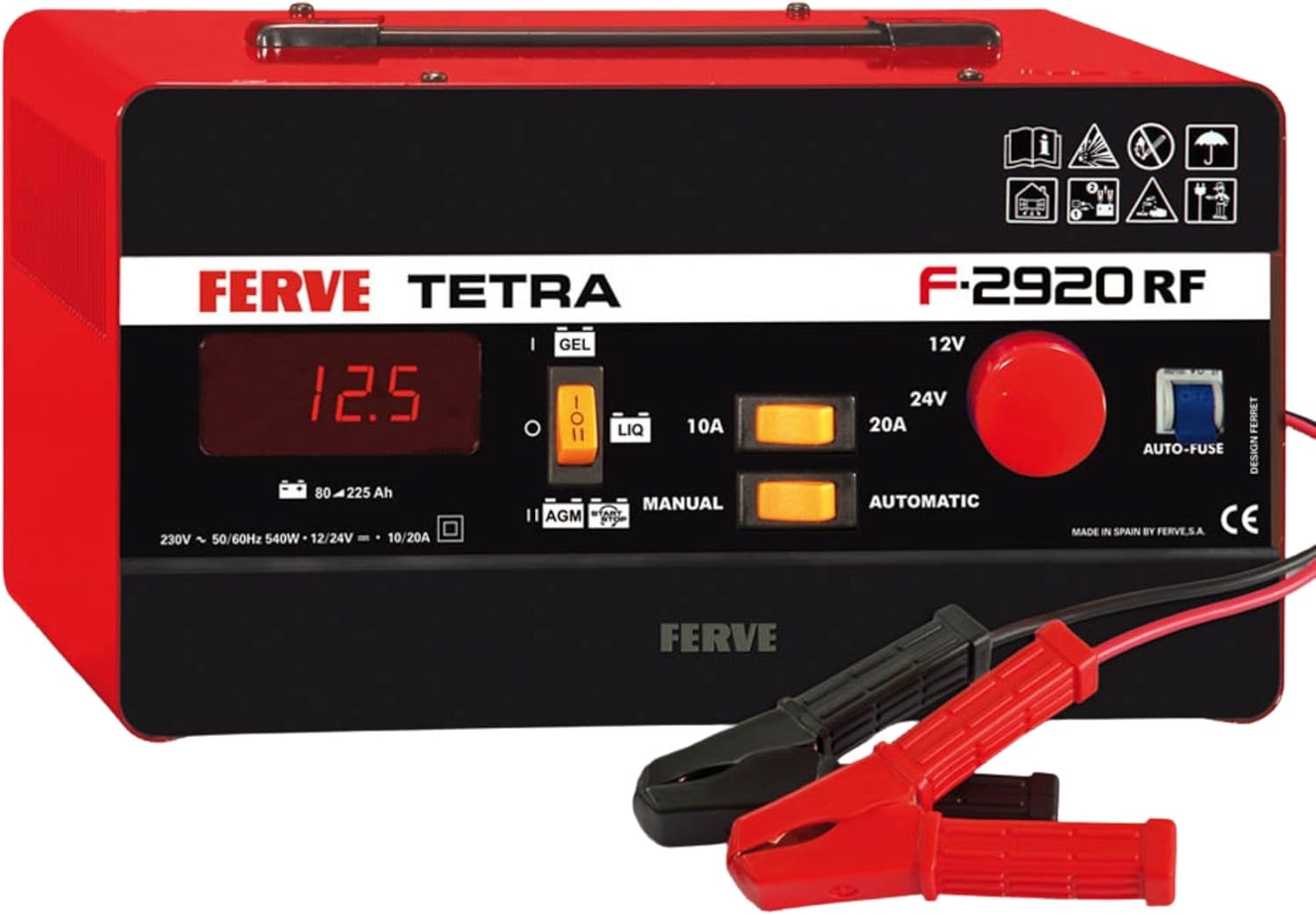
Figure 1: Front view of the FERVE F-2920 Tetra RF Battery Charger, showing the digital display, voltage and current selectors, and battery clamps.

Figure 2: Overview of the charger's "4 in 1" capabilities, including automatic charging, charge restart, battery testing, and alternator testing.
Setup
- Unpack the Charger: Carefully remove the charger and all accessories from the packaging. Inspect for any damage.
- Ventilation: Ensure the charging area is well-ventilated and free from flammable materials.
- Battery Preparation:
- Clean battery terminals of any corrosion.
- If the battery has removable vent caps, remove them and add distilled water until the acid level is just above the plates. Do not overfill.
- Replace vent caps before charging.
- Connect Battery Clamps:
- Connect the RED positive (+) clamp to the positive (+) battery terminal.
- Connect the BLACK negative (-) clamp to the negative (-) battery terminal.
- For vehicles, connect the negative clamp to the vehicle chassis away from the battery and fuel line if the battery is still in the vehicle. Consult your vehicle manual.
- Connect to Power: Plug the charger's power cord into a standard 230V AC grounded electrical outlet.
Operating Instructions
The FERVE F-2920 offers both automatic and manual charging modes. Always ensure correct battery type and voltage selection.
1. Selecting Battery Type and Voltage
- On the control panel, use the switches to select the correct battery type: LIQ (Liquid), GEL, or AGM.
- Select the appropriate voltage: 12V or 24V.

Figure 3: Charger compatibility display, highlighting selectable battery types and voltages for both manual and automatic charging.
2. Selecting Charging Mode (Automatic / Manual)
- Automatic Mode: For most charging scenarios. The charger automatically detects the battery's state and adjusts the charging process. Select AUTOMATIC.
- Manual Mode: For specific applications or deeply discharged batteries. Requires careful monitoring to prevent overcharging. Select MANUAL.
3. Selecting Charging Current
- Choose the desired charging current: 10A or 20A. Refer to your battery's specifications for the recommended charging rate. A general rule is to charge at 10-20% of the battery's Ah rating.
4. Starting the Charge
- Once all settings are configured, the charger will begin the charging process. The digital display will show the current voltage.
- Monitor the charging process, especially in manual mode.
5. Ending the Charge
- When charging is complete (indicated by the charger or stable voltage reading), first unplug the charger from the AC outlet.
- Then, disconnect the negative (-) black clamp from the battery or chassis.
- Finally, disconnect the positive (+) red clamp from the battery terminal.
Maintenance
Proper maintenance ensures the longevity and safe operation of your FERVE F-2920 charger.
- Cleaning: Disconnect the charger from all power sources before cleaning. Wipe the exterior with a soft, dry cloth. Do not use solvents or abrasive cleaners.
- Storage: Store the charger in a cool, dry place when not in use. Keep cables neatly coiled.
- Cable Inspection: Regularly inspect the power cord and battery cables for any signs of damage, fraying, or exposed wires. Do not use the charger if cables are damaged.
- Battery Maintenance: For liquid lead-acid batteries, periodically check electrolyte levels and top up with distilled water as needed.
Troubleshooting
| Problem | Possible Cause | Solution |
|---|---|---|
| Charger does not turn on. | No AC power; faulty outlet; damaged power cord. | Check power outlet with another device. Inspect power cord for damage. Ensure charger is plugged in securely. |
| Charger not charging battery. | Incorrect battery connection; incorrect voltage/type selection; deeply discharged battery; faulty battery. | Verify positive and negative connections. Ensure correct 12V/24V and battery type (Liq/Gel/AGM) are selected. For deeply discharged batteries, try manual mode with caution. Test battery condition. |
| Charger overheats. | Poor ventilation; excessive load; internal fault. | Ensure adequate airflow around the charger. Reduce charging current if possible. If overheating persists, discontinue use and contact support. |
| Digital display shows error. | Internal fault; incorrect operation. | Refer to the specific error code (if any) in the full manual (if available). Disconnect and reconnect the charger. If error persists, contact support. |
Specifications
| Feature | Detail |
|---|---|
| Model | F-2920 |
| Input Voltage | 230V AC, 50/60Hz |
| Output Voltage | 12V / 24V DC |
| Charging Current | 10A / 20A |
| Battery Capacity | 80 - 225 Ah |
| Compatible Battery Types | Lead-Acid (Liquid, Gel, AGM) |
| Dimensions (L x W x H) | 29.5 x 25.5 x 17.5 cm (approx. 11.6 x 10 x 6.9 inches) |
| Weight | 12.05 kg (approx. 26.57 lbs) |
| Special Features | RF Filter, Automatic/Manual Mode, Charge Restart, Battery Test, Alternator Test |
Warranty and Support
FERVE S.A. specializes in the manufacture of battery chargers, starters, and testers. The company has been in operation since 1956, providing high-quality, advanced technological devices.
For warranty information, technical assistance, or support, please refer to the documentation included with your purchase or visit the official FERVE website. Keep your proof of purchase for warranty claims.

Figure 4: FERVE company logo.


