
1. Introduction
The Energizer 2-Amp 7-Step Smart Battery Charger/Maintainer (Model ENC2A) is designed to charge and maintain 6V and 12V lead-acid automotive-type batteries. This fully automatic charger utilizes advanced 7-step smart charging technology to optimize battery life and performance. It is suitable for various vehicles including cars, motorcycles, RVs, boats, and SUVs.
The charger automatically switches between charging and float mode monitoring, ensuring your battery is kept at an optimal charge without overcharging. It features an LCD display for clear status indication and includes quick connection options such as battery clips and O-ring terminals.

Image: The Energizer 2-Amp charger is compatible with a wide range of 6V/12V lead-acid batteries found in vehicles like cars, motorcycles, RVs, boats, and SUVs.
2. Safety Information
WARNING: Read all safety warnings and instructions before using this product. Failure to follow the warnings and instructions may result in electric shock, fire, and/or serious injury.
- Always wear eye protection and protective clothing when working with batteries.
- Ensure the charging area is well-ventilated.
- Keep children and unauthorized persons away from the charging area.
- Do not charge frozen batteries.
- Never smoke or allow a spark or flame in the vicinity of the battery or engine.
- Avoid dropping metal tools onto the battery. This could cause a spark or short-circuit the battery or other electrical parts that may cause an explosion.
- Disconnect the AC power cord from the outlet before making or breaking the connections to the battery.
- This charger is designed for 6V and 12V lead-acid batteries only. Do not use it for charging dry-cell batteries that are commonly used with home appliances. Charging these batteries may cause them to burst and cause injury to persons and damage to property.
- Proposition 65 Warning: This product contains chemicals known to the State of California to cause cancer and birth defects or other reproductive harm.
Integrated Safety Features:
The Energizer ENC2A charger incorporates multiple safety features to protect both the user and the battery:
- Overcharging Protection: Prevents damage to the battery from excessive charging.
- Over Voltage Protection: Safeguards against voltage spikes.
- Reverse Polarity Protection: Prevents damage if battery connections are reversed.
- Short Circuit Protection: Automatically shuts off in case of a short circuit.
- Over Heat Protection: Monitors internal temperature to prevent overheating.

Image: The charger includes multiple safety features for secure operation.
3. Product Features
- 2-Amp Fully Automatic Charger: Delivers a steady 2-amp charge and automatically transitions to float mode.
- 7-Step Smart Charging Technology: Advanced charging process to optimize battery health and longevity.
- 6V/12V Voltage Detection: Automatically detects battery voltage or allows manual selection.
- LCD Display: Provides clear indications of charging status and voltage.
- Battery Maintainer: Keeps batteries at optimal charge during storage.
- Quick Connection Options: Includes both alligator clips and O-ring terminals for versatile and easy connection.
- High-Frequency Charging: Efficient charging process.
- Automatic Switch: Seamless transition between charging stages.
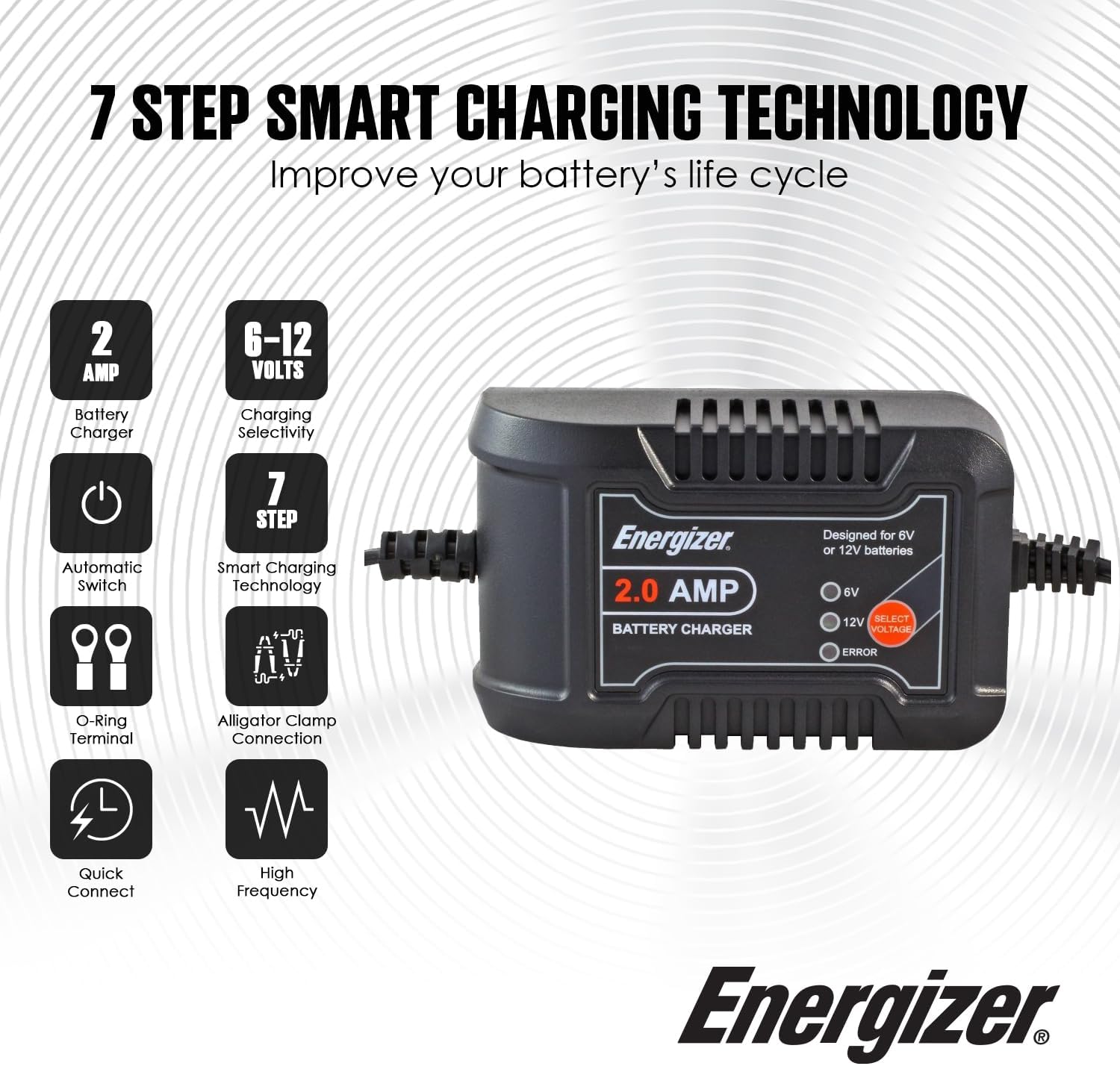
Image: Key features of the Energizer 2-Amp 7-Step Smart Battery Charger.
4. Package Contents
Upon unpacking, please ensure all items are present and undamaged:
- Energizer 2-Amp 7-Step Smart Battery Charger/Maintainer (Model ENC2A)
- Battery Clips (Alligator Clamps)
- O-Ring Terminals
- User Manual
5. Setup
Follow these steps to connect your Energizer battery charger:
- Choose Connection Method: The charger comes with two types of connectors:
- Alligator Clips: For quick, temporary connections. Ideal for jump-starting or short-term charging.
- O-Ring Terminals: For permanent installation or frequent maintenance. Securely attach to battery terminals using bolts.
- Connect to Battery:
- Using Battery Clips: Connect the RED clamp to the POSITIVE (+) terminal of the battery. Then, connect the BLACK clamp to the NEGATIVE (-) terminal of the battery.
- Using O-Ring Terminals: Attach the O-ring terminals to the battery posts according to their color (Red for positive (+), Black for negative (-)). Tighten the bolts securely.
- Plug in the Charger: Plug the charger into a standard AC outlet (110 volts).
- Select Charging Mode: The 6V or 12V indicator light will power on showing the detected voltage required for charging the battery. Press the Voltage Selection button if you wish to change the charging voltage.

Image: The SAE battery connector allows for flexible attachment using either alligator clips or O-ring terminals.

Image: O-ring terminals are ideal for permanent battery connections.

Image: Alligator clips provide a quick and temporary connection to the battery.

Image: Step-by-step guide for connecting the Energizer 2-Amp Smart Charger.

Image: The charger connected to a car battery, ready for charging or maintenance.
6. Operating Instructions
Once connected and plugged in, the Energizer 2-Amp Smart Charger operates automatically:
- The charger will automatically detect the battery voltage (6V or 12V) and begin the 7-step charging process.
- The LCD display will show the current charging status.
- When the battery is fully charged, the charger will automatically switch to float mode. In float mode, the charger maintains the battery's charge without overcharging, making it safe for long-term connection.
- To stop charging, first unplug the charger from the AC outlet, then disconnect the battery connections (black negative first, then red positive).

Image: The fully automatic smart charger charges when needed and stops when the battery is full.
7. Maintenance
Proper maintenance ensures the longevity and safe operation of your battery charger:
- Cleaning: Disconnect the charger from all power sources and batteries before cleaning. Wipe the case with a soft, damp cloth. Do not use solvents or abrasive cleaners.
- Cable Inspection: Regularly inspect the AC power cord and battery cables for any damage, cuts, or frayed insulation. Do not use the charger if cables are damaged.
- Storage: Store the charger in a cool, dry place when not in use. Ensure cables are neatly coiled and not kinked.
- Battery Terminals: Keep battery terminals clean and free of corrosion for optimal connection.
8. Troubleshooting
If you encounter issues with your Energizer battery charger, refer to the table below:
| Problem | Possible Cause | Solution |
|---|---|---|
| Charger not turning on / No display | No AC power; Faulty outlet; Damaged power cord. | Check AC outlet with another device; Ensure power cord is securely plugged in; Inspect power cord for damage. |
| Error indicator light on | Reverse polarity; Short circuit; Over voltage; Overheat; Overcharging. | Disconnect and re-connect battery ensuring correct polarity (+ to +, - to -); Check for short circuits in cables; Allow charger to cool down if overheated; Ensure battery is compatible. |
| Battery not charging | Poor connection to battery; Battery is deeply discharged or damaged; Incorrect voltage selected. | Ensure battery clamps/terminals are clean and securely connected; Have battery tested by a professional; Verify correct 6V/12V mode is selected. |
| Charger gets hot during use | Normal operation (some heat is expected); Poor ventilation; Overload. | Ensure adequate ventilation around the charger; If excessively hot or error light appears, disconnect and allow to cool. |
9. Specifications
| Specification | Detail |
|---|---|
| Brand | Energizer |
| Model Number | ENC2A |
| Output Voltage | 6V / 12V DC |
| Input Voltage | 110V AC |
| Current Rating | 2 Amps |
| Product Dimensions (D x W x H) | 1.77" x 3.11" x 4.96" |
| Item Weight | 14.4 ounces |
| Compatible Devices | Car, Motorcycle, RV, Boat, SUV (6V/12V Lead-Acid Batteries) |
| Connector Type | Battery Clips and O-Ring Terminals |
| Certifications | ETL, UL |
10. Warranty
This Energizer 2-Amp 7-Step Smart Battery Charger/Maintainer (Model ENC2A) comes with a 1-year limited warranty from the date of purchase. This warranty covers defects in materials and workmanship under normal use. It does not cover damage resulting from misuse, abuse, accidents, unauthorized repairs, or modifications.
Please retain your proof of purchase for warranty claims.
11. Support
For technical assistance, warranty claims, or further information regarding your Energizer product, please contact Energizer customer support. Refer to the official Energizer website or your product packaging for the most current contact details.
When contacting support, please have your product model number (ENC2A) and proof of purchase available.


