
1. Introduction
The JUSHENG Spovan SPV600 is a versatile outdoor digital pocket watch designed for enthusiasts of climbing, running, fishing, and other sports. It integrates multiple functions including a barometer, altimeter, thermometer, weather forecast, and smart fishing time reminders, providing essential data for your outdoor activities. This manual will guide you through the setup, operation, and maintenance of your SPV600 device.
2. Product Overview
Familiarize yourself with the components and display of your SPV600 pocket watch.

Figure 2.1: Front View and Main Display
This image shows the front of the SPV600 pocket watch, highlighting its digital display. The display currently shows the time as 19:20 and the date as 07.26. Above the time, a barometric pressure trend graph is visible, along with a weather forecast icon, indicating its multi-functional capabilities. The watch features four control buttons around its bezel.
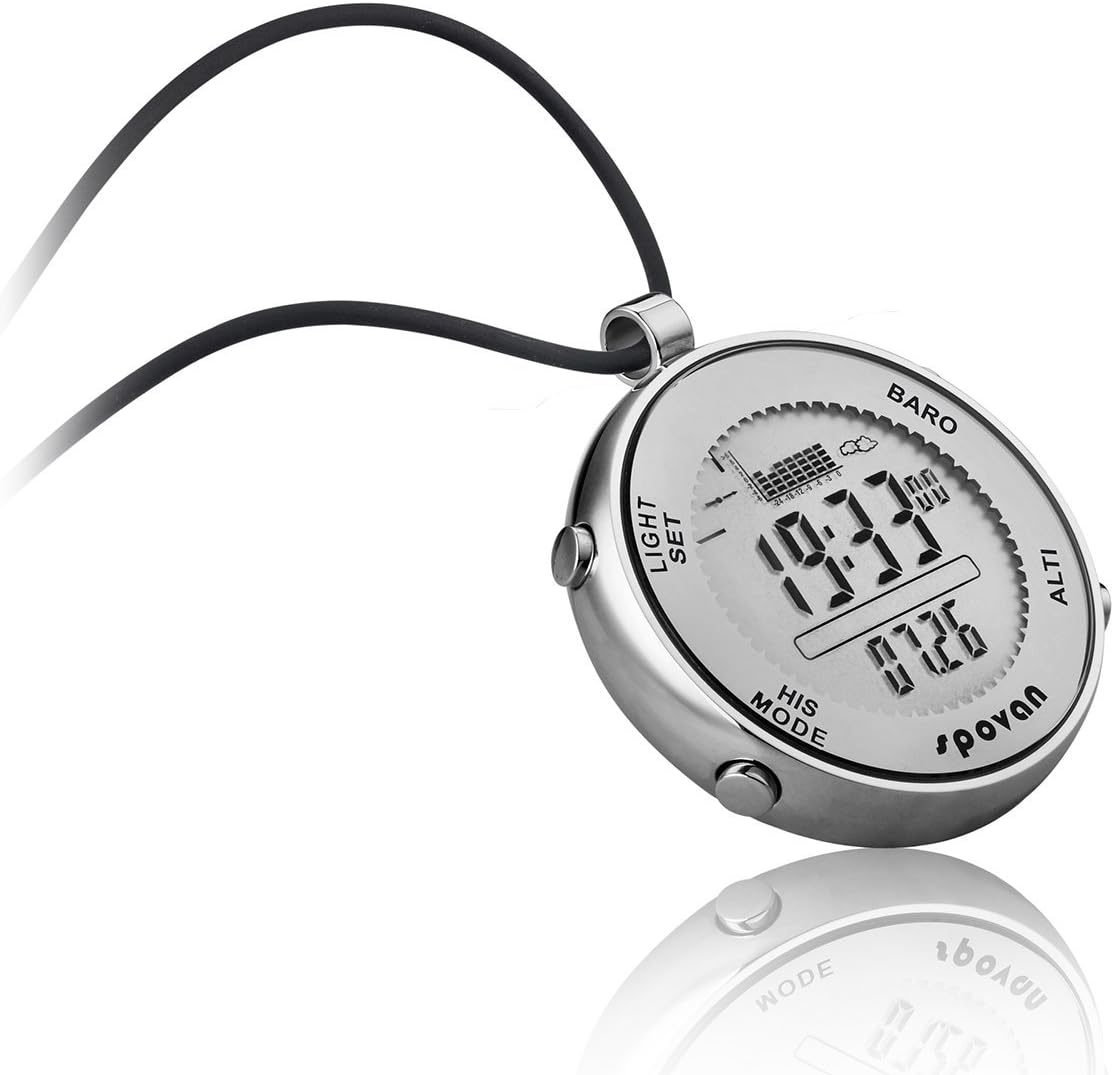
Figure 2.2: Angled View with Buttons
An angled perspective of the SPV600, providing a clearer view of the side buttons labeled "LIGHT", "SET", "HIS", and "MODE". The display shows the time as 19:33 and the date as 07.26, with the barometer graph and weather icon also visible. This view emphasizes the watch's robust design and button placement for easy access.

Figure 2.3: Temperature Display Mode
This image illustrates the SPV600 in its thermometer mode, showing the time as 19:12 and a temperature reading of 30.8°C. The barometric pressure graph remains visible at the top, demonstrating the device's ability to switch between different data displays while retaining core information.

Figure 2.4: Rear View and Engravings
The back of the SPV600 pocket watch is shown, featuring engravings that confirm its construction from "STAINLESS STEEL" and its "WATER RESISTANT" capabilities. The "ELEMENTUM SERIES" and "spovan" brand logos are also clearly visible, along with a "CE" mark, indicating compliance with European standards.
Button Functions:
- LIGHT: Activates the EL backlight for visibility in low-light conditions.
- SET: Used to enter setting modes and confirm selections.
- HIS (History): Accesses historical data records, such as pressure trends or fishing logs.
- MODE: Cycles through different operational modes (Time, Barometer, Altimeter, Thermometer, Fishing, etc.).
3. Setup
3.1 Initial Power On and Basic Settings
- Upon first use, the device may prompt for initial setup.
- Press the SET button to enter the setting mode.
- Use the MODE or HIS buttons to navigate between settings (e.g., 12/24 hour format, time zone).
- Use the SET button to adjust values (e.g., hour, minute, year, month, day).
- Press SET again to confirm and move to the next setting, or hold MODE to exit.
3.2 Unit Configuration
The SPV600 supports various units for temperature, pressure, and altitude. To change units:
- In the respective mode (e.g., Barometer or Altimeter), press and hold the SET button.
- The unit display will begin to flash.
- Use the MODE or HIS buttons to cycle through available units (e.g., °C/°F for temperature, hPa/inHg for pressure, m/ft for altitude).
- Press SET to confirm your selection.
4. Operating Instructions
The SPV600 features multiple modes accessible via the MODE button.
4.1 Time and Date Mode
- This is the default display mode, showing current time (hour, minute, second) and date (month, day).
- To adjust time/date: Press and hold SET. Use MODE/HIS to change values, and SET to move to the next field.
4.2 Barometer Mode
- Press MODE until "BARO" is displayed.
- Displays current atmospheric pressure and a 24-hour barometric pressure trend chart.
- Includes barometric pressure change arrow indication for quick reference.
- Weather forecast icon changes based on pressure trends.
- Storm Alarm: The device will alert you to rapid pressure drops indicating potential storms.
4.3 Altimeter Mode
- Press MODE until "ALTI" is displayed.
- Shows current altitude.
- Altitude can be calibrated manually if a known reference altitude is available. Press and hold SET to enter calibration mode.
4.4 Thermometer Mode
- Press MODE to cycle to the temperature display.
- Displays ambient temperature. Ensure the device is not directly exposed to body heat for accurate readings.
4.5 Fishing Mode
- Press MODE to enter Fishing Mode.
- Smart Fishing Time Remind: The device analyzes barometric pressure trends to suggest optimal fishing times.
- Fishing Place Tracking: Track up to six different fishing locations. For each location, the device records air pressure, temperature, and can estimate fishing water depth.
- Real-time Pressure Tracking: Monitors pressure changes at your current fishing spot.
- To set/view fishing locations: Use SET and HIS buttons within this mode.
4.6 Stopwatch and Countdown Timer
- Access these functions by cycling through modes with the MODE button.
- Stopwatch: Use SET to start/stop, HIS to reset.
- Countdown: Set desired time using SET, then start. An alarm will sound when the countdown finishes.
4.7 Alarm Function
- The SPV600 includes a daily alarm.
- To set the alarm: Navigate to the alarm setting mode (usually after time/date settings or a dedicated alarm mode). Use SET to adjust time and MODE/HIS to navigate.
4.8 EL Backlight
- Press the LIGHT button to illuminate the display for a few seconds.
- This feature is useful in low-light conditions.
5. Maintenance
- Cleaning: Wipe the device with a soft, damp cloth. Avoid harsh chemicals or abrasive materials.
- Water Resistance: The SPV600 is 30m waterproof. This means it is suitable for splashes, rain, and brief immersion in water. It is not recommended for diving or prolonged underwater use. Ensure all buttons are not pressed while submerged.
- Storage: Store the device in a cool, dry place when not in use. Avoid extreme temperatures.
- Battery: The device uses a standard watch battery. When the display dims or functions become erratic, it may be time for a battery replacement. It is recommended to have battery replacement performed by a qualified technician to maintain water resistance.
6. Troubleshooting
| Problem | Possible Cause | Solution |
|---|---|---|
| Display is dim or blank. | Low battery. | Replace the battery. |
| Inaccurate temperature/pressure/altitude readings. | Sensor obstruction, uncalibrated sensor, or rapid environmental changes. | Ensure sensors are clean. Calibrate altimeter if a known reference is available. Allow time for readings to stabilize after significant environmental changes. |
| Buttons are unresponsive. | Device frozen or water ingress. | Try a soft reset (if applicable, refer to manufacturer's specific reset procedure). If water ingress is suspected, cease use and allow to dry completely, then seek professional service. |
| Water inside the display. | Seal compromised or buttons pressed underwater. | Immediately cease use. Do not attempt to dry with heat. Seek professional repair to prevent further damage. |
7. Specifications
- Model: SPV600
- Manufacturer: JUSHENG Electronic Technology Co.,Ltd
- Dimensions: Approximately 4.29 x 3.54 x 3.22 inches (Package Dimensions)
- Item Display Length: 47.5 millimeters
- Weight: Approximately 10.58 ounces
- Water Resistance: 30 meters (3ATM)
- Functions: Barometer, Altimeter, Thermometer, Weather Forecast, Storm Alarm, Time, Date, Smart Fishing Time Remind, Pressure Tracking, Alarm, Stopwatch, Countdown, EL Backlight.
8. Warranty and Support
The JUSHENG Spovan SPV600 is designed for durability and performance. While specific warranty details are not provided in this manual, the product is generally expected to be free from defects in materials and workmanship under normal use. Some product information indicates a "Lifetime Warranty Against Sweat".
For technical support, warranty claims, or service inquiries, please contact JUSHENG customer service through their official channels or the retailer from whom you purchased the device. Please retain your proof of purchase for any warranty-related requests.