
1. Introduction
The mLabs HT-80A is a portable, mini digital sound level meter designed for accurate noise measurement. It features a large LCD screen for clear digital readings, and offers both Fast and Slow dynamic characteristic modes. This instrument is ideal for sound quality control in various environments including factories, offices, homes, schools, and construction sites. Its auto power-off function ensures energy saving.

Figure 1: Front view of the HT-80A Digital Sound Level Meter.
2. Product Features
- Large LCD screen with digital reading for clear display.
- Fast and Slow dynamic characteristic modes for versatile measurement.
- Auto power-off design for energy efficiency.
- Portable, easy to use, and handy for various applications.
- Max and Min Hold Function to capture peak and lowest readings.
- Equipped with a 1/2-inch electret condenser microphone for accurate sound capture.
- Measurement range of 35-130dB.
- Frequency range from 31.5Hz to 8kHz.
- A-frequency weighting.
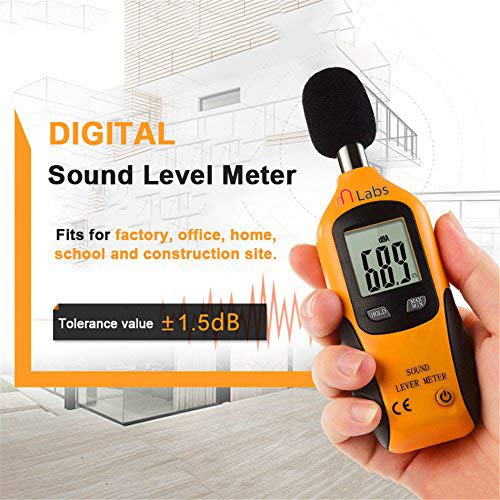
Figure 2: The HT-80A meter is suitable for various environments including factories, offices, homes, schools, and construction sites.

Figure 3: The meter features a sensitive sensor with a 0.5-second fast response time for quick and accurate measurements.
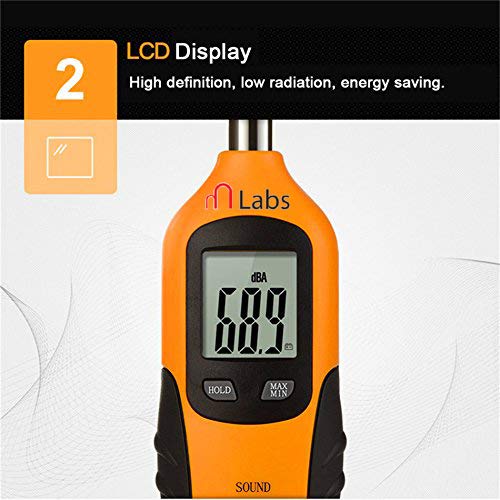
Figure 4: The high-definition LCD display provides clear readings and is designed for energy saving.
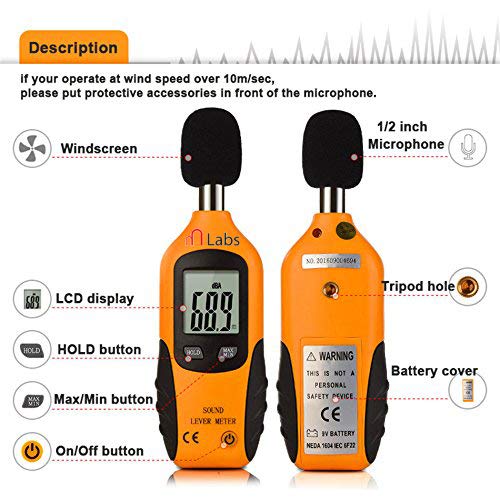
Figure 5: The meter is equipped with a 1/2-inch electret condenser microphone, featuring a metal hole design for double protection of the sound head.

Figure 6: The HT-80A offers a measurement range of 35-130dB with a tolerance value of ±0.5dB.
3. Package Contents
The standard package for the mLabs HT-80A includes:
- 1 x Mini Sound Level Meter (HT-80A)
- 1 x 9V Battery
- Original retail box
4. Setup
To set up your HT-80A Sound Level Meter for first use:
- Install Battery: Open the battery cover located on the back of the device and install the provided 9V battery, ensuring correct polarity.
- Power On: Press the power button (usually indicated by a power symbol) to turn on the meter.
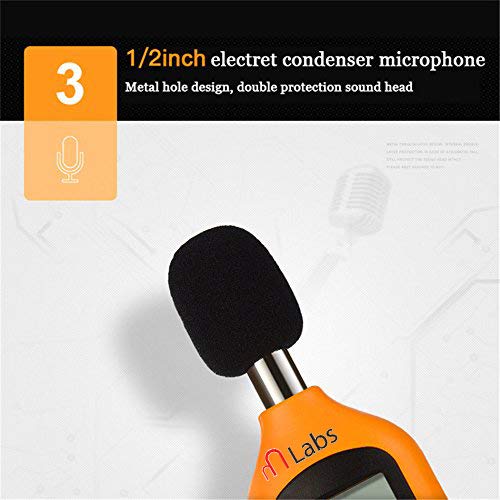
Figure 7: Diagram showing the various parts of the HT-80A, including the battery cover and buttons.
5. Operation
Follow these steps to operate your HT-80A Sound Level Meter:
- Positioning: Hold the meter comfortably in your hand or fix it on a tripod. Point the microphone directly at the suspected noise source. The sound pressure level will be displayed on the LCD screen.
- Max/Min Mode: To view the maximum or minimum sound level recorded during a measurement session, press the "MAX/MIN" button. The meter will then display the highest or lowest reading.
- Hold Function: To freeze the current reading on the display, press the "HOLD" button. Press it again momentarily to deactivate the hold function and resume live readings.
- Windscreen Usage: If operating in conditions where wind speed exceeds 10m/sec, attach the protective windscreen (if included) over the microphone to ensure accurate readings and prevent wind noise interference.
- Auto Power Off: The meter is designed to automatically shut off after approximately 15 minutes of inactivity to conserve battery life.
- Power Off: When you are finished using the meter, press and hold the power button to turn it off. For long-term storage, remove the battery.
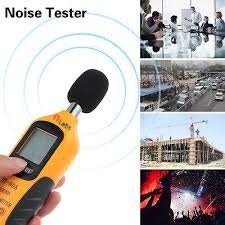
Figure 8: The HT-80A is a versatile noise tester suitable for monitoring sound levels in diverse environments such as offices, busy streets, construction sites, and events.
6. Specifications
| Parameter | Value |
|---|---|
| Model | HT-80A |
| Accuracy | ±3dB (ref 94dB @1kHz) |
| Frequency Range | 31.5Hz to 8kHz |
| Frequency Weighting | A |
| Level Range (LoA) | 35-130dB |
| Resolution | 0.1dB |
| Digital Display | LCD, 3 digits |
| Response Time | 0.5s |
| Time Weighting | FAST (125mS) |
| Microphone | 1/2 inch Electret Condenser Microphone |
| Battery Type | 9V battery |
| Operation Temperature | 0°C - 40°C (<80% R.H.) |
| Storage Temperature | -10°C ~ 60°C (<70% R.H.) |
| Auto Power Off | After approx. 15 minutes of inactivity |
| Power Life | About 50 hours (with 9V battery) |
| Dimensions | 17 x 5.8 x 3.5 cm (Product) / 10 x 8 x 6 cm (Package) |
| Item Weight | 140g (Product) / 249g (Package) |
| Color | Black and Yellow and Gray |
7. Maintenance
- Cleaning: Use a soft, dry cloth to clean the exterior of the meter. Do not use abrasive cleaners or solvents.
- Storage: When not in use for extended periods, remove the 9V battery to prevent leakage and store the meter in a cool, dry place, away from direct sunlight and extreme temperatures.
- Microphone Care: Protect the microphone from dust, moisture, and physical impact. If a windscreen is provided, use it in windy or dusty conditions.
- Battery Replacement: Replace the 9V battery when the low battery indicator appears on the display or if the meter fails to power on.
8. Troubleshooting
| Problem | Possible Cause | Solution |
|---|---|---|
| Meter does not power on. | Dead or incorrectly installed battery. | Check battery polarity; replace with a new 9V battery. |
| "OL" displayed on screen. | Input sound level is out of range (Overload). | Move the meter further away from the sound source or reduce the sound level if possible. |
| Inaccurate readings. | Microphone obstructed, strong wind, or environmental interference. | Ensure microphone is clear. Use windscreen in windy conditions. Minimize other noise sources. |
| Display freezes or is unresponsive. | Hold function is active or temporary software glitch. | Press the "HOLD" button to deactivate. If still frozen, remove and reinsert battery to reset. |
9. Warranty and Support
Specific warranty information for the mLabs HT-80A Digital Sound Level Meter is not provided in this manual. Please refer to the product packaging or contact mLabs customer support for details regarding warranty coverage and technical assistance.
For further support, you may visit the mLabs official website or contact their customer service department using the contact information provided with your purchase.

