
Kronings CT1500
Kronings Camper Trolley CT1500 User Manual
Model: CT1500
1. Introduction
This manual provides essential information for the safe and efficient operation of your Kronings Camper Trolley CT1500. The Camper Trolley is designed to assist with the maneuvering and positioning of your caravan, trailer, boat, or van safely in confined spaces. Please read this manual thoroughly before initial use and keep it for future reference.
2. Safety Information
Always prioritize safety when operating the Camper Trolley.
- Ensure the area around the caravan/trailer is clear of obstacles and people before operation.
- Do not exceed the maximum displacement capacity of 1700 kg.
- Operate on compact surfaces only. Avoid soft ground, steep inclines, or uneven terrain.
- Keep hands and feet clear of the tracks and moving parts.
- Do not expose the unit to excessive moisture or extreme temperatures.
- Always disconnect the unit from the caravan/trailer and store it safely when not in use.
- Use only the provided remote control for operation.
- Ensure the battery is fully charged before each use.
3. Product Overview
The Kronings Camper Trolley CT1500 is a robust, remote-controlled maneuvering device. It features two durable rubber tracks powered by reinforced gear motors, allowing for precise movement.
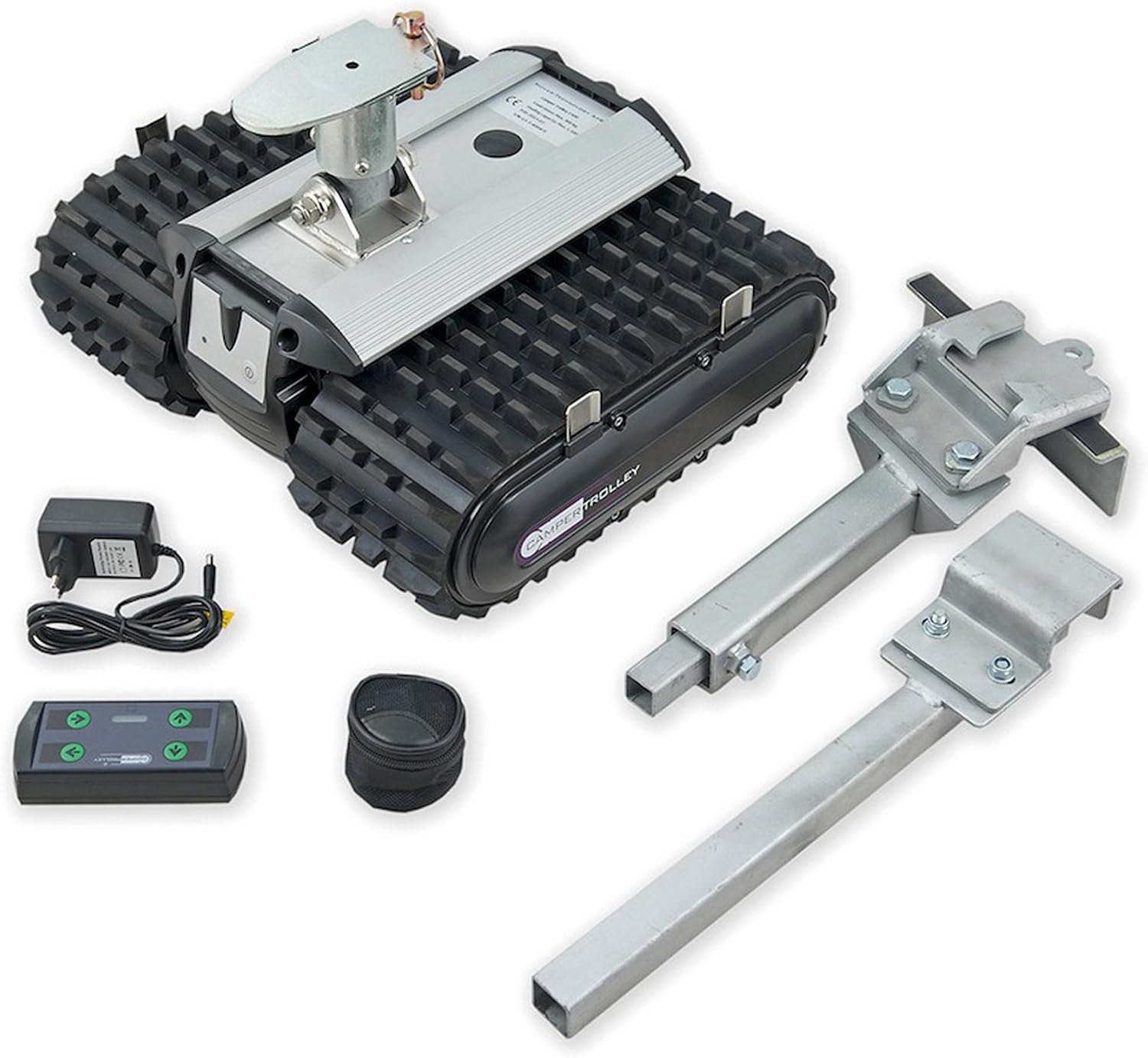
Figure 3.1: Overview of the Kronings Camper Trolley CT1500 and its components. This image displays the main trolley unit with its rubber tracks, a remote control, a power adapter for charging, and two attachment arms for connecting to a caravan or trailer hitch.
3.1 Key Features:
- Capacity: Up to 1700 kg displacement.
- Speed: 9 meters per minute.
- Power: Rechargeable Lithium-Ion battery.
- Control: 2.4Ghz remote control.
- Drive System: Two robust rubber tracks.
- Dimensions (LxWxH): 39 x 44 x 28 cm.
- Weight: 18 kg.
3.2 What's in the Box:
- Camper Trolley CT1500 Unit
- Remote Control
- Charging Adapter
- Attachment Arms (for hitch connection)
4. Setup
The Camper Trolley is designed for straightforward setup.
4.1 Charging the Battery:
- Locate the charging port on the Camper Trolley unit.
- Connect the provided charging adapter to the unit and a suitable power outlet.
- Allow the battery to fully charge before first use. The charging indicator will show the status.
4.2 Attaching to the Caravan/Trailer:
- Position the Camper Trolley unit directly under the caravan's hitch.
- Secure the provided attachment arms to the caravan's drawbar/hitch mechanism. Ensure a firm and stable connection.
- Carefully lower the caravan's jockey wheel onto the Camper Trolley's mounting plate.
- Verify that the trolley is securely attached and balanced before proceeding.

Figure 4.1: The Camper Trolley CT1500 securely attached to a caravan's hitch. This image shows the trolley unit positioned beneath the caravan's A-frame, with the attachment arms connected to the drawbar, ready for maneuvering.
5. Operating Instructions
The Camper Trolley is operated via a pocket-sized remote control.
5.1 Remote Control Functions:
- Power Button: Turns the unit ON/OFF.
- Directional Buttons: Control forward, backward, left, and right movement.
- Speed Control: Adjusts the speed of movement (if applicable, otherwise fixed speed).
5.2 Maneuvering the Caravan/Trailer:
- Ensure the Camper Trolley is securely attached and the area is clear.
- Turn on the Camper Trolley unit and the remote control.
- Use the directional buttons on the remote control to guide the caravan/trailer.
- Move slowly and deliberately, especially in tight spaces.
- Always maintain a clear line of sight to the caravan/trailer and the trolley.
- To stop movement, release the directional button.
- Once positioned, turn off the Camper Trolley and remote control, then detach the unit from the caravan/trailer.
6. Maintenance
Regular maintenance ensures the longevity and optimal performance of your Camper Trolley.
- Cleaning: Wipe down the unit with a damp cloth after use. Avoid using harsh chemicals or abrasive cleaners.
- Battery Care: Recharge the Lithium-Ion battery regularly, even during periods of non-use, to maintain its health. Store the unit with a partially charged battery if storing for extended periods.
- Track Inspection: Periodically inspect the rubber tracks for wear, damage, or debris. Clean any lodged debris.
- Storage: Store the Camper Trolley in a dry, cool place, away from direct sunlight and extreme temperatures.
7. Troubleshooting
This section addresses common issues you might encounter.
| Problem | Possible Cause | Solution |
|---|---|---|
| Unit does not power on. | Battery is discharged. | Charge the battery fully. |
| Unit does not respond to remote control. | Remote control battery low or unit not paired. | Replace remote control batteries. Refer to pairing instructions (if applicable, not detailed in input). Ensure unit is powered on. |
| Trolley struggles to move or slips. | Overload, uneven surface, or soft ground. | Ensure load is within capacity (max 1700kg). Move to a compact, level surface. |
| Unusual noises during operation. | Debris in tracks or mechanical issue. | Inspect tracks for debris and remove. If noise persists, contact support. |
8. Specifications
| Attribute | Detail |
|---|---|
| Brand | Kronings |
| Model Name | CT1500 |
| Manufacturer Model Number | 044230 |
| Displacement Capacity | Up to 1700 kg |
| Speed | 9 meters per minute |
| Power Source | Rechargeable Lithium-Ion Battery |
| Control Method | Remote Control (2.4Ghz) |
| Dimensions (LxWxH) | 39 x 44 x 28 cm |
| Weight | 18 kg |
| Material | Rubber (tracks) |
9. Warranty and Support
For warranty information and technical support, please contact your retailer or the manufacturer directly. Keep your proof of purchase for any warranty claims. The manufacturer is Narbonne Accessoires.
Manufacturer: Narbonne Accessoires
Return Policy: Typically 30 days for refund/replacement, as per retailer's policy.
Related documentsCT1500


Ask a question about this manual
Ask about setup, troubleshooting, compatibility, parts, safety, or missing instructions. Manuals+ will review the question and use this page’s manual context to help answer it.