
Vintage Electronics SCT-84
Vintage Electronics Complete Belt Kit for Realistic SCT-84 Instruction Manual
Introduction
This manual provides detailed instructions for the installation and maintenance of the Vintage Electronics Complete Belt Kit for the Realistic SCT-84 cassette deck. This kit includes all four necessary drive belts, manufactured to meet original equipment manufacturer (OEM) specifications, ensuring optimal performance and longevity for your audio equipment.
Safety Information
WARNING:
- Always disconnect the Realistic SCT-84 cassette deck from its power source before beginning any installation or maintenance procedures.
- Exercise caution when handling internal components to avoid damage to sensitive electronics.
- If you are unsure about any step, consult a qualified technician.
Installation Guide
This belt kit is designed for straightforward installation without the need for specialized tools. Follow these steps carefully:
Tools Required:
- Small Phillips head screwdriver (for opening the cassette deck casing)
- Tweezers or small pliers (optional, for belt manipulation)
- Clean cloth or cotton swabs (for cleaning pulleys)
- Isopropyl alcohol (for cleaning pulleys)
Step-by-Step Installation:
- Prepare the Cassette Deck:
Ensure the Realistic SCT-84 is unplugged from the power outlet. Place the unit on a clean, stable surface with adequate lighting.
- Open the Casing:
Carefully remove the screws securing the outer casing of the cassette deck. Gently lift and remove the casing to expose the internal mechanisms. Note the position of any existing belts before removal.
- Remove Old Belts:
Locate the old drive belts. These may be stretched, cracked, or melted. Carefully remove all old belts from their pulleys and motor shafts. Dispose of them properly.
- Clean Pulleys and Shafts:
Using a clean cloth or cotton swab lightly dampened with isopropyl alcohol, thoroughly clean all pulleys and motor shafts where the new belts will be seated. This removes any residue from old belts, ensuring optimal grip and preventing slippage.
- Install New Belts:
Refer to the diagram below (if available in the original service manual) or carefully observe the path of the old belts. Install the new belts one by one, ensuring they are correctly seated on their respective pulleys and motor shafts. Gently rotate the flywheel by hand to confirm the belts are properly aligned and move freely without obstruction.
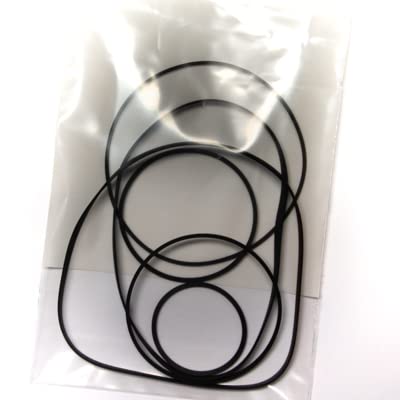
Figure 1: The Vintage Electronics Complete Belt Kit for Realistic SCT-84. This image displays the four new rubber drive belts included in the kit, designed to replace worn belts in your cassette deck. Each belt is manufactured to OEM specifications for precise fit and function.
- Reassemble the Casing:
Once all belts are installed and verified, carefully replace the outer casing of the cassette deck and secure it with the screws removed earlier. Do not overtighten the screws.
Post-Installation Check
After installing the new belt kit, perform the following checks to ensure proper operation:
- Power On: Plug the Realistic SCT-84 back into the power outlet.
- Function Test: Insert a cassette tape and test all functions: Play, Fast Forward, Rewind, and Stop. Listen for any unusual noises or signs of belt slippage.
- Sound Quality: Play a known good tape and ensure the audio playback is stable and at the correct speed. Wow and flutter should be minimal.
If any issues arise, refer to the Troubleshooting section.
Maintenance
Proper maintenance of your cassette deck, including the drive belts, will extend its lifespan and ensure consistent performance:
- Regular Cleaning: Periodically clean the tape heads, capstan, and pinch roller with a specialized head cleaner and cotton swabs.
- Dust Prevention: Keep the cassette deck covered when not in use to prevent dust accumulation, which can affect belt performance and other components.
- Belt Inspection: While the belts are designed for durability, occasional visual inspection during other maintenance (e.g., head cleaning) can help identify early signs of wear.
Troubleshooting
If you encounter issues after installing the new belt kit, consider the following:
| Problem | Possible Cause | Solution |
|---|---|---|
| Tape speed is inconsistent (wow/flutter) | Belts not properly seated; pulleys dirty; incorrect belt tension. | Re-open the deck and verify all belts are correctly installed and pulleys are clean. Ensure belts are not twisted. |
| Fast Forward/Rewind not working or slow | FF/RW belt not installed or slipping; dirty pulleys. | Check the specific FF/RW belt for proper installation and clean its associated pulleys. |
| No movement from tape mechanism | Main drive belt not installed or broken; motor issue (less likely with new belts). | Verify the main drive belt is correctly installed. If the motor is not spinning, further diagnosis may be required. |
| Unusual grinding or squeaking noises | Belts rubbing against components; dry bearings; foreign object. | Inspect the belt path for obstructions. Lubricate moving parts if necessary (refer to service manual for lubrication points). |
If troubleshooting steps do not resolve the issue, please contact Vintage Electronics support.
Specifications
- Product: Complete Belt Kit
- Compatibility: Realistic SCT-84 Cassette Deck
- Number of Belts: 4
- Material: High-quality rubber, manufactured to OEM specifications
- Warranty: Lifetime Warranty
- Tools Required: No special tools needed for belt installation (basic screwdriver for casing removal)
Warranty and Support
Vintage Electronics provides a Lifetime Warranty on all belts included in this kit. This warranty covers manufacturing defects and premature wear under normal operating conditions.
For warranty claims, technical support, or any questions regarding your Vintage Electronics product, please contact our customer service department. Please have your purchase information ready when contacting support.
Contact Information: (Please refer to your purchase receipt or the Vintage Electronics website for current contact details.)
Ask a question about this manual
Ask about setup, troubleshooting, compatibility, parts, safety, or missing instructions. Manuals+ will review the question and use this page’s manual context to help answer it.