
Introduction
This manual provides instructions for the safe and efficient operation of your GPO Ambassador Bluetooth Turntable. Please read this manual thoroughly before using the product and retain it for future reference.
The GPO Ambassador is a portable 3-speed turntable featuring built-in stereo speakers, Bluetooth connectivity for external speakers, and a USB port for recording vinyl to MP3 format.
Important Safety Information
- Do not expose the unit to rain or moisture.
- Do not block any ventilation openings.
- Ensure the power adapter is easily accessible.
- Use only attachments/accessories specified by the manufacturer.
- Refer all servicing to qualified service personnel.
Package Contents
Verify that all items are present:
- GPO Ambassador Bluetooth Turntable
- Power Adapter
- USB Stick
- User Manual (this document)
Setup
1. Unpacking and Placement
Carefully remove the turntable from its packaging. Place the unit on a stable, level surface away from direct sunlight, heat sources, and excessive dust or vibrations.
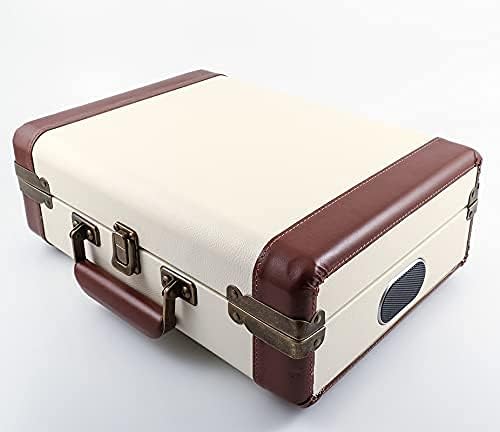
Image: The GPO Ambassador Turntable in its closed, portable briefcase configuration.
2. Power Connection
Connect the supplied power adapter to the DC input jack on the rear of the turntable and then plug it into a wall outlet. The unit may contain an internal rechargeable battery for portable use; ensure it is charged before first use for optimal performance.
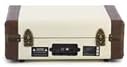
Image: Rear panel of the turntable, illustrating the power input and other connectivity options.
3. Stylus Protection
Before playing a record, gently remove the clear plastic stylus protector from the needle. Be careful not to bend the stylus.

Image: Detailed view of the turntable's stylus and tonearm assembly.
Operating Instructions
1. Playing a Record
- Open the turntable lid.
- Place a record on the platter.
- Select the appropriate speed (33, 45, or 78 RPM) using the speed selector switch. For 45 RPM singles, place the included adapter on the spindle.
- Release the tonearm lock.
- Gently lift the tonearm using the cueing lever and position it over the desired track on the record.
- Lower the tonearm slowly onto the record using the cueing lever. The record will begin to play.
- Adjust the volume using the PWR/VOL knob.

Image: The GPO Ambassador Turntable in operation, playing a vinyl record, with an optional external GPO speaker.
2. Bluetooth Connectivity
The GPO Ambassador can connect wirelessly to external Bluetooth speakers for enhanced audio output.
- Ensure your external Bluetooth speaker is in pairing mode.
- Turn on the GPO Ambassador. The Bluetooth indicator light will flash, indicating it is searching for a device.
- Once connected, the indicator light will become solid.
- Adjust the volume on both the turntable and the external speaker for optimal sound quality and to avoid any potential hiss.

Image: The turntable platter with a record, showing the Bluetooth connection indicator.
3. Recording Vinyl to MP3 (USB)
Use the included USB stick to digitize your vinyl collection.
- Insert the USB stick into the USB port on the turntable.
- Start playing your record as described above.
- Press the "Record" button (refer to the unit's controls for exact button location, typically near the volume knob) to begin recording.
- Press the "Stop" button to end the recording. The audio will be saved as an MP3 file on the USB stick.
- Safely remove the USB stick after recording is complete.

Image: Control panel detail, showing the pitch and volume knobs, and other function buttons.
Maintenance
1. Cleaning the Unit
Wipe the turntable's exterior with a soft, dry cloth. Do not use abrasive cleaners or solvents. Keep the lid closed when not in use to prevent dust accumulation on the platter and stylus.
2. Stylus Care
The stylus (needle) is a delicate component. Clean it periodically with a soft brush, brushing gently from back to front. Replace the stylus if you notice a decrease in sound quality or visible damage. Replacement styli are available from GPO authorized dealers.
Troubleshooting
| Problem | Possible Cause | Solution |
|---|---|---|
| No power | Power adapter not connected or outlet not active. | Ensure power adapter is securely connected and the wall outlet is functioning. Check if the internal battery needs charging. |
| No sound from speakers | Volume too low; stylus protector still on; tonearm not lowered; Bluetooth connected to external speaker. | Increase volume. Remove stylus protector. Lower tonearm. Disconnect Bluetooth if you want sound from internal speakers. |
| Skipping or distorted sound | Dirty or damaged record; dirty or worn stylus; turntable not level. | Clean the record. Clean or replace the stylus. Ensure the turntable is on a stable, level surface. |
| Bluetooth connection issues | External speaker not in pairing mode; too far from turntable; interference. | Ensure external speaker is in pairing mode. Move turntable closer to the speaker. Reduce interference from other devices. |
| Hissing sound via Bluetooth | Incorrect volume balance between turntable and external speaker. | Turn the turntable volume to maximum, then adjust the listening volume using the external Bluetooth speaker's controls. |
Specifications
- Model Name: Ambassador
- Brand: GPO
- Speeds: 33, 45, 78 RPM
- Connectivity: Bluetooth, USB (for recording), Line Out
- Speakers: Built-in Stereo Speakers
- Recording: Direct to MP3 via USB
- Power: AC Power Adapter, Internal Rechargeable Battery (for portability)
- Material: Plastic
- Dimensions (L x W x H): 139.76 x 108.27 x 53.15 inches (Note: These dimensions appear unusually large for a portable unit. Please refer to product packaging for exact measurements.)
- Weight: 5.5 pounds (approx. 2.5 kg)
- Included Components: USB stick
Warranty and Support
For warranty information and technical support, please refer to the warranty card included with your product or visit the official GPO website. Keep your proof of purchase for warranty claims.
Manufacturer: GPO
Date First Available: June 12, 2016


