
1. Introduction
This manual provides detailed instructions for the installation, operation, and maintenance of your Focal FPX1.1000 Class D Mono Amplifier. Please read this manual thoroughly before attempting installation or operation to ensure proper function and safety. Retain this manual for future reference.
2. Safety Instructions
Observe the following safety precautions to prevent injury or damage to the amplifier and vehicle:
- Professional Installation Recommended: Installation of car audio equipment can be complex. It is highly recommended that a qualified professional install this amplifier.
- Disconnect Battery: Always disconnect the vehicle's negative battery terminal before starting any electrical work to prevent short circuits.
- Proper Wiring: Use appropriate gauge wiring for power, ground, and speaker connections as specified in the installation section. Incorrect wiring can cause overheating, fire, or damage to components.
- Ventilation: Ensure the amplifier is mounted in a location with adequate ventilation to prevent overheating. Do not block cooling fins.
- Avoid Moisture: Do not expose the amplifier to moisture or water.
- Secure Mounting: Mount the amplifier securely to prevent it from coming loose during vehicle operation, which could cause injury or damage.
- Fuse Protection: Always use an external fuse on the main power wire, close to the battery, with the recommended amperage.
3. Product Overview
3.1 Key Features
- CEA Power (4 Ohms): 1×420 Wrms
- Maximum Power (2 Ohms): 1×700 Wrms
- Maximum Power (1 Ohm): 1×1000 Wrms
- Bandwidth: 15Hz–250Hz
- Integrated Protections: Short Circuit, low impedance, reversal of polarity, DC, power drop, heat protection.
- Class D Mono Amplifier design for high power and efficiency.
3.2 What's in the Box
- Focal FPX1.1000 Mono Amplifier
- User Manual (this document)
- Mounting hardware (screws, etc.)
4. Installation and Setup
Proper installation is crucial for optimal performance and safety. Consult a professional installer if you are unsure about any steps.
4.1 Mounting Location
Choose a mounting location that is:
- Dry and free from moisture.
- Well-ventilated to allow for heat dissipation.
- Secure and protected from physical damage.
- Away from fuel lines, brake lines, and electrical wiring harnesses.
Common locations include under a seat, in the trunk, or behind a panel.
4.2 Wiring Connections
Before making any connections, disconnect the vehicle's negative battery terminal.
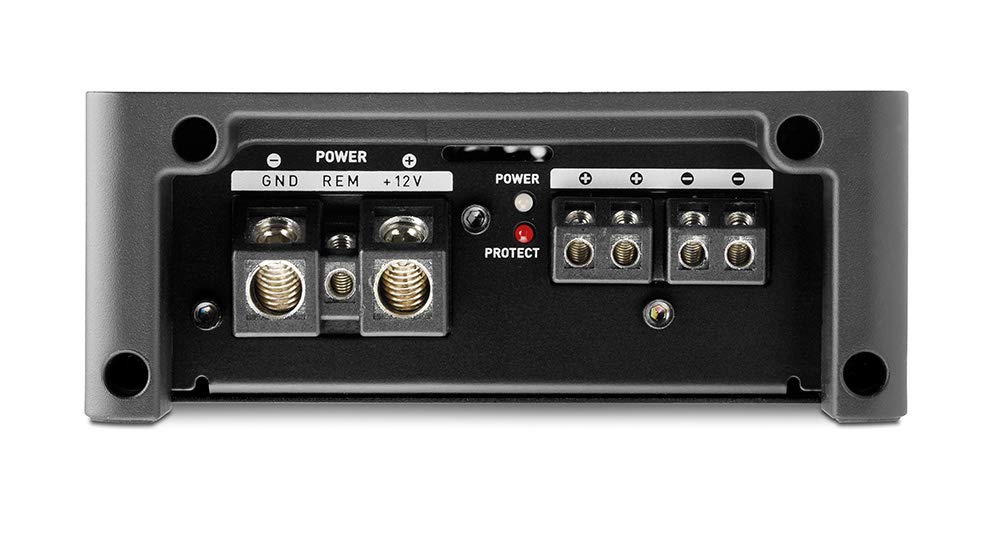
Image 1: Power and Speaker Terminal Connections. This image displays the rear panel of the amplifier, highlighting the power input terminals (GND, REM, +12V) and the speaker output terminals. A red 'PROTECT' indicator light is also visible.
- Power Wire (+12V): Run a heavy-gauge power wire (e.g., 4 AWG or larger, depending on total system power) directly from the positive terminal of the vehicle's battery to the +12V terminal on the amplifier. Install an inline fuse holder with the appropriate fuse (refer to specifications for recommended fuse size) within 18 inches (45 cm) of the battery.
- Ground Wire (GND): Connect a heavy-gauge ground wire (same gauge as power wire) from the GND terminal on the amplifier to a clean, unpainted metal surface on the vehicle's chassis. Ensure a good electrical connection by scraping away any paint or rust. The ground wire should be as short as possible, ideally less than 3 feet (1 meter).
- Remote Turn-On Wire (REM): Connect a smaller gauge wire (e.g., 18 AWG) from the REM terminal on the amplifier to the remote turn-on output of your head unit or other switched 12V source. This wire turns the amplifier on and off with your audio system.
- Speaker Output: Connect your subwoofer(s) to the speaker output terminals. Ensure correct polarity (+ to + and - to -). This is a mono amplifier, designed for a single subwoofer or multiple subwoofers wired to present a 1-ohm or 2-ohm load. Refer to your subwoofer's specifications for impedance matching.
- RCA Input: Connect RCA cables from the subwoofer output of your head unit to the INPUT CH1/CH2 RCA jacks on the amplifier.

Image 2: Input and Control Panel. This image shows the front panel of the amplifier, featuring RCA input and output jacks, a remote port, and various control knobs for Gain, Subsonic filter, Bass Boost, Phase, and Low Pass Filter (LPF).
5. Operating Instructions
Once installed, adjust the amplifier settings for optimal sound performance.
5.1 Control Panel Adjustments
- GAIN (Input Sensitivity): This control matches the amplifier's input sensitivity to the output level of your head unit. Start with the gain at minimum (Min) and slowly increase it until you hear distortion, then back off slightly. Do not use the gain control as a volume knob.
- SUBSONIC: This filter removes extremely low frequencies that are inaudible and can waste amplifier power or damage subwoofers. Adjust it to a frequency below your subwoofer's resonant frequency or port tuning frequency (typically 15-30Hz).
- BASS BOOST: This control provides an increase in bass output at a specific frequency. Use sparingly to avoid distortion and potential damage to subwoofers.
- PHASE: This control adjusts the phase of the subwoofer output relative to the main speakers (0° to 180°). Adjust for the best blend and impact with your front speakers.
- LPF (Low Pass Filter): This filter allows only frequencies below the set point to pass through to the subwoofer. Adjust it to blend smoothly with your main speakers, typically between 50Hz and 80Hz.
5.2 Power and Protection Indicators
- Power Indicator: Illuminates when the amplifier is receiving power and operating normally.
- Protect Indicator: Illuminates when the amplifier detects a fault (e.g., short circuit, overheating, low impedance). If this light comes on, turn off your audio system immediately and troubleshoot the issue.
6. Maintenance
The Focal FPX1.1000 amplifier requires minimal maintenance. Follow these guidelines to ensure longevity:
- Cleaning: Periodically wipe the amplifier's exterior with a soft, dry cloth. Do not use harsh chemicals or abrasive cleaners.
- Ventilation: Ensure that the cooling fins remain free of dust and debris. Use compressed air to gently clear any blockages if necessary.
- Connections: Occasionally check all wiring connections to ensure they are secure and free from corrosion.
7. Troubleshooting
If you experience issues with your amplifier, consult the following table before seeking professional service:
| Problem | Possible Cause | Solution |
|---|---|---|
| No Power / Amplifier does not turn on |
|
|
| Protect light is on |
|
|
| No Sound |
|
|
| Distorted Sound |
|
|
8. Specifications
| Feature | Detail |
|---|---|
| Model Number | FPX1.1000 |
| Brand | Focal |
| CEA Power (4 Ohms) | 1×420 Wrms |
| Maximum Power (2 Ohms) | 1×700 Wrms |
| Maximum Power (1 Ohm) | 1×1000 Wrms |
| Bandwidth | 15Hz–250Hz |
| Protections | Short Circuit, low impedance, reversal of polarity, DC, power drop, heat protection |
| Product Dimensions | 11.81 x 11.81 x 11.81 inches; 6 Pounds |
| Mounting Type | Surface Mount |
| Voltage | 10 Volts, 14.4 Volts, 5 Volts (Operating Voltage Range) |
9. Warranty and Support
Focal products are designed and manufactured to high quality standards. This product is covered by a limited warranty against defects in materials and workmanship. The specific terms and duration of the warranty may vary by region and retailer. Please retain your proof of purchase for warranty claims.
For technical support, warranty service, or further assistance, please contact your authorized Focal dealer or visit the official Focal website for contact information.


