
Introduction
The Howard Leight Impact Sport Electronic Earmuff is designed to provide effective hearing protection while enhancing situational awareness. It features advanced electronic sound amplification and automatic noise reduction for various environments.
Key Features:
- Active Hearing Protection: Automatically reduces impulse noises, such as gunfire, to a safe level of 82 dB. Noise Reduction Rating (NRR) of 22.
- Situational Awareness: 4X sound amplification for low-level sounds like commands and conversations. Two omni-directional microphones help identify sound sources, with recessed placement to minimize wind noise.
- Comfortable & Low-Profile Design: Slim earcups for firearm stock clearance. Padded, adjustable headband for a comfortable fit. Folding design for compact storage.
- Energy Efficient Operation: Automatic shut-off after four hours, providing approximately 350 hours of battery life. Accessible battery compartment and a single power/volume control knob.
- Audio Input: Includes an AUX input jack for connecting external audio devices.

Image: Howard Leight Impact Sport Electronic Earmuff in black, showcasing its compact, folded design.
Setup
1. Battery Installation
- Locate the battery compartment on one of the earcups.
- Open the compartment cover.
- Insert two AAA batteries, ensuring correct polarity (+/-).
- Close the battery compartment cover securely.
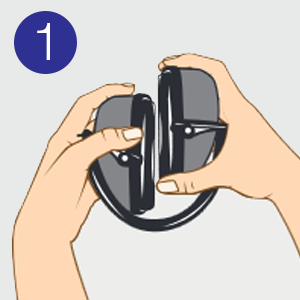
Image: Illustration demonstrating the correct way to insert AAA batteries into the earmuff's battery compartment.
2. Adjusting for Fit
- Unfold the Earmuffs: Gently extend the headband and rotate the earcups into position.
- Position on Head: Place the earmuffs over your ears, ensuring the earcups fully cover your ears.
- Adjust Headband: Slide the earcups up or down along the headband until they fit snugly and comfortably around your ears. The headband should rest over the top of your head.
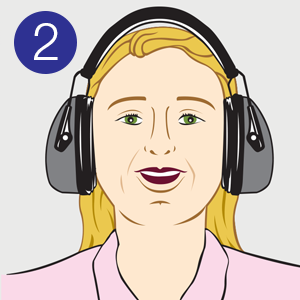
Image: Illustration showing the earmuffs being unfolded from their compact storage position.
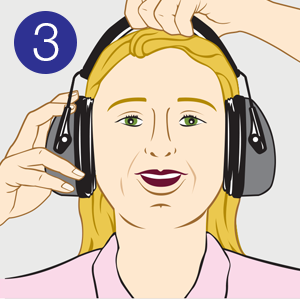
Image: Illustration depicting a person placing the earmuffs over their ears.
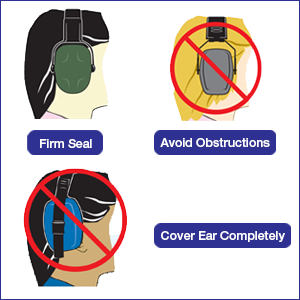
Image: Illustration showing how to adjust the headband for a secure and comfortable fit.
Important Fit Considerations:

Image: Diagram illustrating proper earmuff fit: ensuring a firm seal, avoiding obstructions, and completely covering the ear.
- Ensure a firm seal around your ears.
- Avoid obstructions like hair, glasses, or hats that could break the seal.
- The earcups must cover your ears completely.
Operating Instructions
Power On/Off and Volume Control
The earmuff features a single knob for both power and volume control, located on one of the earcups.
- To power on, rotate the knob clockwise until you hear a click and the unit activates.
- Continue rotating clockwise to increase the volume of ambient sounds.
- Rotate counter-clockwise to decrease the volume.
- To power off, rotate the knob counter-clockwise until you hear a click and the unit deactivates.

Image: Close-up view of the earmuff earcup, highlighting the recessed controls and the power/volume knob.
Automatic Noise Reduction
The earmuff is equipped with electronic circuitry that automatically detects and suppresses loud impulse noises above 82 dB, such as gunshots, to protect your hearing. This function operates automatically when the unit is powered on.

Image: A person wearing the earmuffs, illustrating the features of ambient sound amplification and automatic noise-blocking.
AUX Input Functionality
An auxiliary input jack is provided for connecting external audio devices like music players or scanners.
- Connect one end of the included 3.5 mm audio cable to the AUX input jack on the earmuff.
- Connect the other end of the cable to your external audio device.
- Adjust the volume on both your audio device and the earmuff for desired listening levels.

Image: The earmuff connected to a smartphone using the auxiliary cable, demonstrating its headphone functionality.
Automatic Shut-Off
To conserve battery life, the earmuff will automatically power off after four hours of continuous operation if no sound input or adjustments are detected.
Maintenance
Cleaning
- Wipe the exterior of the earmuffs with a damp cloth. Do not submerge in water.
- Use mild soap if necessary, but avoid harsh chemicals or abrasive cleaners.
- Ensure the earmuffs are completely dry before storage or next use.
Ear Cushion Replacement
For optimal performance and hygiene, ear cushions should be replaced periodically. Replacement cushions are available separately.
- Gently peel off the old ear cushions from the earcup. They are designed to snap in and out.
- Align the new ear cushion with the earcup and press firmly around the edges until it snaps securely into place.
- Ensure a tight seal for effective hearing protection.

Image: The earmuff with one ear cushion removed, illustrating the snap-in design for easy replacement.
Troubleshooting
| Problem | Possible Cause | Solution |
|---|---|---|
| No sound or low volume |
|
|
| Poor hearing protection |
|
|
| Distorted sound |
|
|
Specifications
| Feature | Detail |
|---|---|
| Model Number | R-02524SIOC |
| Noise Reduction Rating (NRR) | 22 dB |
| Sound Amplification | 4X |
| Automatic Shut-off | 4 hours |
| Battery Type | 2 x AAA (included) |
| Estimated Battery Life | Approximately 350 hours |
| Weight | 12 ounces (approx. 340 grams) |
| Dimensions (Product) | 3.75 x 5 x 8.25 inches (approx. 9.5 x 12.7 x 21 cm) |
| Material | Plastic |
| Color | Black |
Safety Information
WARNING: This product contains chemicals known to the State of California to cause cancer and birth defects or other reproductive harm.
Always ensure proper fit and function of the earmuffs before entering noisy environments. Failure to do so may result in hearing damage.
Warranty and Support
Warranty Information
For detailed warranty information, please refer to the official warranty document available at: Howard Leight Warranty Document.
Customer Support
For further assistance, product inquiries, or to purchase replacement parts, please visit the official Howard Leight store: Howard Leight Store on Amazon.