
1. Introduction
This manual provides comprehensive instructions for the installation, operation, and maintenance of your ARIES AeroTread 5" x 73" Black Stainless Running Boards. These running boards are designed to provide a secure and comfortable step into your SUV or crossover, enhancing both functionality and vehicle aesthetics. Please read all instructions carefully before proceeding with installation.
Important Note: Mounting brackets are sold separately and are required for installation. Ensure you have the correct vehicle-specific brackets for your application.

Figure 1: ARIES AeroTread 5" x 73" Black Stainless Running Boards. This image displays the two running boards from an elevated perspective, highlighting their sleek design and full-length tread pattern.
2. Product Features
- Sleek Design: AeroTread running boards feature a modern profile with rounded corners, tapered ends, and an aerodynamic-style tread pattern, designed to complement contemporary SUVs and crossovers.
- Dual Construction: Built with a robust, lightweight aluminum core for durability, covered by a black stainless steel trim accent piece for enhanced aesthetics and protection.
- Corrosion Resistance: Both the aluminum base and stainless steel trim are highly resistant to rust. The trim piece is finished with a durable carbide black powder coat for maximum corrosion protection.
- Comfortable Step: Equipped with 5-inch wide, full-length, non-skid treads, these step bars provide a secure and comfortable stepping surface along the entire length of the board.
- No-Drill Installation: Designed for installation without drilling, utilizing vehicle-specific brackets and pre-existing holes in the vehicle's frame. Brackets are sold separately.

Figure 2: Overview of ARIES AeroTread Running Board features. This image highlights key attributes such as the flat profile, 5-inch width, full-length plastic treads, sleek design, and no-drill track mounting system.

Figure 3: Detailed view of the full-length, tough plastic treads on the ARIES AeroTread Running Board. The image shows the textured surface designed for slip resistance.
3. Specifications
| Attribute | Detail |
|---|---|
| Model Number | 2051973 |
| Brand | ARIES |
| Color | Black |
| Material | Aluminum (Base), Stainless Steel (Trim) |
| Exterior Finish | Carbide Black Powder Coat |
| Dimensions (L x W x H) | 73 inches x 5 inches x (approx. 2 inches height of board itself) |
| Item Weight | Approximately 28 Pounds (per pair) |
| Vehicle Service Type | Sport Utility Vehicle (SUV) |
| Mounting System | Universal track mounting system (requires vehicle-specific brackets, sold separately) |

Figure 4: Diagram illustrating the approximate dimensions of the ARIES AeroTread Running Board, showing a length of 73 inches and a width of 5 inches.
4. Setup and Installation
Installation of the ARIES AeroTread running boards requires vehicle-specific mounting brackets, which are sold separately. The boards utilize a track mounting system designed for no-drill installation using pre-existing holes in your vehicle's frame. Always refer to the specific instructions provided with your mounting brackets for detailed, vehicle-specific steps.
4.1. Required Components (Sold Separately)
- Vehicle-specific mounting bracket kit.
- Appropriate tools (e.g., wrenches, sockets) as specified by the bracket instructions.
4.2. General Installation Steps
The following steps outline a general installation process. Always prioritize the instructions included with your specific mounting bracket kit.
- Prepare Vehicle: Ensure the vehicle is parked on a level surface and the parking brake is engaged. For safety, consider disconnecting the vehicle's battery.
- Install Mounting Brackets: Attach the vehicle-specific mounting brackets to the designated locations on your vehicle's frame. Do not fully tighten all bolts at this stage. Leaving them slightly loose allows for adjustment.
- Prepare Running Boards: Locate the 6 bolts under each running board. Loosen these bolts and slide the running board's track system to roughly match the spacing of your installed mounting brackets.
- Position Running Boards: Carefully place the running board onto the mounting brackets. Align the track system with the brackets and insert the bolts. Hand-tighten these bolts initially.
- Adjust Alignment: Adjust the running boards forwards/backwards, and inwards/outwards until they are positioned to your preference and appear level and flush with the vehicle.
- Final Tightening: Once satisfied with the alignment, fully tighten all bolts on the mounting brackets to the vehicle's frame. Then, fully tighten the bolts securing the running boards to the brackets.
- Repeat for Other Side: Follow the same procedure for the running board on the opposite side of the vehicle.
- Inspect: After installation, thoroughly inspect all connections to ensure they are secure and the running boards are stable.
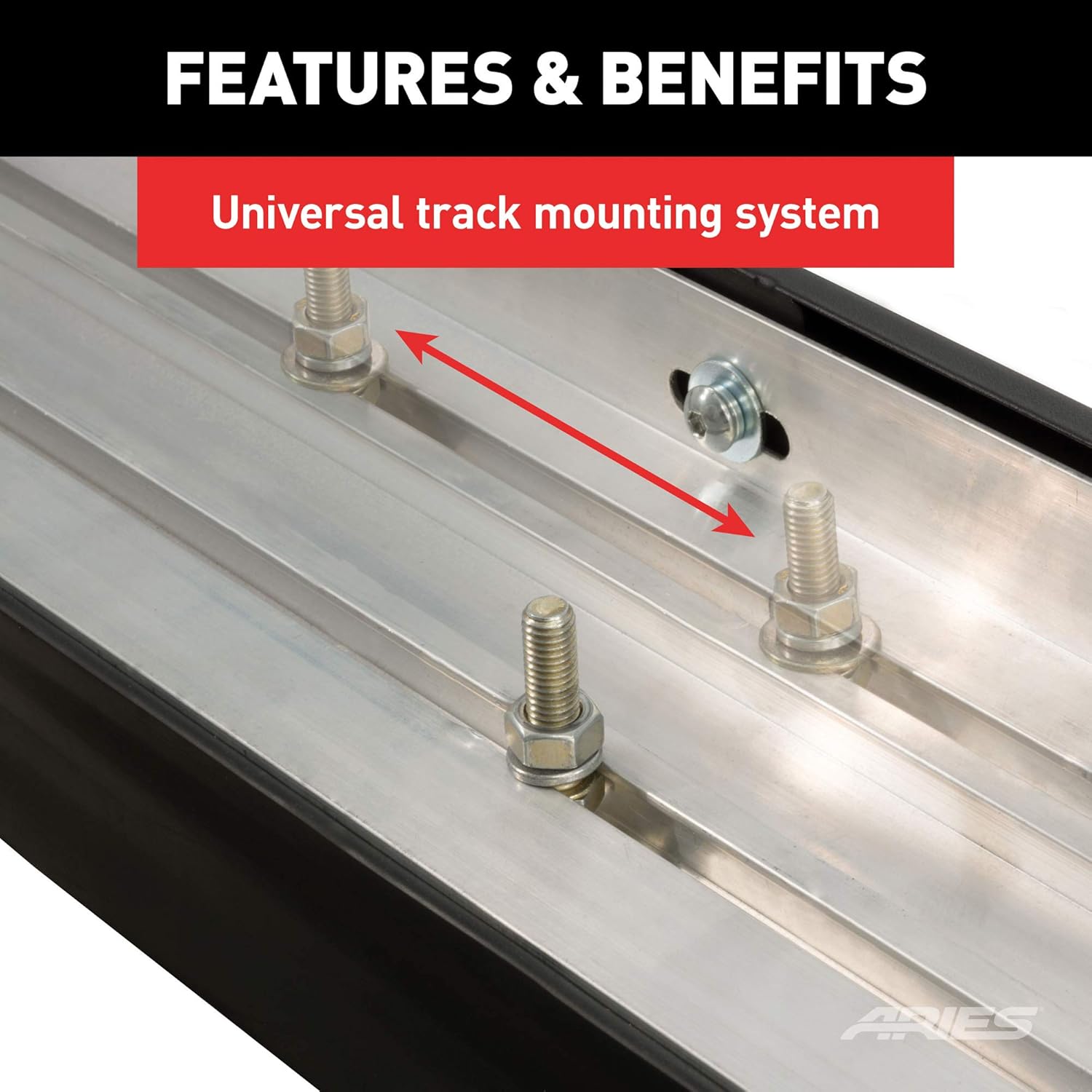
Figure 5: Close-up view of the universal track mounting system on the underside of an ARIES AeroTread Running Board. This image shows the adjustable bolts and channel for bracket attachment.
5. Operating Instructions
The ARIES AeroTread running boards are designed for ease of use. Simply step onto the board when entering or exiting your vehicle. The full-length, non-skid treads provide a secure footing in various weather conditions.
- Ensure your footwear has good traction, especially in wet or icy conditions.
- Avoid placing excessive weight on the running boards. Refer to the weight capacity specified by your mounting bracket manufacturer.
- Do not use the running boards as a jacking point for your vehicle.

Figure 6: A person's foot stepping onto an ARIES AeroTread Running Board, demonstrating its use for vehicle entry. This is a representative image.
6. Maintenance
Regular maintenance will help preserve the appearance and functionality of your ARIES AeroTread running boards.
- Cleaning: Clean the running boards regularly with mild soap and water. Avoid abrasive cleaners, harsh chemicals, or stiff brushes, as these can damage the finish. Rinse thoroughly with clean water and dry with a soft cloth.
- Inspection: Periodically inspect all mounting hardware for tightness. Over time, vibrations can cause bolts to loosen. Re-tighten any loose fasteners to ensure the running boards remain securely attached.
- Corrosion: While designed to be corrosion-resistant, regular cleaning helps prevent the buildup of dirt, salt, and other corrosive materials, especially in harsh environments.
7. Troubleshooting
This section addresses common issues that may arise during or after installation.
- Running Boards Feel Loose:
- Ensure all mounting bracket bolts to the vehicle frame are fully tightened.
- Ensure all bolts connecting the running boards to the mounting brackets are fully tightened.
- Re-check the stability of the mounting brackets themselves.
- Incorrect Fitment:
- Verify that you have purchased the correct vehicle-specific mounting brackets for your exact year, make, and model of vehicle. Incorrect brackets will lead to improper fitment.
- Ensure the running boards are correctly oriented (left vs. right, if applicable) and that the track system is properly engaged with the brackets.
- Missing Parts:
- This package includes only the ARIES AeroTread running boards. Mounting hardware and brackets are sold separately. If you believe components of the running boards themselves are missing, contact your retailer or ARIES customer support.
8. Warranty and Support
For information regarding product warranty, limitations, and customer support, please refer to the official ARIES website or contact ARIES customer service directly. Keep your purchase receipt as proof of purchase for any warranty claims.
Manufacturer: ARIES
Model: 2051973
9. What's in the Box
- One pair of ARIES AeroTread 5" x 73" Black Stainless Running Boards (Model 2051973).
Note: Mounting brackets and installation hardware are sold separately and are not included in this package.


