
1. Introduction
The Avenview C6-USB-50M is a USB 2.0 Extender designed to extend USB 2.0 signals up to 50 meters (164 feet) over a single Cat5e/6 cable. This device allows for flexible placement of USB peripherals away from the host computer, making it ideal for various applications such as remote surveillance, industrial control, and digital signage. This manual provides detailed instructions for the proper installation, operation, and maintenance of your Avenview C6-USB-50M USB 2.0 Extender.
2. Product Overview
The C6-USB-50M extender consists of two main units: a Sender unit and a Receiver unit. The Sender unit connects to the host computer, and the Receiver unit connects to the USB peripheral devices. The two units communicate via a standard Cat5e/6 Ethernet cable. This extender supports USB 2.0 data rates up to 480 Mbps and is plug-and-play, requiring no additional drivers for most operating systems. The Receiver unit requires external power, which is supplied via an included 5V DC power adapter.
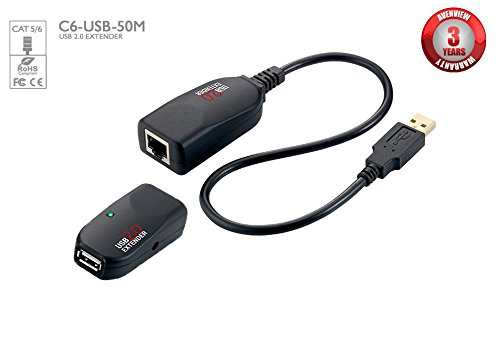
Image: The Avenview C6-USB-50M USB 2.0 Extender, showing both the sender and receiver units. The units are compact, black, and feature USB ports and an RJ45 port for the Cat5e/6 cable connection. The sender unit typically has a USB-B input for the host connection, while the receiver unit has multiple USB-A outputs for peripherals and a power input.
3. Package Contents
Please verify that all items are present in your package. If any items are missing or damaged, contact your vendor immediately.
- 1 x Avenview C6-USB-50M Sender Unit
- 1 x Avenview C6-USB-50M Receiver Unit
- 1 x 5V DC Power Adapter (for Receiver Unit)
- 1 x USB Type-A to Type-B Cable
- 1 x User Manual (this document)
4. Setup Instructions
Follow these steps to properly set up your Avenview C6-USB-50M USB 2.0 Extender:
- Connect the Sender Unit: Connect one end of the provided USB Type-A to Type-B cable to an available USB port on your host computer and the other end to the USB-B port on the Avenview C6-USB-50M Sender unit.
- Connect the Cat5e/6 Cable: Connect a standard Cat5e or Cat6 Ethernet cable (up to 50 meters / 164 feet in length) between the RJ45 port on the Sender unit and the RJ45 port on the Receiver unit. Ensure the cable is securely seated in both ports.
- Connect USB Devices to Receiver: Connect your desired USB 2.0 peripheral devices (e.g., keyboard, mouse, printer, webcam) to the USB-A ports on the Avenview C6-USB-50M Receiver unit.
- Apply Power to Receiver: Connect the included 5V DC power adapter to the power input jack on the Receiver unit, then plug the adapter into a standard electrical outlet. The Receiver unit requires external power for proper operation.
- Verify Connection: Once all connections are made, the extender should automatically establish a link. Check for any status indicator LEDs on the units (if present) to confirm a successful connection. Your connected USB devices should now be recognized by the host computer.
5. Operating Instructions
Once the Avenview C6-USB-50M USB 2.0 Extender is set up according to the instructions above, it operates transparently. No special software or drivers are typically required, as the extender functions as a direct extension of your computer's USB port.
- Ensure all connected USB devices are powered on (if they require external power).
- The extender supports standard USB 2.0 devices. Performance may vary with high-bandwidth devices or devices requiring specific timing.
- For optimal performance, use high-quality Cat5e or Cat6 cables.
6. Maintenance
To ensure the longevity and reliable operation of your Avenview C6-USB-50M USB 2.0 Extender, follow these simple maintenance guidelines:
- Cleaning: Use a soft, dry cloth to clean the exterior of the units. Do not use liquid cleaners or aerosols.
- Environment: Keep the units in a dry, well-ventilated area, away from direct sunlight, excessive heat, and moisture.
- Cable Management: Ensure all cables are routed neatly and are not under excessive tension or sharp bends, which can cause damage.
- Power: Always use the provided 5V DC power adapter with the Receiver unit. Using an incorrect power adapter may damage the device.
7. Troubleshooting
If you encounter issues with your Avenview C6-USB-50M USB 2.0 Extender, refer to the following troubleshooting steps:
- No Power to Receiver Unit:
- Ensure the 5V DC power adapter is securely connected to the Receiver unit and plugged into a working electrical outlet.
- Test the outlet with another device to confirm it is functional.
- USB Devices Not Detected:
- Verify that the Cat5e/6 cable is securely connected to both the Sender and Receiver units.
- Ensure the Cat5e/6 cable length does not exceed 50 meters (164 feet).
- Try connecting a different USB device to the Receiver unit to rule out a device-specific issue.
- Ensure the Sender unit is properly connected to the host computer's USB port.
- If using a USB hub with the extender, ensure the hub is self-powered.
- Try connecting the USB device directly to the computer to confirm it functions correctly without the extender.
- Intermittent Connection or Slow Performance:
- Check the Cat5e/6 cable for any damage, kinks, or improper termination. Replace if necessary.
- Ensure the Cat5e/6 cable is of good quality and meets Cat5e or Cat6 specifications.
- Reduce the cable length if possible, especially if operating near the maximum distance.
- Avoid routing the Cat5e/6 cable near sources of strong electromagnetic interference.
8. Specifications
| Feature | Specification |
|---|---|
| Model Number | C6-USB-50M |
| Brand | Avenview |
| USB Standard | USB 2.0 (backward compatible with USB 1.1) |
| Max Data Rate | 480 Mbps |
| Extension Distance | Up to 50 meters (164 feet) over Cat5e/6 cable |
| Power Supply (Receiver) | 5V DC (included adapter) |
| Package Dimensions | 3 x 1 x 1 inches |
| Manufacturer | Avenview |
| ASIN | B01G7KZHW2 |
| Date First Available | September 19, 2016 |
| Unit Count | 1.0 Count |
9. Warranty and Support
Avenview products are designed for reliability and performance. For information regarding warranty coverage, technical support, or service, please refer to the warranty card included with your product or visit the official Avenview website. Please have your product model number (C6-USB-50M) and purchase information ready when contacting support.

