
1. Introduction
The Runleader RL-TM005 is a versatile 3-in-1 digital meter designed to monitor critical engine parameters. It accurately displays real-time engine temperature, battery voltage, and features a 24-hour clock. This device is equipped with programmable alert reminders for both over-temperature and over/under-voltage conditions, enhancing operational safety and awareness. Its robust design is suitable for various applications, including generators, motorcycles, ATVs, and marine engines.
2. Key Features
- Multifunctional Display: Integrates engine temperature, battery voltage, and a 24-hour clock into a single unit.
- Engine Temperature Monitoring: Displays real-time temperature and records the maximum temperature reached. Features a programmable over-temperature alert. Measurement range: -20℃ to +300℃ (-4℉ to +572℉) with ±1℃/℉ accuracy.
- Battery Voltage Monitoring: Shows current battery voltage (8-60V) and includes programmable over-voltage and under-voltage alert reminders.
- 24-Hour Clock: Provides time display for convenience.
- Backlight: Selectable backlight modes for improved visibility in various lighting conditions.
- Power Supply: Operates via an internal replaceable CR2032 battery and can be connected to an external DC8-60V power source.
- Durable Design: IP67 waterproof rating ensures protection against water ingress.
- Certifications: CE and RoHS certified.

Image: The meter displaying real-time engine temperature in Celsius.

Image: The meter displaying the maximum recorded engine temperature.

Image: The meter indicating an over-temperature alert with a warning symbol.
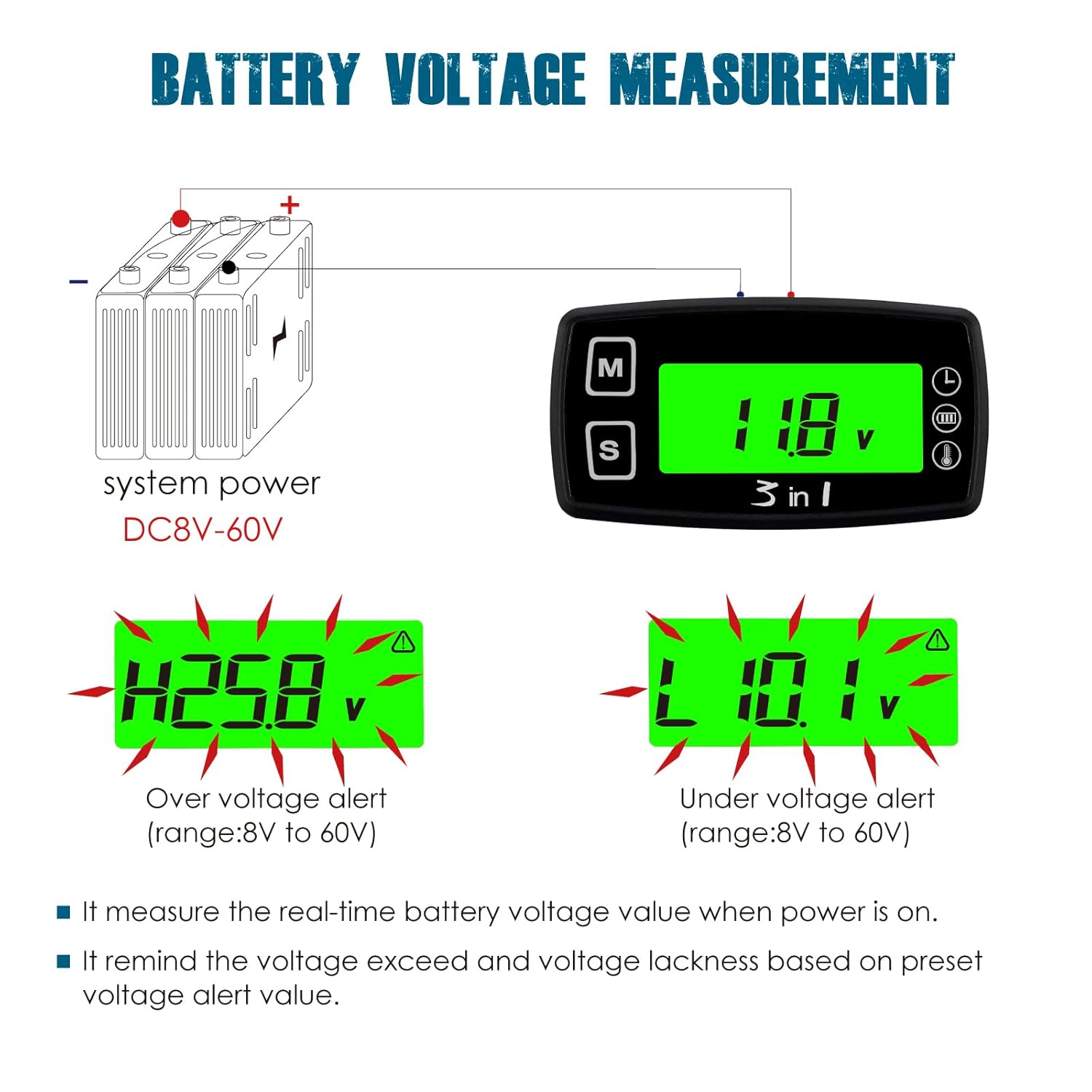
Image: The meter displaying battery voltage, including examples of over-voltage and under-voltage alerts.
3. Package Contents
Please verify that all items listed below are included in your package:
- Runleader RL-TM005 Digital Meter (x1)
- Temperature Sensor (PT100) (x2)
- M3 Bolts (x4)
- M3 Screws (x2)
- M3 Gaskets (x2)
- Double-sided Tape (x1)
- Cable Ties (x2)
- User Manual (x1)
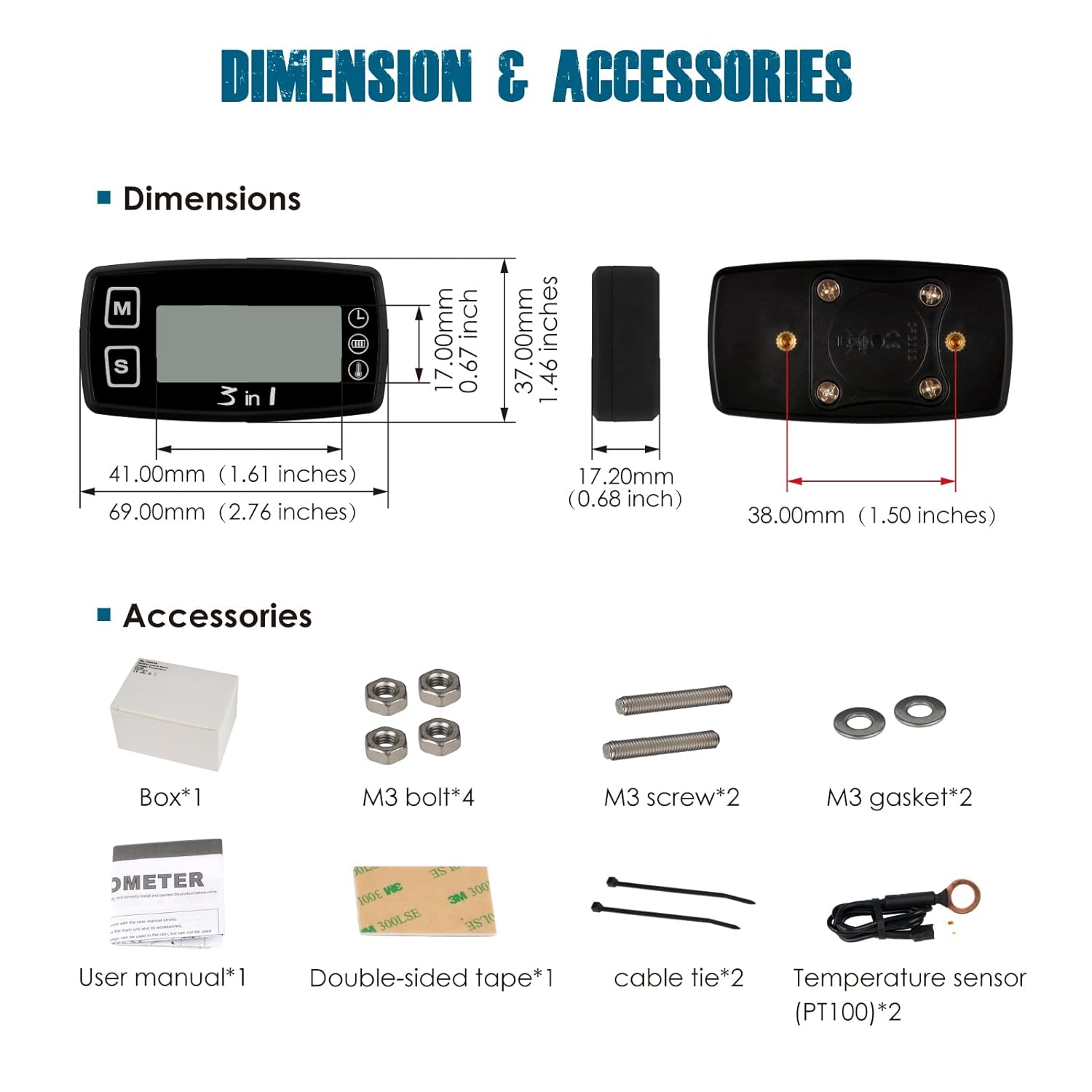
Image: A visual representation of the meter and its included accessories, such as the temperature sensor, mounting hardware, and user manual.
4. Installation Guide
The Runleader RL-TM005 offers flexible installation options to suit various applications.
4.1. Meter Mounting
Choose one of the following methods to mount the meter:
- Stick-on Mounting: Use the provided double-sided tape to adhere the meter to a clean, flat surface. Ensure the surface is free of dust and grease for optimal adhesion.
- Screw-on Mounting: Utilize the M3 screws and gaskets to securely fasten the meter to a desired location. Drill appropriate pilot holes if necessary.
4.2. Temperature Sensor Mounting
Connect the temperature sensor to the meter. The sensor's ring terminal can be attached to an engine component where temperature monitoring is desired, such as a cylinder head bolt or radiator grommet. Ensure the sensor makes good contact with the surface to be measured.
4.3. Power Connection
The meter is powered by an internal CR2032 battery and can also be connected to an external DC8-60V power source for continuous operation and backlight functionality. Connect the red wire to the positive (+) terminal of your power source and the black wire to the negative (-) or ground terminal.

Image: Illustrations demonstrating stick-on and screw-on mounting options for the meter, along with a close-up of the temperature sensor installed on an engine.
5. Operation
The meter features two buttons, 'M' (Mode) and 'S' (Set), for navigation and setting adjustments.
5.1. Display Modes
Press the 'M' button to cycle through different display modes:
- Real-time Temperature: Shows the current engine temperature.
- Maximum Temperature: Displays the highest temperature recorded since the last reset.
- Real-time Voltage: Shows the current battery voltage.
- Clock Display: Displays the current time.
5.2. Setting Alerts and Units
To enter setting mode, press and hold the 'S' button for a few seconds. Use the 'M' button to navigate through settings and the 'S' button to adjust values.
- Over-Temperature Alert: Set a maximum temperature threshold. The indicator light will activate if this value is exceeded.
- Over/Under-Voltage Alert: Define upper and lower voltage limits. The indicator light will activate if the voltage falls outside this range.
- Temperature Unit Selection: Switch between Celsius (℃) and Fahrenheit (℉).
- Clock Setting: Adjust the 24-hour clock.
- Backlight Mode: Select continuous backlight when external power is connected, or a temporary backlight that activates upon button press.
6. Maintenance
- Cleaning: Wipe the meter clean with a soft, damp cloth. Avoid abrasive cleaners or solvents.
- Battery Replacement: The internal CR2032 battery is replaceable. If the display becomes dim or inconsistent without external power, replace the battery. Refer to the diagram on the back of the unit for battery compartment access.
7. Troubleshooting
| Issue | Possible Cause | Solution |
|---|---|---|
| Display is dim or blank. | Low internal battery or no external power. | Replace the CR2032 battery or connect to a DC8-60V external power source. |
| Display is difficult to read from certain angles. | LCD display characteristics. | Adjust viewing angle or ensure adequate lighting. Consider using the backlight feature if connected to external power. |
| Temperature readings are inaccurate. | Sensor not properly connected or positioned. | Ensure the temperature sensor is securely connected and making good contact with the surface being measured. Verify the sensor cable is not damaged. |
| Voltage readings are inaccurate. | Poor power connection or external electrical interference. | Check power connections for secure contact. Ensure the external power source is stable and within the 8-60V range. Test with a known accurate voltmeter if possible. |
| Alerts are not triggering. | Alert thresholds incorrectly set. | Review and adjust the programmable alert values for temperature and voltage in the settings menu. |
8. Technical Specifications
| Model Number | RL-TM005 |
| Functions | Engine Temperature Meter, Battery Volt Meter, 24-Hour Clock |
| Temperature Measurement Range | -20℃ to +300℃ (-4℉ to +572℉) |
| Temperature Accuracy | ±1℃/℉ |
| Voltage Measurement Range | DC 8-60V |
| Power Source | Internal CR2032 battery (replaceable) and External DC 8-60V |
| Waterproof Rating | IP67 |
| Display Type | LCD with Backlight |
| Product Dimensions (L x W x H) | 69.00mm (2.76 in) x 37.00mm (1.46 in) x 17.20mm (0.68 in) |
| Product Weight | Approximately 3.88 ounces |
| Certifications | CE, RoHS |
| Outer Material | Acrylonitrile Butadiene Styrene (ABS) |

Image: The meter submerged in a testing tank, demonstrating its IP67 waterproof capability.

Image: A close-up of the meter's display showing "3 in 1", highlighting its combined functions.
9. Warranty and Support
The Runleader RL-TM005 comes with a 2-year warranty from the date of purchase, covering manufacturing defects. For technical support, troubleshooting assistance, or warranty claims, please contact Runleader customer service through the official website or your retailer.
This product is CE and RoHS certified, ensuring compliance with European safety, health, and environmental protection standards.