
1. Introduction and Safety Information
This manual provides essential instructions for the safe operation, maintenance, and setup of your Makita LH1201FL Table/Mitre Saw. Please read and understand all instructions before operating the tool to prevent injury and ensure optimal performance.
General Power Tool Safety Warnings
- Work Area Safety: Keep the work area clean and well-lit. Cluttered or dark areas invite accidents. Do not operate power tools in explosive atmospheres, such as in the presence of flammable liquids, gases, or dust.
- Electrical Safety: Power tool plugs must match the outlet. Never modify the plug in any way. Avoid body contact with earthed or grounded surfaces such as pipes, radiators, ranges, and refrigerators.
- Personal Safety: Always wear eye protection. Use hearing protection when operating noisy tools. Dress properly; avoid loose clothing or jewelry. Keep hair, clothing, and gloves away from moving parts.
- Tool Use and Care: Do not force the power tool. Use the correct power tool for your application. Disconnect the plug from the power source before making any adjustments, changing accessories, or storing power tools.
- Specific Saw Safety: Always ensure the workpiece is securely clamped. Keep hands away from the cutting area. Never reach under the saw table while the blade is rotating.
For detailed safety guidelines, refer to local regulations and general power tool safety standards.
2. Product Overview
The Makita LH1201FL is a versatile 240V 305mm 1650W Table/Mitre Saw designed for precision cutting of various materials, including wood and metal. It combines the functionality of a mitre saw and a table saw into one robust unit.
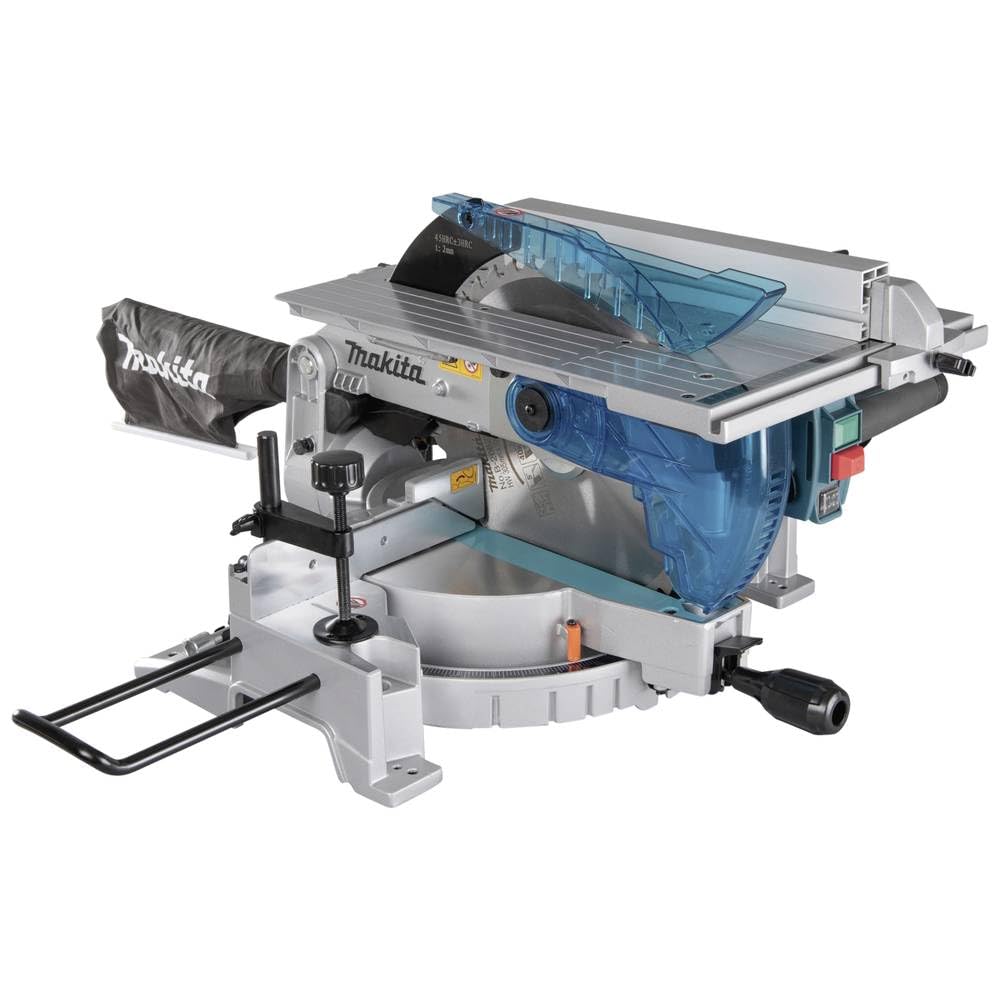
Image showing the Makita LH1201FL 240V 305mm 1650W Table/Mitre Saw, a versatile power tool designed for precision cutting.
Key Features:
- Smooth table elevation by loosening levers and turning a knob.
- Built-in laser guide for accurate cutting lines.
- Soft start feature for smooth power-up and reduced kickback.
- Anti-restart function for enhanced safety after power interruptions.
- Removable guide rule for cutting thin and wide materials.
- Electric brake for quick blade stop.
3. Setup
Unpacking and Assembly
- Carefully remove the saw and all components from the packaging.
- Inspect the tool for any damage that may have occurred during shipping. Do not operate if damaged.
- Attach any necessary accessories, such as the guide rule, following the diagrams in the included assembly guide. Ensure all fasteners are tightened securely.
- Place the saw on a stable, level workbench or stand capable of supporting its weight (approximately 20.7 kg).
Power Connection
- Ensure the power switch is in the "OFF" position before plugging in the tool.
- Connect the saw to a 240V power supply. Verify that the power source matches the tool's voltage requirements.
- Use an appropriate extension cord if necessary, ensuring it is rated for the saw's wattage (1650W) and suitable for outdoor use if applicable.
4. Operating Instructions
The Makita LH1201FL can function as both a mitre saw and a table saw. Always wear appropriate personal protective equipment, including eye and hearing protection, before operation.
Using as a Mitre Saw
- Adjusting Mitre Angle: Loosen the mitre angle lock handle, set the desired angle using the scale, and then securely tighten the handle.
- Adjusting Bevel Angle: Loosen the bevel angle lock, tilt the saw head to the desired angle, and tighten the lock.
- Workpiece Placement: Place the workpiece firmly against the fence and table. Use clamps to secure it if necessary.
- Laser Guide: Activate the laser guide to project a cutting line onto the workpiece for precise alignment.
- Cutting: Start the saw. Allow the blade to reach full speed. Slowly lower the blade through the workpiece. Once the cut is complete, release the trigger and allow the blade to stop before raising the saw head.
Using as a Table Saw
- Converting to Table Saw Mode: Follow the specific instructions in the assembly guide to convert the saw to table saw configuration. This typically involves locking the saw head in the upright position and raising the table.
- Table Elevation: Loosen the table elevation levers and turn the knob to adjust the table height, which controls the blade's cutting depth. Securely tighten the levers.
- Guide Rule: Position the removable guide rule to the desired cutting width. Ensure it is parallel to the blade and locked in place.
- Cutting: Turn on the saw. Using a push stick, feed the workpiece slowly and steadily along the guide rule and into the rotating blade. Maintain firm control of the workpiece.
Special Functions
- Soft Start: The saw incorporates a soft start feature, which gradually increases the blade speed upon startup, reducing initial torque and improving control.
- Anti-Restart Function: In the event of a power interruption, the saw will not automatically restart when power is restored. The power switch must be cycled off and then on again to resume operation.
- Electric Brake: The electric brake quickly stops the blade rotation after the trigger is released, enhancing safety and reducing waiting time.
5. Maintenance
Regular maintenance ensures the longevity and safe operation of your Makita LH1201FL saw. Always disconnect the power plug before performing any maintenance or adjustments.
Cleaning
- After each use, clean sawdust and debris from the saw, especially around the blade guard, motor vents, and moving parts. Use a brush or compressed air.
- Do not use solvents or harsh chemicals that could damage plastic parts.
Blade Inspection and Replacement
- Regularly inspect the saw blade for sharpness, cracks, or missing teeth. A dull or damaged blade can cause kickback and poor cuts.
- When replacing the blade, ensure the new blade is 305mm in diameter and suitable for the material being cut (e.g., aluminum oxide for metal, appropriate blade for wood). Follow the instructions in the assembly guide for safe blade replacement.
- Ensure the blade is installed with the teeth pointing in the correct direction of rotation.
General Inspection
- Check all screws and bolts for tightness.
- Inspect the power cord for damage.
- Ensure all guards and safety features are functioning correctly.
6. Troubleshooting
This section addresses common issues you might encounter with your Makita LH1201FL saw.
| Problem | Possible Cause | Solution |
|---|---|---|
| Saw does not start | No power supply; Anti-restart function engaged; Faulty switch | Check power connection and circuit breaker; Cycle power switch OFF then ON; Contact service center if switch is faulty. |
| Poor cut quality / Blade binds | Dull or incorrect blade; Improper blade alignment; Workpiece not secured | Replace with a sharp, appropriate blade; Check blade alignment; Secure workpiece firmly with clamps. |
| Excessive vibration | Loose blade; Damaged blade; Unstable mounting | Ensure blade is securely tightened; Replace damaged blade; Securely mount the saw to a stable surface. |
| Laser guide not visible | Dust on lens; Laser module malfunction | Clean the laser lens; Contact service center for repair. |
If you encounter problems not listed here or if solutions do not resolve the issue, contact a qualified service technician or Makita customer support.
7. Specifications
| Specification | Detail |
|---|---|
| Brand | Makita |
| Model Number | LH1201FL |
| Voltage | 240 Volts |
| Wattage | 1650 Watts |
| Blade Length / Diameter | 305 Millimeters |
| Item Weight | 20.7 Kilograms |
| Power Source | Electric |
| Blade Material | Aluminum Oxide (for included blade) |
| Surface Recommendation | Metal, Wood |
| Included Components | Guide Rule |
| Special Features | Brake, Laser Guide, Soft Start, Anti-restart function |
8. Warranty and Support
Warranty Information
The Makita LH1201FL Table/Mitre Saw comes with a Limited Warranty. Please refer to the warranty card included with your product or visit the official Makita website for specific terms, conditions, and duration of the warranty in your region.
The warranty typically covers defects in materials and workmanship under normal use. It does not cover damage caused by misuse, abuse, normal wear and tear, or unauthorized repairs.
Customer Support
For technical assistance, spare parts, or warranty claims, please contact Makita customer support. You can find contact information, including phone numbers and service center locations, on the official Makita website (www.makita.com) or through your local authorized Makita dealer.
When contacting support, please have your model number (LH1201FL) and serial number (if applicable) ready.


