
1. Introduction
The Edimax EW-7833UAC is an AC1750 dual-band USB wireless adapter designed to enhance the wireless connectivity of your computer. It supports Wi-Fi 5 (802.11ac) standards, offering data transfer speeds up to 450Mbps on the 2.4GHz band and 1300Mbps on the 5GHz band. This adapter features a USB 3.0 interface for optimal performance and includes a foldaway antenna for improved signal reception. It is compatible with Windows, macOS, and Linux operating systems.
2. Package Contents
- Edimax EW-7833UAC Wireless Adapter
- Quick Installation Guide (QIG)
- Driver CD
3. Setup
3.1 Driver Installation
Before connecting the adapter to your computer, it is recommended to install the necessary drivers. You can install drivers using the included Driver CD or by downloading the latest drivers from the official Edimax website. For Windows 11, the device may offer plug-and-play functionality, but installing the latest drivers is always recommended for optimal performance and stability.
- Using the Driver CD: Insert the Driver CD into your computer's optical drive and follow the on-screen instructions to install the drivers.
- Downloading from Edimax Website: Visit the official Edimax support website, locate the EW-7833UAC model, and download the latest drivers for your operating system (Windows 7/8/8.1/10/11, macOS 10.7~10.15, Linux 2.6.24~5.11).
3.2 Physical Installation
Once the drivers are installed, connect the EW-7833UAC adapter to an available USB 3.0 port on your computer for maximum performance. The adapter is backward compatible with USB 2.0 ports, but speeds may be limited.

Figure 1: Edimax EW-7833UAC Wi-Fi adapter connected to a USB port.
The adapter features a foldaway antenna. For optimal signal reception, adjust the antenna to an upright position. The antenna can rotate 180 degrees to help achieve the best connection quality.
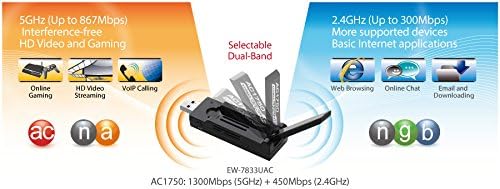
Figure 2: The 180-degree adjustable antenna of the EW-7833UAC adapter.
3.3 WPS (Wi-Fi Protected Setup) Connection
The EW-7833UAC includes a hardware WPS button for easy and secure wireless connections to a compatible router or access point.
- Press the WPS button on your wireless router/access point.
- Within two minutes, press the WPS button located on the Edimax EW-7833UAC adapter.
- The adapter will automatically establish a secure connection with your wireless network.

Figure 3: Location of the WPS button on the EW-7833UAC adapter.
4. Operating Instructions
4.1 Connecting to a Wi-Fi Network
After successful driver installation and physical connection, your computer should detect available Wi-Fi networks. Use your operating system's network settings to select and connect to your desired Wi-Fi network. The EW-7833UAC supports both 2.4GHz and 5GHz bands.
- 2.4GHz Band: Offers wider coverage and better penetration through obstacles, suitable for general internet use, email, and web browsing.
- 5GHz Band: Provides higher speeds and less interference, ideal for HD video streaming, online gaming, and large file transfers.

Figure 4: High Performance 3T3R MIMO Technology for enhanced signal.

Figure 5: Comparison of theoretical data rates for 802.11ac, USB 3.0, and USB 2.0.
4.2 Advanced Features
- Beamforming Technology: This technology directs Wi-Fi signals towards connected devices, improving range, reliability, and coverage while reducing wasted signal power.
- 3T3R MIMO Technology: Equipped with three transmitting and three receiving antennas, this technology ensures fast and consistent data throughput.
- Secure Wi-Fi: Supports 64/128-bit WEP, WPA, and WPA2 encryption protocols for network security.
5. Maintenance
- Driver Updates: Regularly check the Edimax website for the latest driver updates to ensure optimal performance and compatibility with new operating system versions.
- Physical Care: Keep the adapter clean and free from dust. Avoid exposing it to extreme temperatures or moisture. Handle the foldaway antenna carefully to prevent damage.
- Secure Connection: Ensure the adapter is firmly seated in the USB port to maintain a stable connection.
6. Troubleshooting
- No Wi-Fi Connection:
- Verify that the adapter is securely plugged into a USB port.
- Ensure drivers are correctly installed. Reinstall if necessary, downloading the latest version from the Edimax website.
- Check if your computer's Wi-Fi is enabled.
- Restart your computer and your wireless router.
- Slow Speeds or Intermittent Connection:
- Ensure the adapter is connected to a USB 3.0 port for maximum speed.
- Adjust the foldaway antenna for better signal reception.
- Move closer to your wireless router or reduce obstacles between the adapter and the router.
- Check for interference from other devices (e.g., microwaves, cordless phones).
- Update your router's firmware.
- If using Windows 10, ensure you have the latest drivers from the Edimax website, as older drivers may cause instability.
- WPS Connection Failure:
- Ensure your router supports WPS and that WPS is enabled.
- Press the WPS buttons on both the router and the adapter within the specified time frame (usually 2 minutes).
- Adapter Not Recognized:
- Try plugging the adapter into a different USB port.
- Check Device Manager (Windows) or System Information (macOS/Linux) to see if the adapter is listed and if there are any driver errors.
- Reinstall drivers.
7. Specifications
| Brand | Edimax |
| Model Number | EW-7833UAC |
| Hardware Interface | USB 3.0 (backward compatible with USB 2.0) |
| Data Link Protocol | USB |
| Data Transfer Rate | Up to 1300 Mbps (5GHz), Up to 450 Mbps (2.4GHz) |
| Wireless Standard | 802.11ac (Wi-Fi 5) |
| Antenna | Foldaway, 180-degree adjustable |
| Security | 64/128-bit WEP, WPA, WPA2 encryption |
| Compatible Operating Systems | Windows 7/8/8.1/10/11, macOS 10.7~10.15, Linux 2.6.24~5.11 |
| Item Weight | 0.26 Pounds |
| Certifications | FCC, CE |
8. Warranty Information
The Edimax EW-7833UAC Wi-Fi Adapter comes with a 2-year limited Manufacturer Warranty. Please retain your proof of purchase for warranty claims. For detailed warranty terms and conditions, refer to the documentation included with your product or visit the official Edimax website.
9. Support
For technical support, driver downloads, and further information, please visit the official Edimax website:
Edimax Support Website: www.edimax.com
You can also refer to the Quick Installation Guide (QIG) provided in the package for initial setup assistance.


