
1. Introduction
This manual provides detailed instructions for the installation, operation, and maintenance of your Runleader LCD Hour Meter. This device is designed to accurately track the total operating hours of various DC-powered equipment, aiding in timely maintenance scheduling.
2. Product Features
- Hour Tracking: Records total operating hours from 0 to 999,999 hours. The hour value can be reset.
- Data Storage: Features a built-in EEPROM system that saves recorded hours even when power is disconnected.
- Waterproof Design: The housing design provides an IP65 waterproof rating, offering protection against dust and water jets.
- Wide Voltage Range: Compatible with DC 4.5V to 90V power sources.
- Easy Installation: Designed for drill-in and snap-in mounting.

Image: Overview of Runleader LCD Hour Meter features including 6-digit display, total hours (TOT), reset capability, data storage, and IP65 waterproof rating.
3. Package Contents
Upon opening the package, please verify that all the following items are included:
- Runleader LCD Hour Meter (1 unit)
- Insert Spring (2 pieces)
- Spring Sheath (2 pieces)
- Bracket (1 piece)
- User Manual (1 piece)

Image: The Runleader LCD Hour Meter and its included accessories: the meter itself, a package box, two insert springs, two spring sheaths, and a user manual.
4. Specifications
| Brand | Runleader |
| Model Number | RL-HM005 (DC 4.5V to 90V) |
| Material | PC545 |
| Voltage Range | DC 4.5V to 90V |
| Hour Range | 0 to 999,999 hours |
| Waterproof Rate | IP65 |
| Product Dimensions (L x W x H) | 2.4 x 2.4 x 2.72 inches (60.96 x 60.96 x 69.09 mm) |
| Item Weight | 55 Grams (1.94 ounces) |
| Panel Cut-out Size | 43.50mm x 39.50mm (1.71 inches x 1.56 inches) |
| UPC | 713095428665 |

Image: Front and side views of the hour meter with precise dimensions, including overall diameter, depth, and display size.
5. Installation
Follow these steps for proper installation of the hour meter:
- Prepare Panel Cut-out: Create a rectangular opening in your mounting panel with dimensions of 43.50mm x 39.50mm (1.71 inches x 1.56 inches).
- Insert Meter: Gently push the hour meter into the prepared cut-out. The snap-in design will secure it in place.
- Wiring: Connect the meter according to the desired function using the provided wiring diagrams. Ensure correct polarity.
Wiring Diagrams
- Direct Connection: Connect the '+' terminal of the meter to the positive terminal of the DC power source (4.5V-90V) and the '-' terminal of the meter to the negative terminal of the power source. This will start recording hours immediately when power is applied.
- Power Switch Connection: For applications where you want the meter to record only when the machine is operating, connect the '+' terminal of the meter to the positive output of a power switch (e.g., ignition switch) and the '-' terminal to the negative power source.
- Hours Reset Connection: To enable the reset function, connect the 'C' terminal to the negative power source ('-') momentarily. This will reset the accumulated hours to zero.
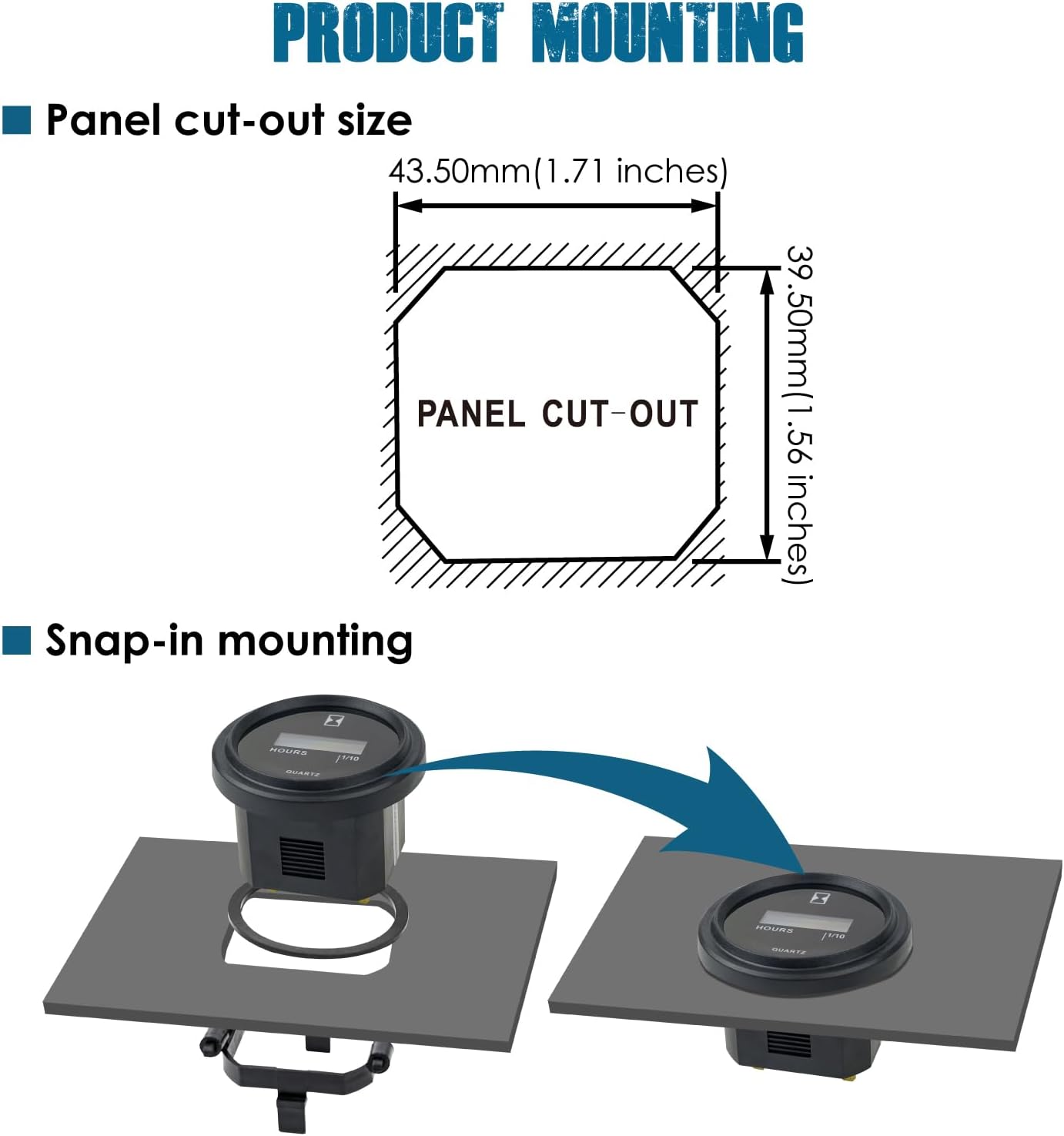
Image: Illustration of the panel cut-out size (43.50mm x 39.50mm) and how the hour meter snaps into the panel for secure mounting.

Image: Three wiring configurations: direct connection to battery, connection via a power switch, and connection for resetting the hour value by momentarily connecting terminal 'C' to negative.
6. Operation
The Runleader LCD Hour Meter operates automatically once correctly installed and powered.
- Starting Hour Record: The meter begins to record total working hours when power is supplied to the '+' and '-' terminals.
- Display: The LCD screen displays the accumulated hours. The display typically shows hours in 1/10th increments (e.g., 0.1, 0.2, 1.0).
- Resetting Hours: To reset the accumulated hours, momentarily connect the 'C' terminal to the negative ('-') terminal. This action will clear the current hour count.

Image: The hour meter display showing '30.0' hours, representing the total accumulated operating time.

Image: The hour meter display showing '27.0' hours, accompanied by an icon signifying its automatic data storage capability, ensuring hours are saved even without power.
7. Maintenance
The Runleader LCD Hour Meter is designed for durability and requires minimal maintenance.
- Cleaning: Wipe the display and housing with a soft, damp cloth. Avoid abrasive cleaners or solvents.
- Connection Check: Periodically inspect wiring connections to ensure they remain secure and free from corrosion.
- Water Resistance: The IP65 rating protects against water splashes and dust. Avoid submerging the device in water.

Image: The hour meter with water droplets on its surface, illustrating its favorable water resistance and IP65 waterproof rating.
8. Troubleshooting
If you encounter issues with your hour meter, consider the following:
- No Display/No Hour Accumulation:
- Ensure the power supply is within the DC 4.5V-90V range.
- Verify that the '+' and '-' terminals are correctly connected to the power source with proper polarity.
- Check for any loose or corroded wiring connections.
- Hours Not Resetting:
- Confirm that the 'C' terminal is momentarily connected to the negative ('-') terminal.
- Ensure the connection is firm and brief.
9. Applications
The Runleader LCD Hour Meter is suitable for a wide range of DC 4.5V to 90V equipment, including but not limited to:
- Golf Carts
- Lawn Mowers
- Forklifts
- Go-Karts
- Sawmills
- Leaf Trimmers
- Other DC-powered machinery requiring hour tracking for maintenance.

Image: Visual representation of common applications for the hour meter, such as golf carts, lawn mowers, forklifts, go-karts, and chainsaws.
10. Warranty and Support
Runleader provides a 2-year warranty for this product, covering manufacturing defects and ensuring reliable technical support and after-sales service. For assistance, please refer to the contact information provided with your purchase or visit the official Runleader website.

