1. Introduction
This manual provides essential information for setting up, operating, and maintaining your VIZIO SB4051-D5 Smartcast 40" 5.1 Slim Sound Bar System. This system is designed to deliver immersive 5.1 true surround sound with a wireless subwoofer and rear satellite speakers, enhancing your audio experience for movies, music, and gaming.
2. What's in the Box
Verify that all components are present in the packaging:
- Sound Bar
- Wireless Slim Subwoofer
- Rear Satellite Speakers (x2)
- LCD Display Remote
- 5’ RCA to 3.5mm Stereo Audio Cable
- 5’ 3.5mm Stereo Mini Jack
- 5’ Digital Coaxial Cable (RCA)
- 5’ Optical Cable (Toslink)
- 5’ HDMI Cable
- 2 x 26’ Satellite Cables
- 8’ AC power cable sound bar
- 8’ AC power cable subwoofer
- Wall Mounts
- 4 pcs. Velcro Cable Wrap
- Quick Start Guide
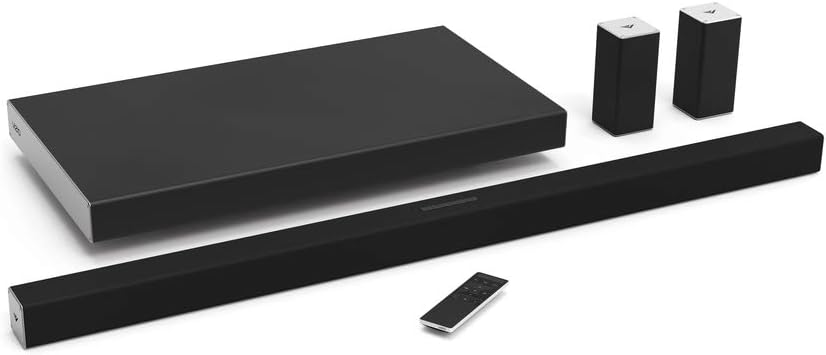
3. Setup
3.1. Placement
Position the sound bar centrally below your television. The wireless slim subwoofer can be placed discreetly beneath or beside your sofa, or standing upright to save floor space. The two rear satellite speakers should be positioned behind your primary listening area for optimal surround sound. They can be placed on a table, mounted on a wall using the included brackets, or on third-party speaker stands (sold separately).

3.2. Connections
- Sound Bar to TV: Connect the sound bar to your TV using the provided HDMI cable. Ensure you use the HDMI ARC (Audio Return Channel) or eARC port on your TV for the best audio experience. If your TV does not have an ARC/eARC port, use the provided Optical cable.
- Satellite Speakers to Subwoofer: Connect one end of each 26’ satellite cable to the corresponding rear satellite speaker. Connect the other end of each satellite cable to the L (Left) and R (Right) ports on the back of the wireless subwoofer.
- Power: Plug the 8’ AC power cable for the sound bar into the sound bar and a power outlet. Plug the 8’ AC power cable for the subwoofer into the subwoofer and a power outlet. Turn on the power switch on the subwoofer. The wireless subwoofer is pre-paired with the sound bar.

3.3. Initial Power On
After all connections are made, power on the sound bar using the power button on the unit or the remote control. The sound bar will automatically detect the input source. If not, manually select the input using the 'Input' button on the sound bar or remote.
3.4. VIZIO SmartCast App Setup
Download the VIZIO SmartCast app from your mobile device's app store. Ensure your mobile device and the sound bar are connected to the same Wi-Fi network. Follow the in-app instructions to pair your sound bar and access advanced settings and controls.

3.5. Setup Videos
How to setup your VIZIO Sound Bar
Video Description: This video provides a step-by-step guide on how to set up your VIZIO Sound Bar system, covering physical connections and initial power-on procedures.
VIZIO SmartCast 5.1 Sound Bar System unboxing video
Video Description: An unboxing video for the VIZIO SmartCast 5.1 Sound Bar System, showing all included components and how they are packaged.
4. Operation
4.1. Sound Bar Controls
The sound bar features integrated controls on its top surface for basic functions:
- Power Button: Turns the sound bar on or off.
- Input Button: Cycles through available audio input sources (e.g., HDMI, Optical, Bluetooth).
- Bluetooth Button: Initiates Bluetooth pairing mode.
- Volume Up/Down: Adjusts the master volume level.

4.2. Remote Control
The included LCD Display Remote provides comprehensive control over your sound bar system, including volume, input selection, and advanced audio settings.

4.3. VIZIO SmartCast App
The SmartCast app transforms your mobile device into a powerful remote, offering:
- EQ Settings: Customize audio presets (Movie, Music, Direct) or fine-tune bass, treble, center channel, subwoofer, and surround levels.
- Audio Source Selection: Easily switch between different audio inputs.
- Casting: Stream audio content from compatible apps directly to your sound bar via Wi-Fi. Your mobile device remains free for other tasks without interrupting playback.
- Multi-Room Capability: Connect multiple VIZIO SmartCast sound bars or speakers to play the same music in different rooms.
4.4. Operation Videos
How to Cast to Sound Bar
Video Description: This video demonstrates how to cast audio content from your mobile device to your VIZIO SmartCast Sound Bar using Wi-Fi, highlighting the multi-tasking benefits.
How to set up multi-room capability on VIZIO SmartCast speakers and sound bars
Video Description: Learn how to configure multi-room audio with your VIZIO SmartCast speakers and sound bars for synchronized music playback across different rooms.
How to Setup and Pair your mobile devices with VIZIO SoundBar and Speakers
Video Description: This video guides you through the process of setting up and pairing your mobile devices with your VIZIO Sound Bar and speakers for seamless control and audio streaming.
5. Maintenance
To ensure the longevity and optimal performance of your VIZIO Sound Bar System, follow these maintenance guidelines:
- Cleaning: Use a soft, dry cloth to clean the surfaces of the sound bar, subwoofer, and satellite speakers. Avoid abrasive cleaners, waxes, or solvents.
- Ventilation: Ensure proper ventilation around all components. Do not block any ventilation openings.
- Power Cables: Regularly check power cables for any signs of damage. Replace damaged cables immediately.
- Environment: Avoid exposing the system to extreme temperatures, humidity, or direct sunlight.
6. Troubleshooting
If you encounter issues with your sound bar system, refer to the following common solutions:
- No Sound:
- Verify all cables are securely connected.
- Ensure the correct input source is selected on the sound bar.
- Check the TV's audio output settings to ensure it's sending audio to the sound bar (e.g., external speakers, HDMI ARC).
- App Disconnects/Pairing Issues:
- Confirm both your mobile device and sound bar are on the same Wi-Fi network.
- Restart the VIZIO SmartCast app.
- Try power cycling the sound bar and your mobile device.
- If issues persist, try re-pairing the device through the app's setup new device option.
- Remote Control Not Working:
- Replace the batteries in the remote control.
- Ensure there are no obstructions between the remote and the sound bar.
- Low Surround Speaker Volume:
- Adjust the "Surround Level" setting in the VIZIO SmartCast app.
- Ensure satellite speakers are positioned optimally, ideally close to the listening area.
7. Specifications
| Feature | Detail |
|---|---|
| Model Name | SB4051-D5 |
| Brand | VIZIO |
| Speaker Type | Subwoofer, Satellite |
| Surround Sound Channel Configuration | 5.1 |
| Connectivity Technology | Wi-Fi |
| Wireless Communication Technology | Wi-Fi |
| Subwoofer Connectivity Technology | Wireless |
| Signal-to-Noise Ratio | 101 dB |
| Control Method | App |
| Product Dimensions | 2"D x 40"W x 2"H |
| Item Weight | 3.42 Pounds |
| Color | Black |
| Power Source | Corded Electric |
| Batteries Required | 2 AAA batteries (for remote) |
8. Warranty & Support
Your VIZIO SB4051-D5 Smartcast 40" 5.1 Slim Sound Bar System comes with a Limited Warranty. For detailed warranty information, product registration, and technical support, please visit the official VIZIO website or contact VIZIO customer service.
Official VIZIO Website: www.vizio.com


