
1. Introduction
Thank you for choosing the EMOS KT3223 Flat Panel TV Wall Mount. This manual provides essential information for the safe and correct installation, operation, and maintenance of your new TV wall mount. Please read these instructions thoroughly before installation and keep them for future reference. Proper installation is crucial for the safety of your television and the mount.
2. Safety Information
- Read all instructions: Before installation, carefully read and understand all assembly instructions and warnings. If you have any questions, contact your retailer or a qualified installer.
- Weight Capacity: Do not exceed the maximum load capacity of 25 kg (55 lbs). This mount is designed for use with TVs weighing up to 25 kg. Exceeding this limit may result in instability and potential injury.
- VESA Compatibility: Ensure your TV's VESA mounting pattern is compatible with this mount (Min. 75x75 mm, Max. 200x200 mm).
- Wall Structure: The wall must be capable of supporting the combined weight of the mount and the TV. For wooden stud walls, ensure the mount is secured to the center of the studs. For concrete or brick walls, use appropriate wall anchors (not always included).
- Professional Installation: If you are unsure about the installation process or the suitability of your wall, seek assistance from a professional installer.
- Avoid Obstructions: Before drilling, verify that there are no hidden electrical wires, water pipes, or gas lines in the wall.
- Children: Keep children away from the installation area. Small parts may be a choking hazard.
3. Package Contents
Please check that all components are present and undamaged before installation. If any parts are missing or defective, contact your supplier for a replacement.
- TV Wall Mount Assembly (1 unit)
- Mounting Hardware Kit (various screws, washers, spacers, wall anchors - specific contents may vary)
- Instruction Manual (this document)
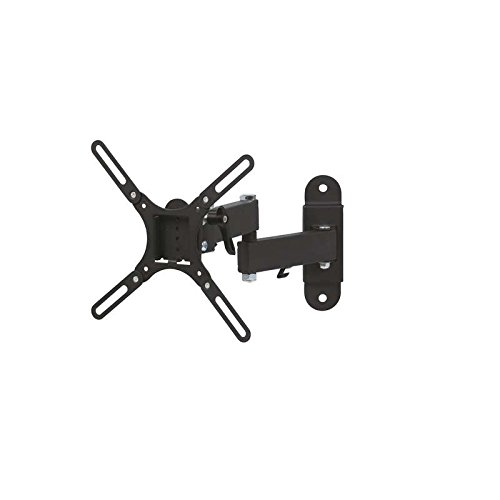
Image: The EMOS KT3223 Flat Panel TV Wall Mount packaging, showing the mount and its features. The box indicates compatibility for 10-32 inch LED TVs and full direction adjustability.
4. Setup and Installation
Tools Required (not included): Pencil, Stud Finder (for wood studs), Drill, Drill Bits (appropriate for wall type), Level, Phillips Head Screwdriver, Socket Wrench.
- Choose Mounting Location: Select a suitable wall location. Use a stud finder to locate wooden studs if mounting on a drywall. For concrete or brick walls, ensure the wall is solid.
- Mark Drill Holes: Hold the wall plate of the mount against the wall at the desired height and use a level to ensure it is straight. Mark the drill hole locations with a pencil.
- Drill Pilot Holes: Drill pilot holes at the marked locations. The drill bit size will depend on your wall type and the anchors/screws provided.
- Attach Wall Plate: Secure the wall plate to the wall using the appropriate screws and anchors. Ensure it is firmly attached and level.
- Attach TV Brackets: Attach the two vertical TV brackets to the back of your television. Align the holes on the brackets with the VESA mounting holes on your TV. Use the correct size screws and washers from the hardware kit. Ensure the brackets are securely fastened.
- Hang TV on Wall Plate: Carefully lift the TV with the attached brackets and hook them onto the wall plate. Ensure the TV is securely seated on the mount.
- Secure TV to Mount: Use the safety screws or locking mechanisms (if provided) to secure the TV to the wall mount, preventing accidental dislodging.
5. Operating Instructions
This wall mount allows for flexible viewing angles.
- Tilt Adjustment: The mount offers a tilt range of -15° to 10°. To adjust the tilt, loosen the tilt adjustment knobs or bolts on the side of the TV brackets, set the TV to the desired angle, and then securely tighten the knobs/bolts.
- Swivel Adjustment: The articulated arm allows for left and right swivel. Gently push or pull the TV to achieve the desired viewing angle. Ensure the arm moves smoothly and does not hit any obstructions.
6. Maintenance
- Cleaning: Clean the mount with a soft, dry cloth. Do not use abrasive cleaners or solvents, as they may damage the finish.
- Periodic Checks: Periodically check all screws and connections to ensure they remain tight and secure. Over time, vibrations or adjustments may cause screws to loosen.
- Damage Inspection: Inspect the mount for any signs of damage or wear. If any damage is observed, discontinue use and contact customer support.
7. Troubleshooting
- TV is not level: Ensure the wall plate is installed level. If the TV brackets allow for minor rotational adjustment, correct it. Otherwise, re-install the wall plate.
- TV feels unstable: Double-check all mounting screws on both the wall plate and the TV brackets. Ensure they are tightened securely. Verify that the TV's weight does not exceed the mount's capacity.
- Difficulty adjusting tilt/swivel: Ensure any locking knobs or bolts for tilt/swivel are sufficiently loosened before attempting to adjust. Do not force movement.
- Missing parts: Refer to the 'Package Contents' section. If parts are missing, contact your retailer or EMOS customer support.
8. Specifications
| Model Number | KT3223 |
| Brand | EMOS |
| Max. VESA Mounting Pattern | 200 x 200 mm |
| Min. VESA Mounting Pattern | 75 x 75 mm |
| Max. Load Capacity | 25 kg (55 lbs) |
| Tilt Range | -15° to 10° |
| Product Dimensions (L x W x H) | 18.5 x 19 x 9.5 cm |
| Product Weight | 1.61 kg |
| Mount Type | Wall Mount |
| Color | Black |
9. Warranty and Support
EMOS products are manufactured to high-quality standards. For warranty information or technical support, please refer to the warranty card included with your purchase or visit the official EMOS website. If you encounter any issues or have questions regarding your EMOS KT3223 TV Wall Mount, please contact your retailer or EMOS customer service for assistance.

