
1. Product Overview
This document provides instructions for the Fluval AquaSky, Eco Bright, and Halo Saltwater Nano LED Replacement Driver, Model LYD2401000B. This AC/DC adapter is designed to provide power to specific Fluval aquarium LED lighting units, ensuring their proper function.
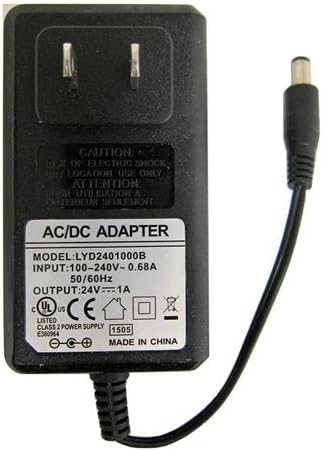
Image 1: Fluval AC/DC Adapter Model LYD2401000B. This is a black AC/DC adapter featuring a two-prong US plug on one end and a barrel connector attached to a cable on the other. The label on the adapter clearly displays its model number LYD2401000B, input specifications (100-240V~ 0.68A 50/60Hz), and output specifications (24V 1A). Various safety certifications and the 'MADE IN CHINA' origin are also visible on the label.
2. Safety Instructions
- CAUTION: Risk of electric shock. For indoor use only.
- ATTENTION: Pour utilisation à l'intérieur seulement.
- Do not expose the adapter to water or excessive humidity.
- Do not attempt to open or modify the adapter casing. There are no user-serviceable parts inside.
- Use this adapter only with the specified Fluval LED lighting units. Using it with incompatible devices may cause damage or present a safety hazard.
- Ensure the adapter is plugged into a properly grounded electrical outlet.
- Keep out of reach of children and pets.
3. Compatibility
This replacement driver (Model LYD2401000B) is compatible with the following Fluval LED lighting units:
- AquaSky 1.0 LED: 24 W, 33-42 inches / 83.5-105.5 cm (Item #A3998)
- Eco Bright LED: 18 W, 39-51 inches / 99-130 cm (Item #13589)
- Halo Nano LED: 22 W, 5.5-6 inches / 14-15.5 cm (Item #A3973)
Verify your LED light's model and power requirements before connecting this driver.
4. Setup
- Unpack the Fluval replacement driver and inspect it for any visible damage.
- Ensure your Fluval LED lighting unit is powered off and disconnected from any previous power source.
- Connect the barrel connector end of the replacement driver's cable securely into the power input port of your compatible Fluval LED lighting unit.
- Plug the two-prong AC plug of the replacement driver into a standard, functional wall electrical outlet.
- Once connected, your LED lighting unit should be ready for operation according to its own controls.
5. Operating Instructions
The Fluval replacement driver provides continuous power to your compatible LED lighting unit. Once properly connected and plugged into an electrical outlet, the driver will supply the necessary power. Control of the LED light's functions (e.g., on/off, brightness, color settings) is managed directly through the LED unit's integrated controls or external controller, not by the power adapter itself.
6. Maintenance
- Keep the adapter clean and dry. Avoid contact with water or other liquids.
- Before cleaning, always unplug the adapter from the wall outlet.
- Wipe the exterior of the adapter with a soft, dry cloth. Do not use harsh chemicals or abrasive cleaners.
- Store the adapter in a cool, dry place when not in use.
- Regularly check the cable and connectors for any signs of wear or damage. If damage is observed, discontinue use and replace the adapter.
7. Troubleshooting
- LED Light Does Not Turn On:
- Ensure the adapter is securely plugged into a functional wall outlet. Test the outlet with another device.
- Verify that the barrel connector is firmly inserted into the LED lighting unit's power input.
- Confirm that your LED lighting unit is compatible with this specific driver model (LYD2401000B). Refer to Section 3: Compatibility.
- Check the LED lighting unit's own power switch or controls.
- Inspect the adapter's cable and casing for any visible damage. If damaged, the adapter must be replaced.
- Intermittent Power:
- Check all connections for looseness.
- Ensure the power outlet is stable and not overloaded.
- If the issue persists, the adapter may be faulty and require replacement.
8. Specifications
| Model Number | LYD2401000B |
| Input | 100-240V~, 0.68A, 50/60Hz |
| Output | 24V, 1A |
| Item Weight | 4 ounces (0.25 Pounds) |
| Manufacturer | Fluval |
| Connector Type | Barrel Connector |
| Form Factor | Compact |
| Certifications | UL Listed, CE |
| Made In | China |
9. Disposal Information
The symbol of the crossed-out wheeled bin indicates that this product should not be disposed of with general household waste. Instead, it must be delivered to an applicable collection point for the recycling of electrical and electronic equipment. Proper disposal helps prevent potential negative consequences for the environment and human health.