1. Introduction
This user manual provides essential information for the safe and effective use of your Panasonic Portable Car Navigation Gorilla CN-G700D. Please read this manual thoroughly before using the device and keep it for future reference. This device features a premium silver frame, a slim body, and a 16GB SSD for detailed map data. It supports triple satellite reception (GPS, Michibiki, GLONASS) for enhanced positioning accuracy.
2. Safety Information
To ensure safe operation and prevent damage, observe the following precautions:
- Do not operate the navigation system or watch TV while driving. Always pull over to a safe location before making adjustments or viewing content.
- Ensure the device is securely mounted to prevent it from obstructing your view or becoming a projectile during sudden stops or accidents.
- Avoid exposing the device to extreme temperatures, direct sunlight for prolonged periods, or excessive moisture.
- Use only the specified power adapter and accessories. Using unauthorized accessories may cause damage or malfunction.
- Do not attempt to disassemble or modify the device. Refer all servicing to qualified personnel.
- Keep the device out of reach of children.
3. Product Overview
3.1 Package Contents
Verify that all items are present in the package:
- Panasonic Portable Car Navigation Gorilla CN-G700D Unit
- Vehicle Mount Suction Cup Stand
- Cigar Lighter Power Cord (DC12V/DC24V compatible)
- Instruction Manual (this document)
- Other small accessories (e.g., cable clips, anti-slip pad)
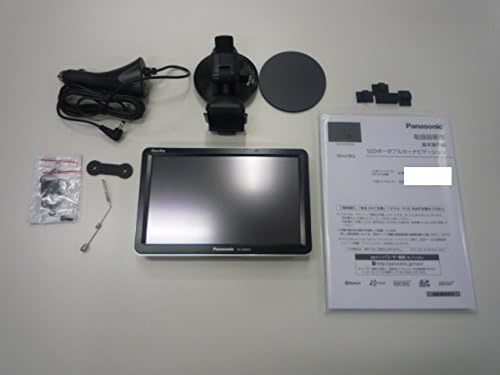
Figure 3.1: Contents of the product package, including the navigation unit, mounting accessories, power cable, and manual.
3.2 Device Layout
The CN-G700D features a 7-inch wide VGA display. Key elements of the display and physical unit are shown below.

Figure 3.2: Front view of the Panasonic CN-G700D unit, showcasing its 7-inch display and sleek design.

Figure 3.3: The navigation screen in operation, highlighting the large map display, easily visible buttons, and clear text for improved readability.

Figure 3.4: Visual representation of the user interface design, emphasizing the benefits of a 7-inch screen for a larger map area, bigger buttons, and more readable text.
4. Setup
4.1 Mounting the Device
- Clean the desired mounting surface on your dashboard or windshield thoroughly.
- Attach the suction cup stand to the cleaned surface, ensuring a firm grip.
- Adjust the angle of the stand for optimal viewing without obstructing your driving view.
- Slide the CN-G700D unit onto the mounting bracket until it clicks securely into place.
4.2 Power Connection
- Connect the cigar lighter power cord to the power input port on the CN-G700D unit.
- Insert the other end of the power cord into your vehicle's cigar lighter socket.
- Ensure the connection is secure. The device will typically power on automatically or indicate charging.
4.3 Initial Power On
- Press and hold the power button (if not already powered on) until the Panasonic logo appears.
- Follow the on-screen prompts to set up initial preferences such as language, time zone, and map display settings.
- Allow the device to acquire GPS signals. This may take a few minutes during the first use or after a long period of inactivity.
5. Operating Instructions
5.1 Basic Navigation
- Map Display: The main screen displays the current map. You can zoom in/out and pan the map using touch gestures or on-screen buttons.
- Destination Search: Tap the "Search" icon to find destinations by address, point of interest (POI), or coordinates.
- Route Calculation: After selecting a destination, the device will calculate the optimal route. You can choose between different route options (e.g., shortest, fastest).
- Voice Guidance: Follow the spoken turn-by-turn directions and on-screen prompts to reach your destination.
- Triple Satellite Reception: The device utilizes GPS, Japan's Michibiki (QZSS), and Russia's GLONASS satellites for enhanced positioning accuracy, especially in urban areas or mountainous regions.
5.2 One-Seg TV Function
The CN-G700D includes a One-Seg TV tuner for receiving digital terrestrial broadcasts.
- From the main menu, select the "TV" icon to switch to TV mode.
- The device will automatically scan for available One-Seg channels.
- Use the on-screen controls to change channels, adjust volume, or access TV settings.
- Note: TV reception quality may vary depending on your location and environmental conditions.
5.3 Media Playback
The device supports MP3 audio playback from a microSD card.
- Insert a microSD card containing MP3 files into the designated slot.
- From the main menu, select the "Audio Player" or "Media" icon.
- Browse your music files and select a track to play.
- Audio output is available via the built-in speaker or the mini-jack output on the side for connection to your car's audio system.
6. Maintenance
- Cleaning: Use a soft, dry cloth to clean the screen and exterior of the device. Do not use abrasive cleaners or solvents.
- Battery Care: To prolong battery life, avoid fully discharging the battery frequently. If storing the device for an extended period, charge it to about 50% and store in a cool, dry place.
- Map Updates: Periodically check the Panasonic support website for available map updates to ensure your navigation data is current.
7. Troubleshooting
| Problem | Possible Cause | Solution |
|---|---|---|
| Device does not power on. | Low battery or power connection issue. | Ensure the power cord is securely connected and the vehicle's cigar lighter socket is functional. Charge the device. |
| No GPS signal or inaccurate positioning. | Obstructed view of the sky, device indoors, or initial signal acquisition. | Move to an open area with a clear view of the sky. Allow several minutes for signal acquisition. Ensure the device is not blocked by metallic objects. |
| Touch screen unresponsive. | Temporary software glitch or screen calibration issue. | Restart the device. If the problem persists, perform a screen calibration (refer to device settings). |
| One-Seg TV reception is poor or unavailable. | Weak signal area, antenna not properly extended. | Extend the TV antenna fully. Move to an area with stronger digital terrestrial broadcast signals. |
8. Specifications
| Feature | Description |
|---|---|
| Screen Size (W x H) | 7V-type Wide VGA (152 mm x 91 mm) |
| Pixel Count | 1,152,000 pixels (800 horizontal x 480 vertical x 3) |
| Built-in Speaker | φ28 mm, Rated Output: 1.0 W / Max Output: 2.0 W |
| Navigation Unit Dimensions (W x H x D) | 176.5 mm x 113.7 mm x 21.5 mm |
| Weight | Approx. 355 g |
| Map Data | 2016 Edition |
| TV Tuner | One-Seg |
| Power Source | Cigar Lighter Cord (DC12V/DC24V) |
| Special Features | Triple Satellite Reception, Large Capacity Offline Map Storage |
| Mounting Type | Dashboard Mount |
| Memory Storage Capacity | 16 GB SSD |
| Battery | 1 Lithium Ion battery (included) |
9. Warranty and Support
The Panasonic Portable Car Navigation Gorilla CN-G700D comes with a manufacturer's warranty of 1 year from the date of purchase.
For technical support, warranty claims, or service inquiries, please refer to the official Panasonic support website or contact their customer service department. Keep your proof of purchase for warranty validation.
Note: Warranty terms and conditions may vary by region. Please consult your local Panasonic representative or the official website for specific details.


